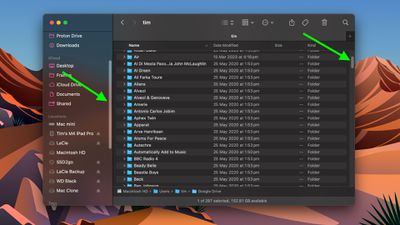
Since macOS Ventura, Apple has made hiding scroll bars when not in use a default behavior of the operating system, but you can prevent this from happening if you know where to look. Keep reading to learn how it's done.
finder
If your Mac is running macOS Ventura, you may have noticed that it makes window scroll bars visible only when you are actively scrolling with your mouse or trackpad.

Apple has made this the default setting because it is in keeping with the minimalist UI design of macOS, but if you don't see a scroll bar, you may not even know that a window can be scrolled, making navigation more difficult in general.

Fortunately, you can change this behavior pretty easily in macOS and make it so that scroll bars always remain visible. The following steps show you how.

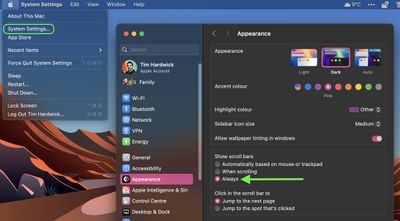
  1. Click the Apple () symbol in the top-left corner of your Mac's menu bar, then click System Settings....
  2. Using the sidebar, scroll down and select Appearance.
  3. Under the "Show scroll bars" option, click the radio button next to Always.
finder

Your preference will be implemented instantly, and you should now see scroll bars wherever scrolling is available.

Note that if you're using macOS Monterey or earlier, the same setting can be found in the General panel of System Preferences.


Popular Stories

airpods pro 3 purple

New, Higher End AirPods Pro Coming This Year

Tuesday January 20, 2026 9:05 am PST by
Apple is planning to debut a high-end secondary version of AirPods Pro 3 this year, sitting in the lineup alongside the current model, reports suggest. Back in September 2025, supply chain analyst Ming-Chi Kuo reported that Apple is planning to introduce a successor to the AirPods Pro 3 in 2026. This would be somewhat unusual since Apple normally waits around three years to make major...
iOS 27 Mock Quick

iOS 27 Will Add These 8 New Features to Your iPhone

Sunday January 18, 2026 3:51 pm PST by
iOS 27 is still many months away, but there are already plenty of rumors about new features that will be included in the software update. The first beta of iOS 27 will be released during WWDC 2026 in June, and the update should be released to all users with a compatible iPhone in September. Bloomberg's Mark Gurman said that iOS 27 will be similar to Mac OS X Snow Leopard, in the sense...
smaller dynamic island iphone 18 pro Filip Vabrous%CC%8Cek

iPhone 18 Pro Leak: Smaller Dynamic Island, No Top-Left Camera Cutout

Tuesday January 20, 2026 2:34 am PST by
Over the last few months, rumors around the iPhone 18 Pro's front-panel design have been conflicted, with some supply-chain leaks pointing to under-display Face ID, reports suggesting a top-left hole-punch camera, and debate over whether the familiar Dynamic Island will shrink, shift, or disappear entirely. Today, Weibo-based leaker Instant Digital shared new details that appear to clarify the ...
14 inch MacBook Pro Keyboard

MacBook Pro Buyers Now Facing Up to a Two-Month Wait Ahead of New Models

Sunday January 18, 2026 6:50 pm PST by
MacBook Pro availability is tightening on Apple's online store, with select configurations facing up to a two-month delivery timeframe in the United States. A few 14-inch and 16-inch MacBook Pro configurations with an M4 Pro chip are not facing any shipping delay, but estimated delivery dates for many configurations with an M4 Max chip range from February 6 to February 24 or even later. At...
iPhone Top Left Hole Punch Face ID Feature Purple

iPhone 18 Pro Launching Later This Year With These 12 New Features

Thursday January 15, 2026 10:56 am PST by
While the iPhone 18 Pro and iPhone 18 Pro Max are not expected to launch for another eight months, there are already plenty of rumors about the devices. Below, we have recapped 12 features rumored for the iPhone 18 Pro models, as of January 2026: The same overall design is expected, with 6.3-inch and 6.9-inch display sizes, and a "plateau" housing three rear cameras Under-screen Face ID...