

Update December 13: This change did not make it into the final release of iOS 15.2, but may reappear in a future update.
In iOS 15.2, which is available in beta right now, Apple introduced new features for the Find My app, including a way to search for items that might be used to track your location.

The new Unknown Items feature is called "Items That Can Track Me," and when activated, it will scan for anything that's nearby that belongs to someone else and let you know about it.
If anything is detected, such as an AirTag or other Find My-enabled item, Apple will provide you with more details on the item and instructions on how to disable it so that it can no longer be used for tracking purposes.
The following steps show you how to activate the feature in iOS 15.2. Note that items can only be found if they are not in range of their owner's device, up to 50 meters.
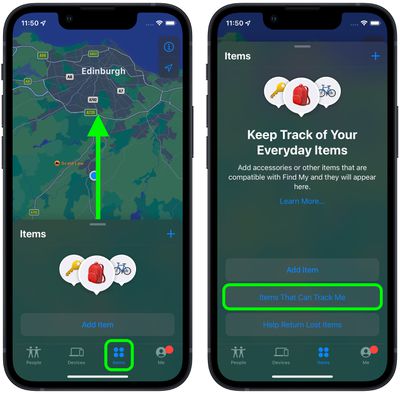
- Launch the Find My app on your iPhone.
- Tap the Items tab at the bottom of the screen.
- Drag the items card further up onto the screen using the small pill-shaped handle to reveal more options.
- Tap Items That Can Track Me.

- Tap the Search button.
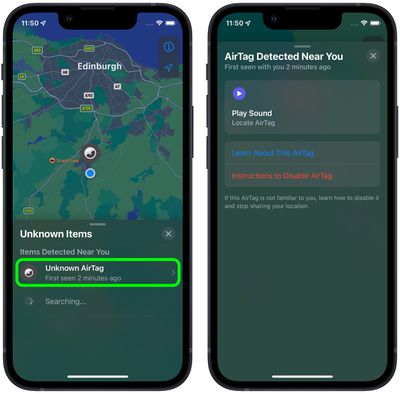
- Look at the list titled "Items Detected Near You." If a device is discovered, tap it for more information.
- If it's an AirTag, you can tap Play Sound to more exactly locate it. You can also tap Learn More About This AirTag to see if its owner has added contact details in case the item is lost. If you want to disable the AirTag to prevent it from potentially tracking you, tap Instructions to Disable AirTag and follow the instructions to remove the battery.
AirTags and items with Find My integration are meant to allow users to track their lost devices, but there have been concerns that AirTags can be planted on people for stalking purposes. To prevent stalking with AirTags and other devices, Apple has implemented several safety measures.
AirTags are designed to start playing a sound between eight and 24 hours after being separated from their owner, and iPhone users are alerted if an AirTag is traveling with them. Apple is also working on an Android app that will let Android users detect an unknown AirTag or Find My network-enabled item to prevent AirTags from being used to stalk Android users.
















Top Rated Comments
For example, if someone steals my bike which has an airtag attached to it - all they need to do is go 50m scan for tracking devices and disable it - not cool.
Before with the “traveling with you” warnings, at least then the owner of a stolen item would have 1-2 hours to discover it was stolen before the tracker was disabled. Now a thief can actively target valuables and disable a tracker before the theft has even occurred. Apple definitely taking its “tracking/stalking” paranoia about 5 steps too far.
If airplane mode is properly enabled, it would not receive or send a signal. Not sure how AirTags use it.
You can't disable the AirTag, only it's ability to use your phone to report location. If you are the only phone close enough to respond then yes, you disable teh Find Me feature until another phone gets close enough.
That was my thought as well. Not only can a their check for trackers, but disable them from using their phone to track it.
Better yet - go 50 meters, have it play a sound so if it is hidden it can be located. Toss teh AirTag in the trash, stick it on a car or bus, etc. Even if someone isn't interested in stealing it it opens up a new pranking scenario.
I think Apple clearly does not care about the ability to use AirTags to recover stolen property over their potential use for stalking and the negative publicity it would generate if someone used them for tat and harmed someone.
On a separate note? Why just AirTags? How about beacons used to track movement?