Skip to Content

iPhone 16: Edit Photographic Styles After Shooting

by

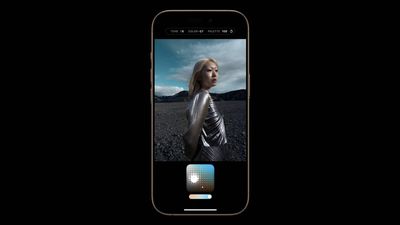
With Apple's iPhone 16 models, you can use new Photographic Styles to adjust specific colors in certain parts of your photos to create the exact look you want. Photographic Styles can also be changed after shooting. Keep reading to learn how.
photographic styles iphone 16
When you choose a default Photographic Style, it's saved and reflected across all of the photos you take, and you can make adjustments to it in the Camera app or edit it in the Photos app. Think of this capability as providing flexibility similar to ProRAW, though with less creative control.

Here's how to adjust photos taken in a Photographic Style after shooting:

  1. Open the Photos app on your iPhone 16.
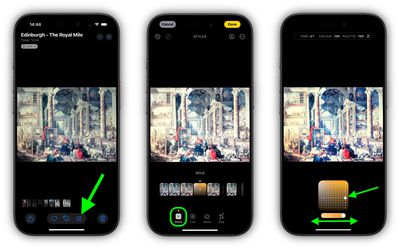
  2. Choose a picture taken with a photographic style, then tap the Edit icon (it looks like three sliders).
  3. Tap Styles in the editing toolbar, then drag along the row of predefined styles to preview each one. Available styles include: Cool Rose, Neutral, Rose Gold, Gold, Amber, Vibrant, Natural, Luminous, Dramatic, Quiet, Cosy, Ethereal, Muted B&W, and Stark B&W.
  4. To adjust one of the predefined styles, simply tap it, then drag your finger on the dotted square to simultaneously adjust the tone and color. Drag your finger on the slider below the square to adjust the intensity level. When you're finished, tap a space on the screen to return to the editing tools UI.
  5. When you're happy with the result, tap Done.
photographic styles photos iphone 16

Bear in mind that as you make adjustments to a photographic style, the values for tone, color, and intensity will be shown at the top of the screen. To reset these values, simply tap the circular arrow.


Related Roundup: iPhone 16
Related Forum: iPhone

Popular Stories

MacBook Neo Feature Pastel 1

First MacBook Neo Benchmarks Are In: Here's How It Compares to the M1 MacBook Air

Thursday March 5, 2026 4:07 pm PST by
Benchmarks for the new MacBook Neo surfaced today, and unsurprisingly, CPU performance is almost identical to the iPhone 16 Pro. The MacBook Neo uses the same 6-core A18 Pro chip that was first introduced in the iPhone 16 Pro, but it has one fewer GPU core. The MacBook Neo earned a single-core score of 3461 and a multi-core score of 8668, along with a Metal score of 31286. Here's how the...
MacBook Neo Feature Pastel 1

Apple Announces $599 'MacBook Neo' With A18 Pro Chip

Wednesday March 4, 2026 6:15 am PST by
Apple today announced the "MacBook Neo," an all-new kind of low-cost Mac featuring the A18 Pro chip for $599. The MacBook Neo is the first Mac to be powered by an iPhone chip; the A18 Pro debuted in 2024's iPhone 16 Pro models. Apple says it is up to 50% faster for everyday tasks than the bestselling PC with the latest shipping Intel Core Ultra 5, up to 3x faster for on-device AI workloads,...
Multicolored Low Cost A18 Pro MacBook Feature

Apple Accidentally Leaks 'MacBook Neo'

Tuesday March 3, 2026 7:00 am PST by
Apple appears to have prematurely revealed the name of its rumored lower-cost MacBook model, which is expected to be announced this Wednesday. A regulatory document for a "MacBook Neo" (Model A3404) has appeared on Apple's website. Unfortunately, there are no further details or images available yet. While the PDF file does not contain the "MacBook Neo" name, it briefly appeared in a link...