iOS 27: Tone Down Liquid Glass Transparency - MacRumors
Skip to Content

iOS 27: Tone Down Liquid Glass Transparency

by

If you've never been a fan of Liquid Glass – Apple's glass-like interface effect introduced in iOS 26 – then there's some good news in iOS 27. Apple has added a setting that lets you finely adjust the level of translucency, giving you more control over the look and feel of your iPhone.
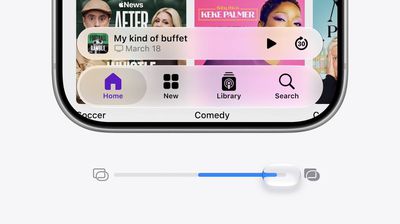
liquid glass slider
Perhaps you find notifications too see-through, or you want to see more of your wallpaper through Control Center. Fortunately, iOS 27 includes a dial that can help with that. Apple has swapped the two-option Clear and Tinted setting for a continuous slider that puts translucency anywhere between barely-there glass and a heavy frost.

The earlier presets arrived in iOS 26.1 and gave you two positions on a spectrum, whereas iOS 27 gives you the whole spectrum. It also locates the control in "Appearance" – a new section in Settings that gathers up interface options previously scattered through Display & Brightness, including Light and Dark mode and text size.

Not only that, Apple has also tweaked the default look, and says that Liquid Glass now diffuses complex content behind it more effectively while drawing a clearer separation between layers.

How to Change the Liquid Glass Effect

When you first install iOS 27, you'll be presented with the slider to change the Liquid Glass effect, but it's good to know how to get to it later if you want to switch up the look.

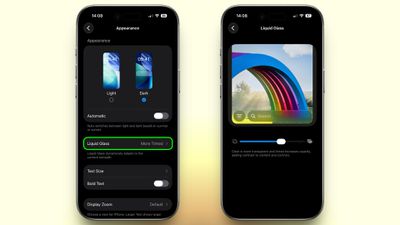
  1. Open Settings on your iPhone.
  2. Tap Appearance.
  3. Tap Liquid Glass.
  4. Drag the slider left for a clearer, more transparent effect, or right to add tint and opacity.
settings

The midpoint on the slider is Apple's default. The UI preview redraws in real time as you drag it, so you can watch it instead of having to back out of Settings to check. Note that the setting applies across the system, and affects everything from Control Center and Home screen folders to app overlays and Lock Screen notifications.

If the Slider Doesn't Go Far Enough

Even at the tinted end, Apple's interface retains a degree of glassiness. If you're not satisfied with the result, two Accessibility options push it further:

  • Reduce Transparency strips out nearly all translucency, leaving only flat, solid backgrounds.
  • Increase Contrast sharpens the boundaries between buttons, text, and whatever sits behind them.

You can find both in Settings ➝ Accessibility ➝ Display & Text Size.

You'll find that iPadOS 27 also offers these controls in the same place, and the same goes for macOS 27 Golden Gate (albeit in System Settings). All three software updates are in public beta now, with a general release expected in September.


Related Roundups: iOS 27, iPadOS 27
Related Forum: iOS 27

Top Rated Comments

6 weeks ago

Never had an issue with Liquid Glass but then I have better things to occupy my time with than mindless complaining on internet forums
Then why did you spend time commenting on this topic?
Score: 29 Votes (Like | Disagree)
Apple Weeb Avatar
6 weeks ago
Just let me turn it off please
Score: 25 Votes (Like | Disagree)
ghostface147 Avatar
6 weeks ago
I want it more glassy!
Score: 23 Votes (Like | Disagree)
6 weeks ago

We need more Liquid Glass not less.
We need Freedom so that a user can pick what the user likes. So more Liquid Glass - fine. No Liquid Glass - also fine.
Score: 22 Votes (Like | Disagree)
6 weeks ago

Absolutely. Give users the ability to choose what they want. If they want it let them go nuts with it. If they don't want it, give us the option to totally turn it off.

Make it optional.
And for us that want to go extreme!

Attachment Image
Score: 18 Votes (Like | Disagree)
B4U Avatar
6 weeks ago
It just takes some courage to give it this option.


Attachment Image
Score: 17 Votes (Like | Disagree)

Popular Stories

iPhone Handoff Feature

iOS 27 Introduces New 'iPhone Handoff' Feature

Wednesday September 2, 2026 12:35 pm PDT by
Apple has added a new "iPhone Handoff" feature to iOS 27 that will allow you to switch between two iPhones while using the same phone number on each device. This functionality was briefly mentioned during the WWDC 2026 keynote in June, on a slide that listed hundreds of new features coming in iOS 27 and corresponding software updates, but Apple never shared any further details at the time. ...
iOS 27 Feature Dark

Apple Announces iOS 27 Release Date

Wednesday September 9, 2026 10:46 am PDT by
At its event today unveiling the iPhone 18 Pro, AirPods 5, Apple Watch Series 12, and more, Apple announced that iOS 27 will be released later this month. iOS 27 has already been available as a developer beta since June and as a public beta since July, and Apple today said that the update will be released for all users with a compatible iPhone model on Monday, September 14. iOS 27 is...
iPhone Handoff iOS 27 Feature

T-Mobile to Charge $5 a Month for iOS 27 iPhone Handoff

Thursday September 10, 2026 3:58 pm PDT by
T-Mobile will charge customers $5 per month to use iPhone Handoff, an e-SIM feature that allows the same phone number to be used on two separate iPhones. iPhone Handoff requires carrier support, and at launch, only T-Mobile users in the U.S. and Deutsche Telekom users in Germany will be able to use it. T-Mobile says customers can use their number across two compatible iPhone models and...