How to Install macOS Tahoe Public Beta 3 - MacRumors
Skip to Content

How to Install macOS Tahoe Public Beta 3

by

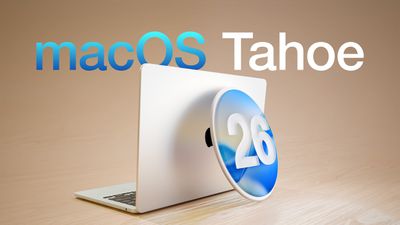
Apple has made the third macOS Tahoe public beta available for testing before the new Mac operating system's official release in the fall. Keep reading to learn whether you should install it on your Mac, and if so, how to go about it.
macOS Tahoe 26 Thumb
Getting access to the macOS Tahoe public beta is simple, and can be done by enrolling your Mac in Apple's free Apple Beta Software Program. The steps you need to complete to install the software on your Mac are provided towards the end of this article, but before you jump ahead, here are a few things worth considering.

Should I Install the macOS Tahoe Public Beta?

With macOS Tahoe, Apple introduces a major redesign for the platform with the all-new Liquid Glass interface, along with a host of new features. These include the Phone app on Mac, powerful new Spotlight actions, further Apple Intelligence integration, a dedicated Games app, and customizable backgrounds in Messages. Live Activities from iPhone also make their way to your Mac's menu bar, which now has a fully customizable Control Center. With so many additions and a striking visual update, it's no surprise that macOS Tahoe is generating a lot of interest among Mac users.

But before you commit, bear in mind that Apple does not recommend installing macOS beta updates on your main Mac. Remember, this is beta software, which means there are almost certainly bugs and issues that can prevent software from working properly or cause other problems with the system. Indeed, one of the reasons that Apple releases the beta to developers early is so that they can feed back problems and help Apple debug them. If you have a spare Mac hanging around, by all means use that, otherwise consider holding off until the general release in the fall.

Is My Mac Supported?

macOS Tahoe is compatible with the following Mac models, according to Apple:

  • MacBook Air with Apple silicon (2020 and later)
  • MacBook Pro with Apple silicon (2020 and later)
  • MacBook Pro (16‑inch, 2019)
  • MacBook Pro (13‑inch, 2020, Four Thunderbolt 3 ports)
  • iMac (2020 and later)
  • Mac mini (2020 and later)
  • Mac Studio (2022 and later)
  • Mac Pro (2019 and later)

macOS Tahoe officially drops support for the following Macs (earlier models than those shown are also not supported):

  • MacBook Air (Retina, 13-inch, 2020)
  • MacBook Pro (13-inch, 2018, Four Thunderbolt 3 ports)
  • MacBook Pro (15-inch, 2018)
  • MacBook Pro (13-inch, 2019, Four Thunderbolt 3 ports)
  • MacBook Pro (15-inch, 2019)
  • MacBook Pro (13-inch, 2019, Two Thunderbolt 3 ports)
  • MacBook Pro (13-inch, 2020, Two Thunderbolt 3 ports)
  • iMac (Retina 5K, 27-inch, 2019)
  • iMac (Retina 4K, 21.5-inch, 2019)
  • iMac Pro (2017)
  • Mac mini (2018)

Don't Forget to Back Up Your Mac

Be sure to back up your Mac using Time Machine before installing the software using the method, otherwise you won't be able to revert back to the previous version of macOS if things go wrong.

How to Install macOS Tahoe Public Beta

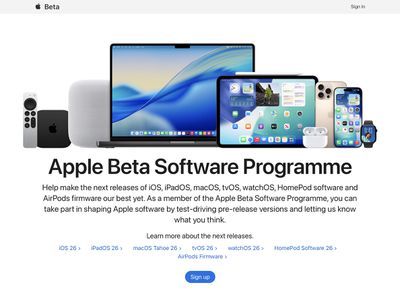
  1. Head over to Apple's Beta Software Program website and sign up using your Apple Account credentials, then agree to the terms and conditions if required.
    apple public beta program

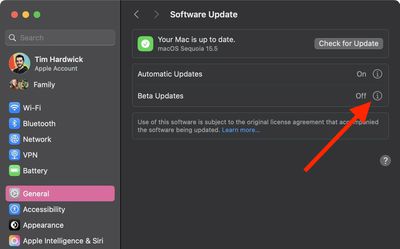
  2. Next, open System Settings on your Mac and select General ➝ Software Update.
  3. Look for "Beta Updates" and click the info (i) symbol next to it.
    settings

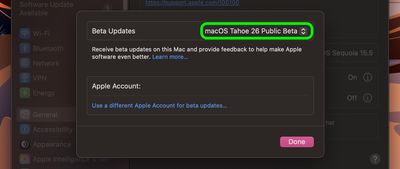
  4. Choose macOS Tahoe 26 Public Beta from the dropdown list.
    settings

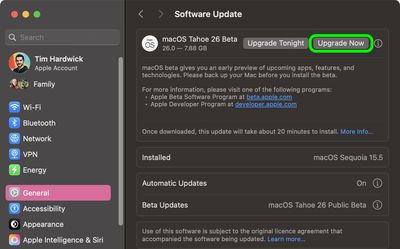
  5. Click Upgrade Now to begin the update process to macOS 26.
    settings

That's all you need to do. The installation process will complete just like a standard macOS update, so sit back and let the installation finish, after which your Mac will boot directly into the macOS Tahoe beta.


Related Roundup: macOS Tahoe
Related Forum: macOS Tahoe

Popular Stories

macos tahoe

Apple Releases macOS Tahoe 26.7 and macOS Sequoia 15.8

Monday September 14, 2026 10:40 am PDT by
Alongside macOS Golden Gate, Apple today released new versions of macOS Tahoe and macOS Sequoia. macOS Tahoe 26.7 and macOS Sequoia 15.8 are available for users with older Macs or those who don't yet want to update to Golden Gate. The updates can be downloaded through the Software Update section of the System Settings app. On Macs eligible to install macOS Golden Gate, users will see both...


iphone 17 pro max battery 1 year

Three Years of 80% Charge Limits on iPhone: The Results

Tuesday October 6, 2026 12:59 pm PDT by
Since 2023, Apple's newer iPhones have had an 80 percent charge limit for those who want to extend battery lifespan. Charging to 80 percent instead of 100 percent is supposed to put less stress on the battery, improving longevity. For the last three years, I've used that setting on my iPhone. I started with the iPhone 15 Pro Max, then did the iPhone 16 Pro Max, and most recently, the iPhone...
MagSafe 3 Cable Midnight Feature

Apple Releases MagSafe 3 Charging Cable Firmware Update

Monday October 5, 2026 5:59 am PDT by
For the first time since February 2023, Apple has released a firmware update for the MagSafe 3 charging cable for the MacBook Pro and MacBook Air. Specifically, Apple last week released firmware version 3.2.0 for the USB-C to MagSafe 3 Cable. The previous firmware version for the cable was 3.1.12. It is unclear what is included in the latest firmware, as Apple does not publish release...
Latest Stories
New iPad Mini Rumored to Have 60Hz OLED Display Ahead of Launch
48 minutes ago
Gurman: OLED MacBook Pro Won't Be 'Significantly Thinner'
2 hours ago
Microsoft Launches $2,599 Surface Laptop Ultra to Take on MacBook Pro
9 hours ago
Google's SynthID AI Detector is Now Available to Everyone
10 hours ago
ChatGPT Gets GPT-6 and New Intelligent UI With Visual Answers
12 hours ago
Get AirPods Pro 3 for $179, Apple Watch for $199, and More Before Prime Day Ends Today
12 hours ago
Apple Watch Series 12 and Ultra 4 Score 4/10 for Repairability
12 hours ago
Apple Launches Creative Labs Program With The King's Trust
13 hours ago
Apple Watch Series 12, Ultra 4 Owners Report Skin Irritation
15 hours ago
Boston's MBTA Testing New Charlie Card With Apple Wallet Support
16 hours ago
Manchester's Bee Card Now Fully Supported in Apple Wallet
18 hours ago
You Can Get Up to $149 Off Every New Mac Mini During Prime Day
19 hours ago
Best Buy Takes $260 Off All iPhone Air Models During Techtober Sale
19 hours ago
The Best Anker Prime Day Deals: Score Big on MagSafe Chargers and More
19 hours ago
12 New Things to Expect From Apple in October
19 hours ago
Prime Day Offers Best TV Prices of the Year From Samsung, Sony, and More
20 hours ago
First Look at LG's Smart Home Products Made With Apple
21 hours ago
Apple Watch Ultra 3 and Ultra 4 See Record Discounts During Prime Day
21 hours ago
Apple Drops Intel Macs From Magic Mouse/Trackpad Compatibility Lists
21 hours ago
Apple Reportedly Waiting on Samsung for Ultimate Bezel-Free iPhone Display
22 hours ago
Apple's Own Home Security Camera Still Coming Next Year
23 hours ago
Unfolded iPhone Duo Lets You Preview Documents in a Two-Page Layout
1 day ago
Formula 1 Coverage on Apple TV to Get Dolby Atmos Later This Month
1 day ago
LG Making Doorbell, Lock, and Cameras for Apple's Home Hub
2 days ago
Apple to Report Q4 2026 Earnings on November 2
2 days ago
Three Years of 80% Charge Limits on iPhone: The Results
2 days ago
macOS 27.2 Further Hints at MacBook With Touch-Enabled OLED Display
2 days ago
The 15 Best Apple Deals Under $200 for Prime Day
2 days ago
AirPods Pro 3 and AirPods Max 2 Get Big Price Drops for Prime Day
2 days ago
Apple Releases Second Public Betas of iOS 27.2 and macOS Golden Gate 27.2
2 days ago