

If you are looking for an easy way to identify the species of plants and flowers that doesn't involve reaching for a taxonomy book, then try your iPhone. You don't even need to purchase an app, because in iOS 15 and later, Apple's software includes a feature called Visual Lookup that will do just what you need.
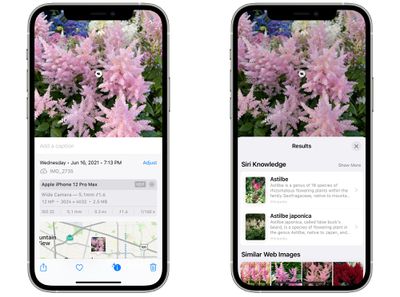
Since iOS 15, Apple has made advances in its on-device machine learning and integrated them into its stock Photos app to make your iPhone more intelligent at recognizing the contents of pictures you take.
This means the Photos app can identify various objects, landmarks, animals, books, plants, works of art, and more in your image library, and then offer information about them that it draws from the web.
The following steps show you how to use Visual Lookup to get taxonomic information on plants and flowers whenever you come across one that you don't recognize.
- Open the Photos app on your iPhone and select a picture with a clearly defined subject, such as a flower or animal.
- Check the info ("i") icon at the bottom of the screen. If it has a little star over it, tap it – this indicates there's a Visual Lookup you can examine.
- Tap the little icon in the center of the photo to bring up the Lookup search results.
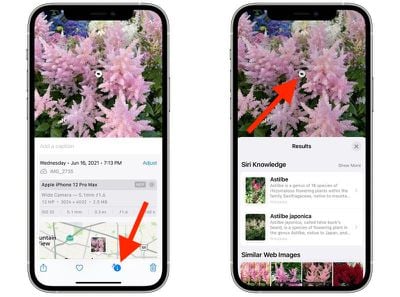
Visual Lookup search results consist of Siri Knowledge, similar images found on the web, and other online sources of information. Note that Visual Lookup has limited availability depending on your region.












































![Apple Pulls Keynote, Pages and Numbers From App Store [Update: Back]](https://images.macrumors.com/t/Okb7kitB_gNr6qe5Pex9nQIysD8=/112x112/article-new/2026/01/Apple-Creator-Studio-iWork-suite.jpg)

