

How to Enable End-to-End Encryption in Facebook Messenger - MacRumors
Skip to Content

How to Enable End-to-End Encryption in Facebook Messenger

by

Facebook Messenger claims to be a secure platform for private communications, but the truth is that regular conversations conducted through the app are not end-to-end encrypted, which puts your sensitive information at considerable risk.

facebook messenger icon new
End-to-end encryption ensures that only you and the person you're communicating with can read or listen to what is sent, and nobody in between, not even Meta/Facebook, can gain access to this content.

Unfortunately, unlike WhatsApp, end-to-end encryption is not enabled by default, meaning the onus is on you to make sure you turn it on so that third parties cannot eavesdrop on your communications.

On the plus side, enabling it is not difficult once you know how, but it can only be turned on for individual contacts – it is not a global setting. To start an encrypted chat with someone requires entering into a "Secret conversation." The following steps show you how it's done.

  1. Open the Messenger app, and tap the profile icon of the contact that you want to chat with using end-to-end encryption.
  2. At the top of the conversation window, tap their profile icon again.
  3. Under "More Actions," tap Go to secret conversation.
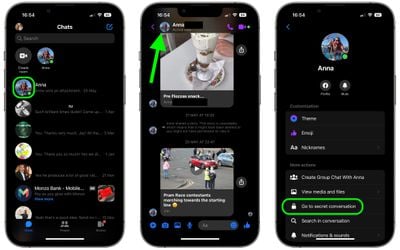
messenger

You will now be in a conversation window that implements end-to-end encryption. From here, you can also set your messages to disappear from the conversation thread completely (on both your device and the device of the person you're chatting with).

To do so, tap the clock banner at the top of the conversation window. Alternatively, tap the top-left profile of the person you'll be chatting with, then select Disappearing messages and choose an expiration time.


Popular Stories

iOS 26

iOS 26.4 Adds Two New Features to CarPlay

Tuesday March 24, 2026 1:55 pm PDT by
iOS 26.4 was released today, and it includes a couple of new features for CarPlay: an Ambient Music widget and support for voice-based chatbot apps. To update your iPhone 11 or newer to iOS 26.4, open the Settings app and tap on General → Software Update. CarPlay will automatically offer the new features so long as the iPhone connected to your vehicle is running iOS 26.4 or later....


Apple Business hero

Apple Unveils 'Apple Business' All-in-One Platform

Tuesday March 24, 2026 8:53 am PDT by
Apple today announced Apple Business, a new all-in-one platform that unifies device management, productivity tools, and customer outreach features. The service is designed to be a consolidated replacement for several of Apple's existing business-focused offerings, including Apple Business Essentials, Apple Business Manager, and Apple Business Connect. It provides organizations with a single...
AirPods Pro Firmware Feature

Apple Releases New Firmware for AirPods Pro 3, AirPods Pro 2 and AirPods 4

Tuesday March 24, 2026 12:31 pm PDT by
Apple today released new firmware for the AirPods Pro 2, AirPods Pro 3, and the AirPods 4. The firmware has a version number of 8B39, up from 8B34 on the AirPods Pro 3, 8B28 on the AirPods Pro 2, and 8B21 on the AirPods 4. There is no word on what's included in the firmware, but Apple has a support document with limited notes. Most updates are limited to bug fixes and performance...








































