Disable Touch on MacBook Pro PROLED XDR and When Using Sidecar - MacRumors
Skip to Content

Disable Touch on MacBook Pro PROLED XDR and When Using Sidecar

by

Apple has long rejected the idea of a touchscreen Mac, so moving ahead with one was always going to be a major shift in the company's thinking. In 2010, Steve Jobs argued that "touch surfaces don't want to be vertical," citing the arm fatigue that comes from repeatedly reaching up to a screen.
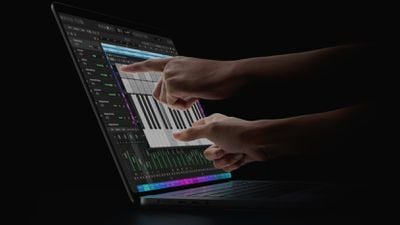
oled macbook pro touch

Some would call this sacrilege...

More than a decade later, in 2021, Apple's then-hardware engineering chief John Ternus remarked that the Mac was made exclusively for indirect input and that Apple saw no compelling reason to change its approach.

"We make the world's best touch computer on an iPad. It's totally optimized for that. And the Mac is totally optimized for indirect input. We haven't really felt a reason to change that," Ternus said in an interview with Joanna Stern.

Touch Comes to the Mac

Fast forward to 2026, and Apple has had a change of heart. The new MacBook Pro with PROLED XDR is the first Mac to adopt touchscreen technology. Many younger people who grew up with smartphones and tablets expect to interact with their computers the same way they do with their mobile devices, and that expectation appears to have twisted Apple's arm (no pun intended).

Of course, just because the new MacBook Pro models have a touchscreen doesn't mean you have to use it. If you forget it's even there, you can turn off the function and pretend it doesn't exist. If you use Sidecar with an iPad on another Mac, you can turn off touch in the same way.

Turn Off Touch on MacBook Pro and Sidecar

The steps are the same whether you want to disable the MacBook Pro's touchscreen or touch input in Sidecar:

  1. Click the Apple logo in the top-left corner of the menu bar and choose System Settings....
  2. Select Accessibility in the sidebar.
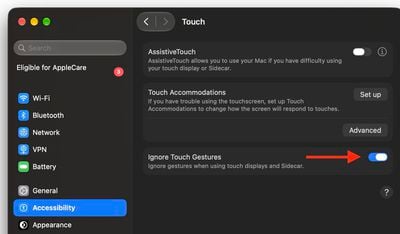
  3. Under "Physical and Motor," click Touch.
    settings

  4. Toggle on the switch next to Ignore Touch Gestures.
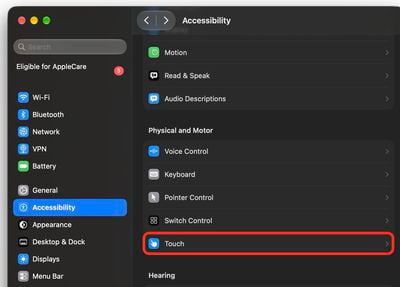
    settings

That's all there is to it. Your Mac will now ignore touch input, and since the setting covers Sidecar too, an iPad you use as a second display will ignore touches as well. If you ever want touch back, return to the same screen and toggle off Ignore Touch Gestures.

Touch Friendly, Not Touch First

If some gestures prove useful but others keep being triggered by accident, you can adjust them individually instead of disabling touch altogether. In System Settings, select Touch Display in the sidebar, where each gesture can be switched off, and Swipe between spaces, Mission Control, and App Exposé also have pop-up menus for changing how the gesture is performed.
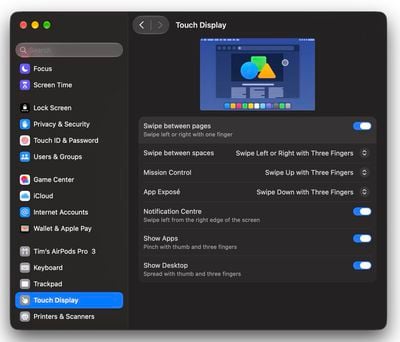
settings
Don't overlook the fact that the Accessibility ➝ Touch screen (where "Ignore Touch Gestures" lives) offers further customization options. Touch Accommodations changes how the screen responds to taps, swipes, and touch-and-hold input. AssistiveTouch can also be found on this settings menu if you want alternative ways to control the screen, and the Accessibility ➝ Zoom menu includes an option to zoom using the touch display or Sidecar.
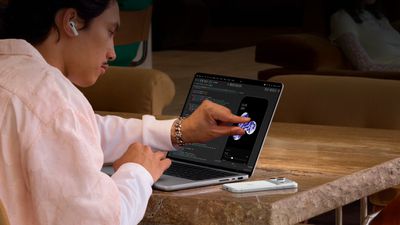
macbook pro proled touch
Whatever you think about touch on a Mac, one group with a genuine reason to leave it on is app developers. Xcode's iOS Simulator responds to direct touch, so you can test your app's taps, swipes, and pinches right on the screen instead of approximating them with a trackpad and keyboard modifiers.
Related Roundup: MacBook Pro
Buyer's Guide: MacBook Pro (Buy Now)
Related Forum: MacBook Pro

Top Rated Comments

iMac The Knife Avatar
5 days ago at 08:14 am
Steve Jobs was right, for the most part.
Score: 18 Votes (Like | Disagree)
Omega Mac Avatar
5 days ago at 08:54 am
Looking forward to the "Disable Ai on macOS/iOS" MR article. 🍿
Score: 10 Votes (Like | Disagree)
5 days ago at 08:38 am
Who wants to have dirty screen all the time? It's ok on iPad or iPhone (even though it's annoying) but Mac? No way, I like my screen nice and clean.
Score: 8 Votes (Like | Disagree)
dannys1 Avatar
5 days ago at 09:35 am

"We make the world's best touch computer on an iPad. It's totally optimized for that. And the Mac is totally optimized for indirect input. We haven't really felt a reason to change that," Ternus said in an interview ('https://www.macrumors.com/2021/10/29/apple-face-id-touchscreens-macs/') with Joanna Stern.
Now look at him...


Attachment Image
Score: 7 Votes (Like | Disagree)
vegetassj4 Avatar
5 days ago at 08:35 am
A Touch Mac smh. What's next, a keyboard for the iPhone?
Score: 6 Votes (Like | Disagree)
5 days ago at 08:18 am

Steve Jobs was right, for the most part.
I think that’s why they didn’t emphasize it during the rollout. It was more like “look at this beautiful screen” and “oh, by the way, you can touch it.”
Score: 6 Votes (Like | Disagree)

Popular Stories

M5 MacBook Pro

RIP, MacBook Ultra

Monday October 19, 2026 9:37 am PDT by
Apple today sent out invites for an experience in Los Angeles on Wednesday, October 28, and the "Pro and tell" tagline on the invitation likely means that the rumored MacBook models with touch-enabled OLED displays will stick with MacBook Pro branding instead of the once-rumored "MacBook Ultra" name. The long-rumored "iPhone Ultra" ended up being named iPhone Duo, so speculation that Apple...
Apple MacBook Pro with PROLED XDR Display family lineup feature

Apple Announces OLED MacBook Pro With Touch Display

Wednesday October 28, 2026 10:11 am PDT by
Apple today announced a new high-end MacBook Pro, which is available in 14-inch and 16-inch sizes. The new device has a PROLED XDR display that supports touch gestures, and a glowing rear Apple logo. Pricing on the MacBook Pro starts at $2,899 for the 14-inch model and $3,399 for the 16-inch model. Apple says the MacBook Pro has the "world's best display in a pro laptop." The PROLED...


Apple MacBook Pro 14 in with M6 hero

Apple Announces New 14-Inch MacBook Pro With M6 Chip

Tuesday October 27, 2026 6:01 am PDT by
Apple today announced a refreshed 14-inch MacBook Pro featuring the M6 chip, upgraded connectivity specifications, and more. The M6 chip in the MacBook Pro features a 12-core CPU with 2 super cores, 4 performance cores, and 6 efficiency cores, paired with a 12-core GPU. This is up from the M5 chip with a 10-core CPU with 4 super cores and 6 efficiency cores, paired with a 10-core GPU. M6...
Latest Stories
Early Apple Watch Black Friday Deals Arrive With Series 12 Hitting New Record Lows
8 minutes ago
Apple's Smart Glasses Strategy Hinges on Siri and iPhone Apps
13 minutes ago
AirPods Pro 3 Discounted to $179.99 in Early Black Friday Sale
41 minutes ago
Apple Aiming to Upgrade the iPhone Duo in Four Ways
1 hour ago
Apple Black Friday Starts Early: Save on Apple Watch, MacBook Air, and More
6 minutes ago
Top Stories: Apple's New Software Approach, iPhone Duo-Optimized Apps, and More
1 day ago
HomeView Tidbits: Mirror, Sleep Timer, and Other Details
2 days ago
Siri AI Still Not Enabled on HomePod Mini 2 With Latest Software Update
2 days ago
Apple Releases tvOS 27.2.1 With Siri AI for Older Apple TVs
2 days ago
Microsoft 365 Outage Resolving After Nearly 24 Hours
2 days ago
iPhone Duo Survives 450,000 Folds, but Hinge is Weakening
2 days ago
Apple TV 4K Launch Day Deal Arrives at Amazon
2 days ago
The MacRumors Show: HomeView and Apple TV 4K First Impressions
2 days ago
YouTube App Not Working on Your New Apple TV? Here's the Fix
2 days ago
Apple Meets Thai Officials Over iPhone Spyware Warnings
2 days ago
Apple Shares HomeView 27.2 Release Notes With List of Features
2 days ago
HomeView in Québec: Apple Says Canadian French Support to Arrive in Software Update
2 days ago
Apple Watch Ultra 3 Gets Big $250 Discounts Ahead of Black Friday
2 days ago
Apple Says HomeView Sets New Record in Design-Focused Interview
2 days ago
Best Apple Deals of the Week: AirTag 2 Hits Record Low Price, Plus Early Black Friday Sales
2 days ago
iPhone 18 and 18e Coming in Spring 2027 With A20 Chip
2 days ago
King Charles to Join Elton John's Apple Music Radio Show
2 days ago
Select 'Apple Home Collection' Accessories Now Available to Order
2 days ago
Major Microsoft 365 Outage Continues
2 days ago
Apple Launches Two Products Today
2 days ago
Hands-On With the New Apple TV 4K and Siri AI
3 days ago
Siri AI Coming to Older Apple TV 4K Models in tvOS 27.2.1
3 days ago
HomeView Launch Kicks Off as First Orders Reach Customers
3 days ago
Apple Continues to Move Up iPhone Duo Delivery Dates
3 days ago
Apple Explains How HomeView Keeps Camera Data Private
3 days ago