

How to Disable Playback of Explicit Content on HomePod - MacRumors
Skip to Content

How to Disable Playback of Explicit Content on HomePod

by

Apple's HomePod speaker is a great way for your kids to play their favorite songs from Apple Music and podcasts from the Podcasts app, but many parents will be aware that some song lyrics and the contents of some podcast episodes can include explicit content.
HomePod 2 and Mini feature 2
Fortunately, you can disable playback of explicit content for specific ‌HomePod‌ users in your home. Once the restriction is turned on, when that person makes a request, the ‌HomePod‌ will not play songs, albums or podcast episodes that contain explicit content. Here's how to access the setting on your iPhone or iPad.

  1. Open the Home app.
  2. Tap the ellipsis button (three dots in a circle) in the top-right corner of the main Home screen.
  3. Select Home Settings from the dropdown menu.
  4. Under "People," tap the name of the person whom you want to protect from explicit content.
  5. Under the "Music & Podcasts" section, toggle off the switch next to Allow Explicit Content.
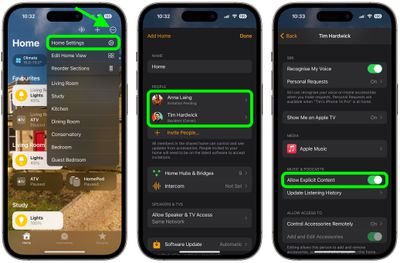
home

That is all you have to do. The new setting will take effect immediately.

Related Roundups: HomePod, HomePod mini

Popular Stories

HomePod 2 and Mini feature 1

Apple Releases HomePod Software 26.5

Monday May 11, 2026 9:59 am PDT by
Alongside iOS 26.5, iPadOS 26.5, and macOS Tahoe 26.5, Apple has released new HomePod 26.5 software for the HomePod and the HomePod mini. The update comes a little over a month after Apple released HomePod Software 26.4. According to Apple's release notes, HomePod Software 26.5 includes performance and stability improvements. ‌HomePod‌‌‌‌‌‌‌ software is installed...
Four iPhone 18 Pro Colors Mock Feature

iPhone 18 Pro Launching Later This Year With These 10 New Features

Tuesday May 26, 2026 6:32 am PDT by
While the iPhone 18 Pro and iPhone 18 Pro Max are not launching until September, there are already plenty of rumors about the devices. It was initially reported that the iPhone 18 Pro models would have fully under-screen Face ID, with only a front camera visible in the top-left corner of the screen. However, the latest rumors indicate that only one Face ID component will be moved under the...
apple wallet drivers license feature iPhone 15 pro

Apple Just Expanded iPhone Driver's License Feature to Arkansas

Wednesday May 27, 2026 9:41 am PDT by
In select U.S. states, residents can add their driver's license or state ID to the Apple Wallet app on the iPhone and Apple Watch, and then use it to display proof of identity or age at select airports and businesses, and in select apps. Starting today, the feature is available in Arkansas, which is the 14th state to offer it. However, it may take some time to roll out to all users. To...














































