In iOS 15, paid iCloud+ plans feature Hide My Email, which lets you create unique, random email addresses that forward messages to your personal inbox whenever you want to keep your personal email address private.
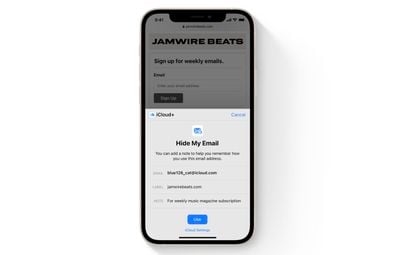
They're really useful if you think that a business or website is likely to share your email address with ad agencies or other third-parties for marketing purposes. Providing them with a dummy address means you can deactivate or delete the address at any time, ensuring any unsolicited emails don't reach your inbox.
How to Deactivate an Address Using Hide My Email
If you aren't currently using a random address generated by Hide My Email, you can temporarily deactivate it so that you don't receive any forwarded email from it.
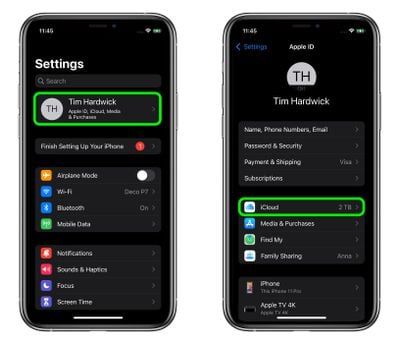
- Launch the Settings app on your iPhone or iPad
- Tap your Apple ID name at the top of the main settings menu.
- Tap iCloud.

- Tap Hide My Email.
- Tap the email address in the list that you want to deactivate.
- Tap Deactivate email address.
- Tap Deactivate to confirm.
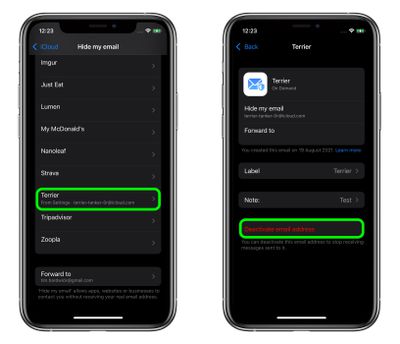
From now on, you won't receive emails sent to that address anymore. If you want to re-activate the address at any time, you'll find it in an "Inactive Addresses" section at the bottom of your active addresses list. Tap the address in question, then tap Reactivate address. Alternately, you can delete it completely by selecting Delete Address.
Paid iCloud+ plans also include another premium feature called Private Relay, which ensures that all traffic leaving your device is fully encrypted, so that no third party between the website and your device can see the website being viewed. Check out our dedicated how-to for all the details.