How to Create Calendar Events on Your Apple Watch - MacRumors
Skip to Content

How to Create Calendar Events on Your Apple Watch

by

With the release of watchOS 9, Apple introduced a range of quality of life improvements for Apple Watch, one of which is the ability to create Calendar events right on your wrist. Keep reading to learn how.
watchOS 9 header
In watchOS 8 and earlier versions, the Calendar app on Apple Watch limited you to viewing events you've scheduled or been invited to in the past six weeks and for the next two years (in List and Day view), but there was no obvious way to create an event.

That's all changed in watchOS 9, because now you can create events right on your watch, and they will be automatically synced to your iPhone.

How to Create a Calendar Event on Apple Watch

Method 1: Siri

There are two ways to create events on Apple Watch. You can use Siri (press and hold the Digital Crown), and say something like "Create a calendar event titled lunch with Dad for October 31 at 1 p.m."

Method 2: Use the Calendar App

The other way is to open the Calendar app on your Apple Watch.

  1. When viewing events in Up Next, Day, or List view, tap the ellipsis (three dots) button.
  2. Tap New Event.
  3. Add event details such as title, description, date and time, and invitees.
  4. Choose the calendar you want to add the event to, then tap Add.
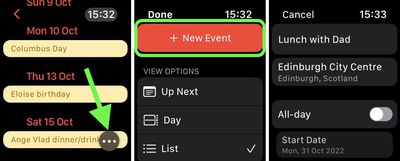
calendar

How to Delete a Calendar Event

To delete and event you created, tap the event, tap Delete, then tap Delete again. If it's a recurring event, you can delete this event only, or all future events. Note that to change an event, you need to use the Calendar app on your iPhone.


Popular Stories

macworld iphone 18 pro colors

iPhone 18 Pro's Four Rumored Colors Revealed, Including 'Dark Cherry'

Friday April 17, 2026 3:50 am PDT by
A source said to be familiar with Apple's supply chain today revealed the color options Apple is planning for the iPhone 18 Pro, iPhone 18 Pro Max, and the upcoming foldable iPhone. Image via Macworld. The information comes from Macworld, which says the signature new color for this year's Pro models will be Dark Cherry, a deep wine-like red. While other sources had previously reported on a...

macOS 27 on MacBook Pro

macOS 27 Will Mark the End of an Era

Saturday April 18, 2026 6:45 am PDT by
During its Platforms State of the Union segment at WWDC 2025, Apple revealed that macOS 26 Tahoe is the final major macOS version for Intel-based Macs. The upcoming macOS 27 release will be compatible with Apple silicon Macs only, meaning that you will need a Mac with an M-series chip or a MacBook Neo with an A18 Pro chip in order to install the software update. macOS 27 should be available...


ipad mini 7 feature red and blue

OLED iPad Mini: Release Date, Pricing, and What to Expect

Wednesday April 15, 2026 8:15 am PDT by
According to the latest rumors, Apple is close to launching its next-generation iPad mini. So what should we expect from the successor to the iPad mini 7 that Apple released over a year ago? Read on to find out. Processor and Performance Apple is working on a next-generation version of the iPad mini (codename J510/J511) that features the A19 Pro chip, according to information found in code...