

If you regularly share your iPhone's data connection with your laptop or iPad, or let family members piggyback on your device's data, you'll be glad to learn that Apple recently made it a lot easier to keep tabs on who's burning through your monthly allowance.
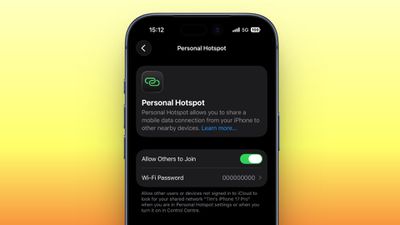
In a welcome change with the release of iOS 26.4, Apple has moved Personal Hotspot data usage info out of its previous hiding spot and put it in a much more convenient location.
Before the latest update, Personal Hotspot's per-device breakdown was secreted away inside cellular settings, where it was easy to miss. Now it sits right inside the Personal Hotspot menu, making it way more practical for anyone on a capped data plan who's keen to keep an eye on usage.
Here's how to check it in iOS 26.4 (you can make sure your device is up-to-date via Settings ➝ General ➝ Software Update).
How to Check iPhone Hotspot Data Usage
- Open Settings on your iPhone.
- Tap Personal Hotspot.
- Below the "Maximize Compatibility" toggle, tap Data Usage.
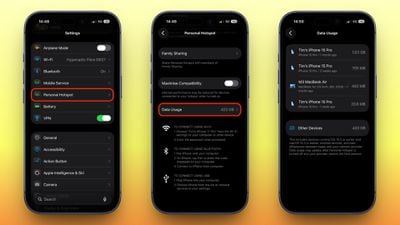
Here you'll see a list of connected devices along with how much data each one has consumed, as well as a total figure across all devices. Note that Apple devices running iOS 26.4 or macOS 26.4 appear individually by name, whereas Android phones, Windows PCs, and anything running older Apple software are grouped together under "Other Devices."
Bear in mind that the Data Usage option only appears if you've used Personal Hotspot recently. If you want, you can clear the figures and start tracking anew by heading to Settings ➝ Cellular/Mobile Service and resetting your overall cellular usage statistics (the option at the bottom). This wipes your hotspot numbers at the same time.




















Top Rated Comments
Is it still going to sometimes just not show up arbitrarily?
Who's using the data isn't going to helpful if the connected devices aren't able to connect or stay connected.
There is a niggle, sometimes, with the Hotspot not showing up when you search for it. Used to do this all the time but over the years that's got better. Occasionally I need to wake up my iPhone and unlock it. That might just be me being impatient because I suspect what happens is that the iPhone periodically broadcasts the fact that the Hotspot is available to other Apple devices using some sort of low power BLE advertising packet, and unless my macBook has seen one recently, it doesn't show up. Presumably the macBook has to ping back a request for the phone to bring up the Hotspot, again to save battery. Perhaps this handshake is a little slow, and that's why I suspect it's just impatience. But it's very rare this affects me, and once connected, it's solid.
YMMV, I guess.
[LIST=1]
* Often can't get a device to see the Hotspot. The fix is to try, try, try, try again and often turning the Hotpot on and off, etc.
* The Hotspot doesn't seem to stay enabled if the connected device doesn't use any data for say, 10 minutes. I dunno. But my Hotspot is enabled 100% of the time so it should be available and usable 100% of the time. It's my problem/own fault if I let my friends suck all my data.
* Building on #2, there are plenty of people (like my 80+ year old mom that doesn't have WIFI in her apartment) that attempt to use the Hotspot as their WIFI provider and it just sucks and is extremely frustrating for them. Gee, it worked this morning...why doesn't it work now? It's the same phone, same connecting device.
It's 2026, Apple. This feature should have been stable 10 years ago (Hotspot was launched in 2011 on iOS 4.3!!!). 15 YEARS AGO! :mad:
Maybe it does now?