


How to Change Video Quality in the Camera App on iPhone 11 and 11 Pro - MacRumors
Skip to Content

How to Change Video Quality in the Camera App on iPhone 11 and 11 Pro

by

ios camera app iconFor the iPhone 11, iPhone 11 Pro, and iPhone 11 Pro Max, Apple redesigned the Camera app and added new ways to shoot video.

As well as the usual method of selecting Video from the menu strip below the viewfinder, iPhone 11 series users can also simply press and hold the shutter button, then release it to stop recording.

In October 2019, Apple released iOS 13.2, which added another camera app function for iPhone 11, iPhone 11 Pro, and ‌iPhone 11 Pro Max‌: The ability to change video resolution and frame rate on the fly.

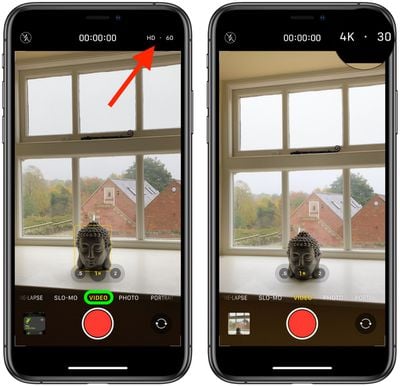
Next time you shoot video using the Video mode found in the menu strip below the viewfinder, notice the video resolution and frame rate separated by a dot in the top-corner of the screen.
camera
If video quality is set to 1080p in Settings -> Camera, you can tap the resolution in the Camera interface to flip between HD (1080p) and 4K. If it's set to 720p in Settings, tapping the format flips between 720p and 4K.

When shooting in 4K, you can tap the frame rate to switch between 24 (for low light), 30, and 60fps. If you shoot in HD (1080p) format, you can flip between 30 and 60fps, and when shooting in 720p, the frame rate is limited to 30fps.

Previously, changing these video settings was only possible by going into Settings -> Camera, so the ability to adjust them from the Camera app is a boon, especially when you want to capture something at a moment's notice.


Popular Stories

apple wallet drivers license feature iPhone 15 pro

Apple Says iPhone Driver's Licenses Will Expand to These 6 U.S. States

Thursday July 9, 2026 7:29 am PDT by
In select U.S. states, residents can add their driver's license or state ID to the Apple Wallet app on the iPhone and Apple Watch, and then use it to display proof of identity or age at select airports and businesses, and in select apps. To set up the feature, open the Wallet app on the iPhone and tap on the plus sign in the top-right corner. Next, tap on Driver's License and ID Cards,...
apple silicon 1 feature

Apple Silicon is Taking an Unexpected Turn

Friday July 10, 2026 7:24 am PDT by
Ever since the Mac switched from Intel processors to Apple silicon starting in 2020, each generation of M-series chips has included higher-end Pro and Max variants. If a recent report proves to be accurate, though, that streak will be coming to an end. According to Bloomberg's Mark Gurman, Apple will be releasing a regular M6 chip, but it has no plans to offer higher-end M6 Pro and M6 Max...
Apple TV Thumb 3

Everything Coming in the 2026 Apple TV 4K

Wednesday July 8, 2026 4:51 pm PDT by
The Apple TV 4K hasn't been updated since 2022, and it's due for a refresh. An update is planned for 2026, but Apple is likely going to wait to launch it after Siri AI launches in iOS 27. Design Apple TV design updates don't happen often, and that's not changing. The next Apple TV is going to have the same squircle shape as the current model, and it'll continue to be made from a black...










































