Apple TV+ has been praised for offering content in the highest streaming quality provided by any video streaming service. The only problem is that higher quality requires more bandwidth, and that isn't great news if you're watching on iPhone or iPad using a cellular connection and have a data cap to consider. Fortunately, you can change streaming quality settings for the Apple TV+ platform. Keep reading to learn how.

How High is Apple TV+ Streaming Quality?
Apple TV+ has the highest 4K streaming quality offered by a streaming service that supports 4K, according to tests conducted by FlatpanelsHD.
For example, Apple original "See" is streamed at the highest bitrate on the platform, at an average of 29Mb/s video bitrate and a 41Mb/s peak. That's almost twice the video bitrate of a typical HD Blu-ray disc and around half of a typical UHD Blu-ray disc.
By default, Apple TV+ dynamically adjusts this bitrate based on the device that's being used, but always with a view to maximizing the quality. However, that behavior can be tempered by changing a single setting in iOS. Follow the steps below to do just that.
How to Change Apple TV+ Streaming Quality
- Launch the Settings app on your iPhone or iPad.
- Tap TV.

- Tap iTunes Videos.
- Under Playback Quality, tap Wi-Fi or Mobile Data.
- Tap Good so that a tick appears alongside it.
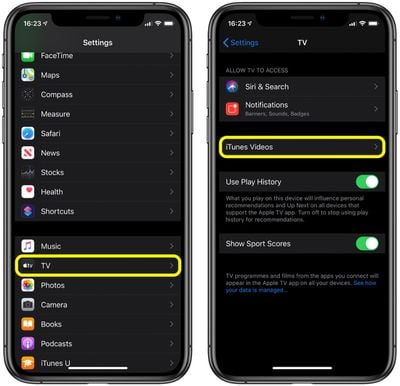
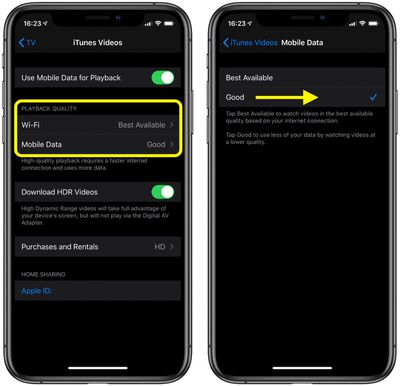
The data savings you can expect by changing this option will vary depending on the content you're watching, but in our tests we found that switching from Best Available to Good reduced streaming bandwidth by around 40 percent over equivalent viewing times.
If this doesn't help you avoid maxing out your data cap, consider toggling off Use Mobile Data for Playback (shown above, at the top of the third screenshot) and stick to Wi-Fi streaming instead.