Skip to Content

iOS 15: How to Turn on Auto-Translate in the Translate App

by

Following its introduction in iOS 14, Apple's Translate app has received some functional improvements in iOS 15. Once of those improvements is Auto Translate.
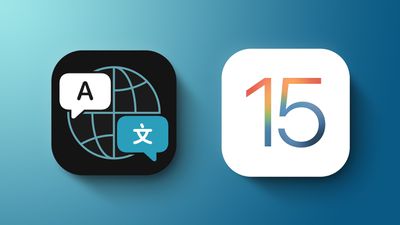
iOS 15 Translate Feature
The Translate app has always supported voice translation, which enables you to speak a phrase out loud and have it translated into the target language. For example, if you have English and Spanish selected as chosen languages and ask "Where's the bathroom?" the app will provide the proper response: "Dónde está el baño?"

In Conversation Mode, this ability allows you to chat back and forth with someone who speaks another language, because the ‌iPhone‌ listens for both languages and can translate right between them.

Previously, you had to tap the microphone icon before you started speaking a phrase you want translated, and then the other person tapped the same icon before they could speak in the other language. However, in iOS 15 Apple has added an Auto Translate option that means neither person has to interact with the screen to get their part of the conversation translated.

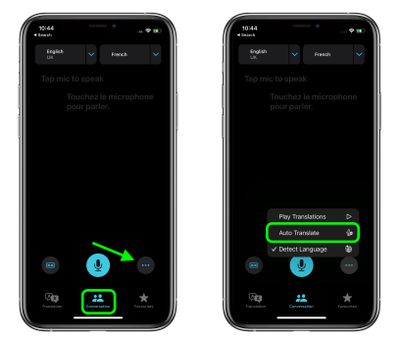
  1. To enable Auto Translate, first enter conversation mode by tapping on the Conversation tab, located at the bottom of the interface in both landscape and portrait view.
  2. Tap the ellipsis (three dots) icon, bottom-right.
  3. Select Auto Translate from the popup menu.
    translate

Now the Translate app will automatically detect when you start speaking and when you stop, so the other person can just respond without the need for interacting with the ‌iPhone‌.

Related Forum: iOS 15

Popular Stories

Apple Event Logo

Apple Released Seven New Products Today

Wednesday March 11, 2026 7:05 am PDT by
Starting today, the seven new Apple products that were announced last week are available at Apple Stores and beginning to arrive to customers. The colorful MacBook Neo and all of the other new products are on display at most Apple Store locations around the world starting today. Apple Stores have inventory of the new products for both walk-in customers and Apple Store pickup, but...
ios 26 4 yellow

Everything New in iOS 26.4 Beta 4

Monday March 9, 2026 3:50 pm PDT by
Apple is continuing to test the iOS 26.4 beta, and the latest update is now available for developers and public beta testers. As testing goes on, there are fewer new features in each beta, but today’s release adds new emoji characters and a few other changes. New Emoji Apple added new emoji characters, including trombone, treasure chest, distorted face, hairy creature, fight cloud, orca,...
Apple MacBook Pro M4 hero

Apple Planning 'MacBook Ultra' With Touchscreen and Higher Price

Sunday March 8, 2026 8:05 am PDT by
Apple is planning to launch an all-new "MacBook Ultra" model this year, featuring an OLED display, touchscreen, and a higher price point, Bloomberg's Mark Gurman reports. Gurman revealed the information in his latest "Power On" newsletter. While Apple has been widely expected to launch new M6-series MacBook Pro models with OLED displays, touchscreen functionality, and a new, thinner design...