Skip to Content

How to Adjust iCloud Private Relay IP Address Settings

by

As part of iOS 15, Apple introduced iCloud Private Relay, a feature of all ‌iCloud‌+ paid plans that's designed to encrypt all of the traffic leaving your device so no one can intercept it or read it.
iCloud General Feature
Private Relay works by sending web traffic to a server that is maintained by Apple to strip the IP address. Once the IP info has been removed, Apple sends the traffic to a second server maintained by a third-party company that assigns a temporary IP address and then sends the traffic to its destination, a process that prevents your IP address, location, and browsing activity from being used to create a profile about you.

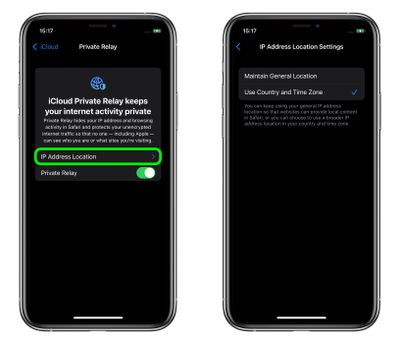
Once ‌iCloud‌ Private Relay is enabled, you can choose how the assigned IP address uses geographical information to conceal your actual location. If you still want to receive local content when you're browsing in Safari, the IP address can maintain your general location without being specific (the default setting), or if you want the relay to be more private, the IP address can simply include your country and time zone.

Whichever option you choose, here's how to set it in iOS 15.

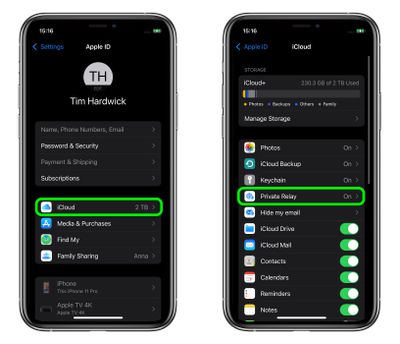
  1. Launch the Settings app on your iPhone or iPad.
  2. Tap your name at the top of the main settings menu.
  3. Tap iCloud.
  4. Tap Private Relay.
    settings

  5. Tap IP Address Location.
  6. Select Maintain General Location (the default) or Use Country and Time Zone.
    settings

Paid ‌‌‌iCloud‌‌‌+ plans also include a new Hide My Email feature that lets you create unique, random email addresses that forward to your personal inbox, and it allows for ‌‌‌iCloud‌‌‌ Mail addresses to be personalized with a custom domain name. To learn more about Hide My Email and how to enable it, check out our dedicated how-to guide.


Popular Stories

MacBook Neo Feature Pastel 1

First MacBook Neo Benchmarks Are In: Here's How It Compares to the M1 MacBook Air

Thursday March 5, 2026 4:07 pm PST by
Benchmarks for the new MacBook Neo surfaced today, and unsurprisingly, CPU performance is almost identical to the iPhone 16 Pro. The MacBook Neo uses the same 6-core A18 Pro chip that was first introduced in the iPhone 16 Pro, but it has one fewer GPU core. The MacBook Neo earned a single-core score of 3461 and a multi-core score of 8668, along with a Metal score of 31286. Here's how the...
imac video apple feature

Apple Unveils Seven New Products

Friday March 6, 2026 11:48 am PST by
Apple this week unveiled seven products, including an iPhone 17e, an iPad Air with the M4 chip, updated MacBook Air and MacBook Pro models, a new Studio Display, a higher-end Studio Display XDR, and an all-new MacBook Neo that starts at just $599. iPhone 17e features the same overall design as the iPhone 16e, but it gains Apple's A19 chip, MagSafe for magnetic wireless charging and magnetic...
Apple MacBook Pro M4 hero

Apple Planning 'MacBook Ultra' With Touchscreen and Higher Price

Sunday March 8, 2026 8:05 am PDT by
Apple is planning to launch an all-new "MacBook Ultra" model this year, featuring an OLED display, touchscreen, and a higher price point, Bloomberg's Mark Gurman reports. Gurman revealed the information in his latest "Power On" newsletter. While Apple has been widely expected to launch new M6-series MacBook Pro models with OLED displays, touchscreen functionality, and a new, thinner design...