How to Specify Your Activity Type in the Apple Watch Workout App - MacRumors
Skip to Content

How to Specify Your Activity Type in the Apple Watch Workout App

by

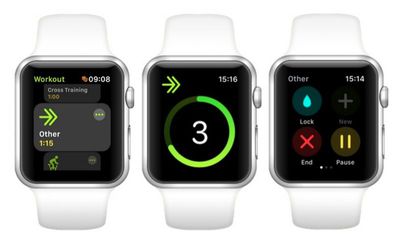
workout appWhen you open the Apple Watch Workout app, the main screen by default offers you 10 quick-start workout types that you can use to track your exercise. These include Walking, Running, Cycling, Elliptical, Rower, Stair stepper, HIIT, Swimming, and Wheelchair.

If you want to track a more specialized activity that isn't covered by these types, then you'll want to note the tenth option on the main screen, called Other. Selecting Other allows you to label your activity more accurately by choosing from over 60 pre-defined workout categories – you can find Apple's full list at the end of this article.

The neat thing about using the Other option is that once you've recorded a workout and given it a custom label, that workout type will subsequently appear in the main Workout screen as a quick-start option for the next time you need it.

How to Categorize an Activity in the Workout App

  1. Launch the stock Workout app on your Apple Watch.

  2. Using your watch's Crown, scroll down the list of activity types and tap the Other option to begin your workout, or tap the three circled dots at the upper right of the option's icon if you want to define a specific time or calorie goal before the workout starts.

  3. When you've completed the activity you want to track, swipe right on the metrics readout and tap End.
    name a workout 1 apple watch

  4. Tap the grey Name Workout button near the top of the workout summary.

  5. Scroll through the alphabetical list and tap the category that best describes your workout. (Apple includes a convenient list of popular categories at the top.)

  6. With your activity now labeled, scroll down to the bottom of the workout summary screen and tap Done.name a workout 2 apple watch

It's unclear whether using these additional categories affects the way Apple Watch's biometric sensors work (although we do know that using Other earns you the calorie or kilojoule equivalent of a brisk walk whenever sensor readings are unavailable). Either way, using specific labels ensures the Activity iOS app offers you a more informative exercise log, which makes it easier to filter to display specific workouts.
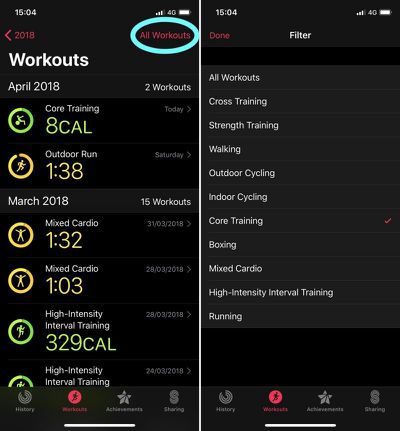
ios activity app filtering exercises
To learn how you can customize the Workout metrics for your chosen activity on Apple Watch, check out our how-to guide.

Full List of Apple Watch Workout Categories

  • American Football

  • Archery

  • Athletics

  • Australian Football

  • Badminton

  • Barre

  • Baseball

  • Basketball

  • Bowling

  • Boxing

  • Climbing

  • Core Training

  • Cricket

  • Cross-Country Skiing

  • Cross Training

  • Curling

  • Dance

  • Downhill Skiing

  • Equestrian Sports

  • Fencing

  • Fishing

  • Flexibility

  • Functional Training

  • Golf

  • Gymnastics

  • Hand Cycling

  • Handball

  • HIIT (stands for High Intensity Interval Training)

  • Hiking

  • Hockey

  • Hunting

  • Jump Rope

  • Kickboxing

  • Lacrosse

  • Martial Arts

  • Mind & Body

  • Mixed Cardio

  • Paddling

  • Pilates

  • Play

  • Racquetball

  • Rolling

  • Rugby

  • Sailing

  • Skating

  • Snow Sports

  • Snowboarding

  • Soccer

  • Softball

  • Squash

  • Stairs

  • Step Training

  • Strength Training

  • Surfing

  • Table Tennis

  • Tai Chi

  • Tennis

  • Track & Field

  • USA Football

  • Volleyball

  • Water Fitness

  • Water Polo

  • Water Sports

  • Wrestling

  • Yoga

Related Roundup: Apple Watch 12
Buyer's Guide: Apple Watch (Buy Now)
Related Forum: Apple Watch

Top Rated Comments

112 months ago
Is the ‘play’ category for boom boom time?
Score: 10 Votes (Like | Disagree)
112 months ago
Hmm...no "pooping" and yet the watch often beeps me to happily announce I met my move goal, inexplicably while seated. :confused:

Well, at my age, I suppose that is all it takes.
Score: 3 Votes (Like | Disagree)
112 months ago
"Fishing" is a workout? I guess if you're fighting a 600lb marlin for 30 minutes it could be.


Very puzzling that “snow sports” and “snowboarding” are separate, yet there’s no “skiing” workout.
Under "Downhill Skiing"
[doublepost=1523622752][/doublepost]
Score: 3 Votes (Like | Disagree)
bingeciren Avatar
112 months ago
Where does mountain biking go? It’s not the same as outdoor cycling; not by a long shot.
Where does Sex go? :rolleyes: Mixed Cardio?
Score: 2 Votes (Like | Disagree)
B4U Avatar
112 months ago
Where does Sex go? :rolleyes: Mixed Cardio?
Wrestling...?:confused:

Meanwhile, I am debating what shall I categorize this:
Score: 1 Votes (Like | Disagree)
urnotl33t Avatar
112 months ago
Where does Sex go? :rolleyes: Mixed Cardio?
That's the category we used.
Score: 1 Votes (Like | Disagree)

Popular Stories

apple watch s12 ultra 4

Apple Watch Series 12, Ultra 4 Owners Report Skin Irritation

Wednesday October 7, 2026 12:02 pm PDT by
Some Apple Watch Series 12 and Ultra 4 owners have experienced unexpected skin irritation with the new models, according to reports on the MacRumors forums and Reddit. Affected users complain of a burning sensation and redness under the sensor area. The Apple Watch Series 12 and Ultra 4 measure heart rate every five seconds, and some people have wondered if that's the cause of the skin...
southern straps 3 1

MacRumors Giveaway: Win an Apple Watch Series 12 and a Nylon Band From Southern Straps

Friday October 9, 2026 10:20 am PDT by
For this week's giveaway, we've teamed up with Southern Straps to offer MacRumors readers a chance to win an Apple Watch Series 12 and a nylon band from Southern Straps to go along with it. Southern Straps is a California-based company that has been making high-quality bands for the Apple Watch since the device first launched in 2015, and the company's selection of bands offer a an...
apple watch series 6 blood oxygen monitoring 1

Apple's $634 Million Apple Watch Patent Bill Just Got Even Bigger

Tuesday October 6, 2026 6:09 am PDT by
Apple's $634 million patent loss to medical technology company Masimo has just gotten even bigger, after a federal judge ordered Apple to pay an additional $184 million in interest on what it owes (via Bloomberg Law). The ruling takes Apple's bill to around $818 million, but that doesn't include any post-judgment interest continuing to accrue until the judgment is paid. Judge James Selna ...
Latest Stories
Touchscreen MacBook Pro's New Hinge Linked to iPhone Duo 2
1 hour ago
macOS 27 Assets Hint at Dynamic Island for MacBook Pro
2 hours ago
Touchscreen MacBook Pro to Debut Today With These 5 Features
3 hours ago
Apple to Open Pre-Orders for Five New Products Today
4 hours ago
MacPaw Launches 'Eney' AI Assistant for Mac and iPhone
6 hours ago
Apple Shares New Apple Watch Survival Stories
14 hours ago
Apple Shares tvOS 27.2 Release Notes With List of New Features
14 hours ago
OLED Touchscreen MacBook Pro Could Start at $2,899
15 hours ago
M6 iMac Sticks With Its Five-Year-Old Color Lineup
17 hours ago
ChatGPT Can Now Access Your iCloud Mail and Calendar
17 hours ago
Best Buy Details Black Friday Plans With Early Deals Available on Halloween
20 hours ago
Apple Reportedly Plans to Release MacBook Neo 2 in First Half of 2027
21 hours ago
M5 vs. M6 MacBook Pro Buyer's Guide: All Differences Compared
22 hours ago
New iMac Available With 2.5 Gigabit Ethernet Port on Power Adapter
22 hours ago
M4 vs. M6 iMac Buyer's Guide: Should You Upgrade?
22 hours ago
Apple Expected to Announce MacBook Pro With Touchscreen Tomorrow
22 hours ago
Banktivity Offers 30% Off First Year Subscriptions for MacRumors Readers
23 hours ago
M6 MacBook Pro's 170GB/s Memory Bandwidth Skips Base 16GB Model
23 hours ago
M6 iMac Pre-Orders and Release Date Announced
1 day ago
Apple Updates Creator Studio With New Tools and AI Features
1 day ago
M6 14-Inch MacBook Pro: Pre-Orders and Release Date Announced
1 day ago
Apple Announces New 14-Inch MacBook Pro With M6 Chip
1 day ago
Apple Announces New iMac With M6 Chip and More
1 day ago
Apple Fixes Possibly Exploited CoreGraphics Flaw on Older iPhones
1 day ago
Apple's MacBook Pro Touch Bar Was Announced 10 Years Ago Today
1 day ago
iPhone 18e Could Get Two Key Upgrades While Keeping 60Hz Display
1 day ago
New iMac and 14-Inch MacBook Pro With M6 Chip Expected Tomorrow
1 day ago
JAŸ-Z to Headline 2027 Apple Music Super Bowl LXI Halftime Show
1 day ago
macOS 27.2 Stops Upgrades From Removing Rosetta
1 day ago
Older Siri Remotes Now Show Up in Find My With iOS 27.2
2 days ago