26 New Features to Try in watchOS 26

Apple released watchOS 26 yesterday, and if you have a Series 9 or later or an Ultra 2 or later, there are a surprising number of useful new features. Apple could have limited new additions like Sleep Score and Hypertension notifications to the newest Apple Watch models, but now you don't need to buy a new watch to get helpful features.
watchos 26 main

Design

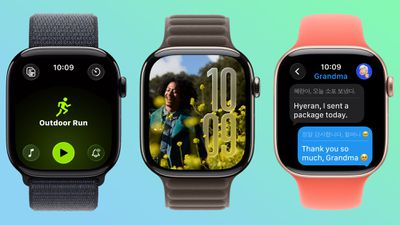
  • Liquid Glass - ‌watchOS 26‌ adopts Liquid Glass, with translucent, glass-like buttons and interface elements. It's most visible with select watch faces, the Smart Stack, and Control Center.
  • Control Center - Control Center is customizable, and you can rearrange it and add third-party app controls. If you don't like your changes, you can revert to the original design.
  • Smart Stack - The Smart Stack uses a new prediction algorithm and it will prompt you if there is a suggestion that's immediately useful.
  • Widgets - Widgets in the Smart Stack are customizable, so you can rearrange them to show what's most important to you first. Third-party apps are supported.

Gestures

  • Wrist Flick - There's a wrist flick gesture for things like silencing incoming calls and dismissing notifications one-handed.

Health

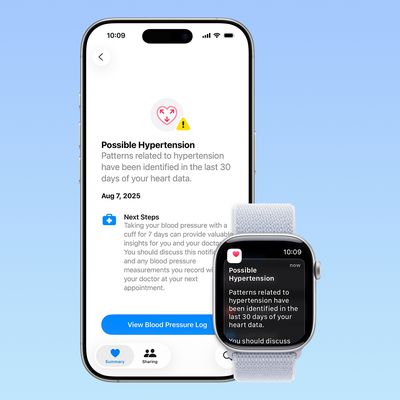
  • Hypertension Notifications - ‌watchOS 26‌ adds hypertension notifications based on heart rate, letting you know if high blood pressure is detected over time. It's available on the Series 9 and later and Apple Watch Ultra 2 and later.
  • Sleep Score - Sleep Score gives you a number-based evaluation of your sleep quality. It takes into account sleep duration, the number of times you woke up in the night, and when you went to bed.

Fitness

  • Workout Buddy - There's an AI-powered Workout Buddy that motivates you during workouts and provides helpful insights.
  • Workout app - Apple redesigned the Workout app with an updated layout that makes options like custom workout, Workout Buddy, and Pacer easier to get to.
  • Media - There's an Autoplay Media option that will automatically play music that matches your workout. You can also select your own media to have autoplay when a workout is started.

Messages

  • Smart Actions - The Messages app can suggest smart actions like location sharing, providing an address, and more based on the context of a text.
  • Smart Replies - Smart replies have been improved so you should get more relevant one-tap responses for incoming messages.
  • Live Translation - The Messages app supports Live Translation, so incoming texts in another language can be translated to your language.
  • Backgrounds - Personalized backgrounds that you create for conversations on iPhone sync to the watch.

Phone

  • Call Screening - Call Screening asks callers for more information before your phone or Apple Watch rings.
  • Hold Assist - You can use the Hold Assist feature on the Apple Watch. It waits on the line for you so you can do other things.

Watch Faces

  • Photos - The Photos watch face uses Liquid Glass for the time, and the size and location of the time adjust based on the image that's being displayed. The shuffle option also uses Featured content from ‌Photos‌.
  • Flow - Flow is a watch face designed for Liquid Glass. It features an orb of color with Liquid Glass numbers.
  • Exactograph - Exactograph has hour, minute, and second dials for precise time keeping. If you tap on the face, it zooms in on the minutes and seconds dials so you can measure in even smaller increments of time.
  • Waypoint - Waypoint is only for the Apple Watch Ultra, but it shows points of interest in relation to where you are.
  • Hermes - There's a Hermes Faubourg Party watch face for Hermes watches. It displays different animations based on the time of day.
  • Ticking Seconds - More watch faces support the 1Hz refresh rate on the Apple Watch Series 10 and later, showing a ticking second hand even when your wrist is down.
  • Gallery - The watch face gallery has a new design that groups faces into collections.

Other Features

  • Volume Adjustment - The volume of incoming calls and notifications adjusts based on the ambient sound around you. So if you're in a quiet room, your watch won't have a super loud ring.
  • Live Listen - When using Live Listen on a connected ‌iPhone‌, a transcript of what's being said is displayed on the watch.
  • Notes - The Notes app is available on the Apple Watch, so you can view existing notes and create new ones.

Read More

For more on the features available in ‌watchOS 26‌, we have a dedicated watchOS 26 roundup.

Related Roundup: watchOS 26
Related Forum: Apple Watch

Popular Stories

Apple Creator Studio

Apple Introduces New 'Creator Studio' Bundle of Apps for $129 Per Year

Tuesday January 13, 2026 6:11 am PST by
Apple today introduced a new Apple Creator Studio bundle that offers access to six creative apps, as well as exclusive AI features and content, as part of a single subscription. In the U.S., pricing is set at $12.99 per month or $129 per year. Here are the six apps included with an Apple Creator Studio subscription:Final Cut Pro on the Mac and iPad Logic Pro on the Mac and iPad Pixelmator...
Low Cost MacBook Feature A18 Pro

Apple Is Expected to Launch These Four MacBooks in 2026

Friday January 9, 2026 8:17 am PST by
2026 could be a bumper year for Apple's Mac lineup, with the company expected to announce as many as four separate MacBook launches. Rumors suggest Apple will court both ends of the consumer spectrum, with more affordable options for students and feature-rich premium lines for users that seek the highest specifications from a laptop. Subscribe to the MacRumors YouTube channel for more videos. ...
iOS 18 Siri Personal Context

Apple Confirms Google Gemini Will Power Next-Generation Siri This Year

Monday January 12, 2026 7:38 am PST by
In a statement shared with CNBC today, Apple confirmed that Google Gemini will power the next-generation version of Siri that is slated to launch later this year. "After careful evaluation, we determined that Google's technology provides the most capable foundation for Apple Foundation Models and we're excited about the innovative new experiences it will unlock for our users," the statement...
iOS 26

Here's What's New in iOS 26.3 So Far

Monday January 12, 2026 1:15 pm PST by
Apple today seeded the second beta of iOS 26.3, nearly a month after the first beta. So far, the update includes a couple of new features for iPhones. iOS 15.3 through iOS 18.3 were all released in late January over the years, so it is thereby likely that iOS 26.3 will be released towards the end of this month as well. The update is compatible with the iPhone 11 series and newer. Below,...
iPhone Top Left Hole Punch Face ID Feature Purple

10 Reasons to Wait for This Year's iPhone 18 Pro

Thursday January 8, 2026 2:56 am PST by
Apple's iPhone development roadmap runs several years into the future and the company is continually working with suppliers on several successive iPhone models at the same time, which is why we often get rumored features months ahead of launch. The iPhone 18 series is no different, and we already have a good idea of what to expect for the iPhone 18 Pro and iPhone 18 Pro Max. One thing worth...
fcp pcp iwork creator studio

These Apple Apps Will No Longer Receive All New Features Without a Subscription

Tuesday January 13, 2026 10:50 am PST by
If you are not interested in subscribing to the new Apple Creator Studio bundle introduced today, you will officially start to miss out on some new features. Apple said some "exciting new intelligent features and premium content" in Final Cut Pro, Pixelmator Pro, Keynote, Numbers, Pages, and Freeform will only be accessible with a Creator Studio subscription. In the U.S., a subscription...
airpods pro 3 design

Apple Releases New AirPods Pro 3 Firmware Update

Tuesday January 13, 2026 11:29 am PST by
Apple today released a firmware update for the AirPods Pro 3. The latest firmware has a version number of 8B34, up from the previous version 8B30. Apple has a support document for AirPods firmware updates, and it indicates that the 8B34 update contains unspecified "bug fixes and other improvements." No other AirPods models received firmware updates today. How to install AirPods Pro...
iOS 18 Siri Personal Context

Elon Musk Reacts to Apple and Google Teaming on Gemini-Powered Siri

Monday January 12, 2026 11:38 am PST by
Elon Musk today expressed concern about Apple and Google partnering on a more personalized version of Siri powered by Google's generative AI platform Gemini. "This seems like an unreasonable concentration of power for Google, given that [they] also have Android and Chrome," wrote Musk, in a post on X. Musk serves as CEO of xAI, the company behind Gemini competitor Grok. It is unlikely...
iOS 26

iOS 26.2.1 Update Coming Soon for iPhones

Monday January 12, 2026 8:19 am PST by
iOS 26.3 will likely be released to the public later this month, but it appears that Apple is preparing to push out another software update in the interim. Apple's software engineers have started testing iOS 26.2.1, according to the MacRumors visitor logs, which have been a reliable indicator of upcoming iOS versions. The update will likely be released at some point this week or next week. ...

Top Rated Comments

ipedro Avatar
17 weeks ago
I feel so much better about holding off another year. Series 6 and Ultra 2 have gotten me value for my money. To Apple’s credit, software updates have continued for older Watches. All the new features have come to both of mine.

I planned to upgrade this year but this is clearly a year to skip. Let’s see if the Series 12 has a chip capable of the new upcoming Siri and Apple Intelligence.
Score: 4 Votes (Like | Disagree)
Johnny907 Avatar
17 weeks ago
Not a fan of the redesigned workout app, which was implicitly changed to support “features” my Series 8 doesn’t.
Apple used to give Android grief over the stratified rollout of features based on how old your device was, but in the last few years has seemed to perfect that brand of nonsense.
Score: 4 Votes (Like | Disagree)
BlackPhoenix64 Avatar
17 weeks ago
Not a big fan of the new workout app on ultra 2. They added a play/start button on screen which isn’t a start button. Start used to be pushing the action button, but when you do that when you’re in the workout app you just go to the workout app again. Now you need to select your workout, push the start button on screen, then push the action button to actually start your workout. Then, what’s the point of the start button on screen? It’s not a start button! I missed a couple of workout starts already because of this stupid design.
Score: 3 Votes (Like | Disagree)
robfoll Avatar
17 weeks ago
I haven't heard much from all the conspiracy theorists who whine all the time about Apple holding back features for their new products only ?

Not a fan of the redesigned workout app, which was implicitly changed to support “features” my Series 8 doesn’t.
Apple used to give Android grief over the stratified rollout of features based on how old your device was, but in the last few years has seemed to perfect that brand of nonsense.
It's not nonsense at all. The newer watches have faster processors, much upgraded performance, new sensors, and a lot of extra technology to handle a lot of the new features. It's like complaining your 5-year-old TV can't handle Dolby Atmos or 4K.
Score: 3 Votes (Like | Disagree)
ELman Avatar
17 weeks ago
Why can't they allow the wrist temperature to be used all time. It appears it only works while your using your watch to track sleep.
Score: 2 Votes (Like | Disagree)
DVD Plaza Avatar
17 weeks ago
Not that I've found any of the watch faces exciting, but I'm really bored of them to be honest. I was really hoping for some gorgeous ones based on liquid glass, but alas the selection is just so blehhhhh.....

Apple need to stop being so stubborn like they used to be with alert tones, colours, etc and just give us a watch face store. They'd not only make a killing but we could get some actually nice faces. Apple can vet every single one of them if they like to ensure they meet standards, but for heavens sake I'm really bored of these designs.
Score: 2 Votes (Like | Disagree)