

Following the release of macOS Catalina version 10.15.7, an increasing number of users have experienced an issue with a system process named "accountsd" showing very high CPU usage in Activity Monitor, causing their Mac to slow down.
One user in the Apple Support Communities shared a screenshot of "accountsd" with CPU usage above 400%, rendering their 2018 MacBook Pro "useless."
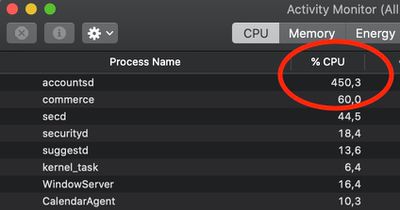
While this issue has popped up occasionally over the years, there has been a noticeable uptick in complaints across the Apple Support Communities, MacRumors Forums, Twitter, Reddit, Stack Exchange, and elsewhere since the release of macOS Catalina version 10.15.7, with users attempting to troubleshoot the issue.
What is accountsd?
Accountsd is a daemon, part of the Accounts framework. Apple's developer documentation says this framework helps users access and manage their external accounts from within apps, without requiring them to enter login credentials.
The Accounts framework provides access to user accounts stored in the Accounts database, which is managed by the system. An account stores the login credentials of a particular service, such as Twitter, and you use those credentials to authenticate with the service. When you integrate the Accounts framework into your app, you don't need to store account logins yourself. Instead, the user grants your app access to use their account login credentials, bypassing the need to type their username and password. If no account for a particular service exists in the user's Accounts database, you can let them create and save an account from within your app.
How to fix accountsd CPU usage?
Affected users have offered a wide range of potential solutions, but your mileage may vary.
Some users have managed to solve the issue by signing out of their Apple ID account under System Preferences > Apple ID > Overview > Sign Out, restarting their Mac, and then signing back in to the account, but this has not worked for everyone.
Some users have solved the issue by resetting their Mac's SMC and/or NVRAM.
One user on Stack Exchange believes the issue relates to a bug with file indexing on the Mac. Their solution involves resetting the indexing by navigating to System Preferences > Spotlight > Privacy and adding (+) your storage drive ("Macintosh HD" by default) to the "Prevent Spotlight from searching these locations" list. Then, remove (-) the drive from the list, and the Mac will begin reindexing. The indexing process can temporarily slow down your Mac, so these steps are recommended to be completed overnight.
As for more advanced troubleshooting, some users have had success with navigating to "~/Library/Accounts" and renaming the file "Accounts4.sqlite" to "Accounts4.sqlite.testbackup" or using more complex Terminal commands, but proceed with caution, as these solutions could impact your iCloud accounts or syncing.
Apple has yet to acknowledge this issue. Should a software update be released with a fix, we will update this article accordingly.

















Top Rated Comments
Unheard of.