Everything New in iOS 27 Beta 5 - MacRumors
Skip to Content

Everything New in iOS 27 Beta 5

We're a little over a month away from the launch of iOS 27, and Apple is continuing to make changes. The fifth beta of ‌iOS 27‌ changes the look of some app icons and adjusts Liquid Glass, plus it adds some smaller features that make the iPhone just a little nicer to use.
iOS 27 Feature Cool

App Icons

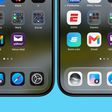
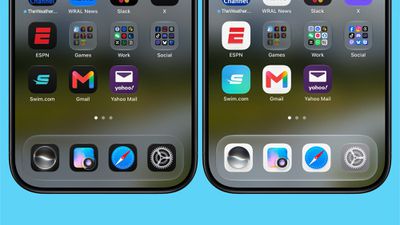
There are updated Liquid Glass icons for Safari, Siri, Settings, Remote, App Store, and Preview. Some of the icons have been entirely redesigned, while others feature more detail than before.
ios 27 b5 icons

Siri AI Voice Customization

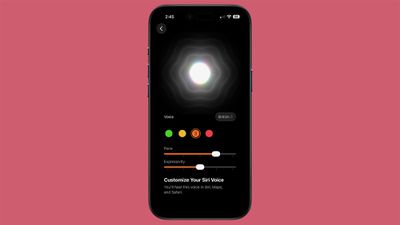
Voice customizations for ‌Siri‌ AI have been expanded, and Pace and Expressivity can be adjusted for all seven American voices and the four British voices.
ios 27 siri voice
‌Siri‌ AI voice customization is done on-device, so the feature is limited the iPhone 17 Pro, ‌iPhone 17 Pro‌ Max, or iPhone Air.

Contacts

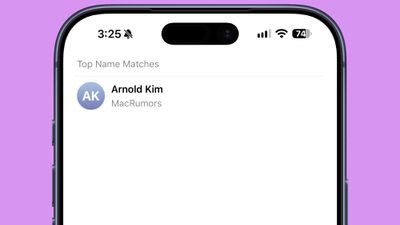
If a contact you've created has a company associated with it, the company name will show in the contact list under the name and in search. It makes it easier to see more information on a contact without having to tap into the contact card.
ios 27 contacts company name

Create a Pass

The Apple Wallet Create a Pass feature is now available outside of the U.S.
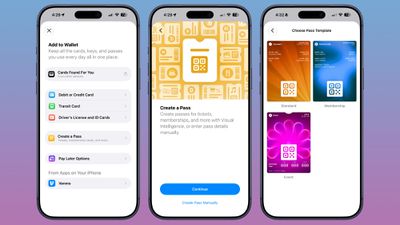
ios 27 wallet create pass

Splash Screens

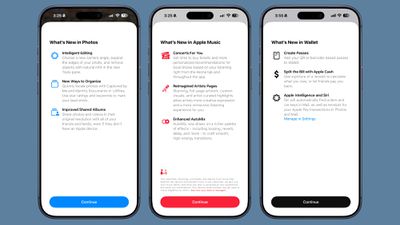
Apple added splash screens for the Photos, Wallet, and Music apps, explaining what's new in ‌iOS 27‌.

ios 27 beta 5 splash screens

Search and Ask

Apple made minor changes to the animation when bringing up Search or Ask. The suggestions interface now comes up as the search bar does rather than popping up slightly afterward.

The search interface also now has a "Search the Web" option at the bottom of results that was not there before.

Apps in Search

You can now decide whether search should show app results, and if so, how many. You can turn off app results, have it show four apps, or have it show eight apps. There's also a toggle for showing app shortcuts.
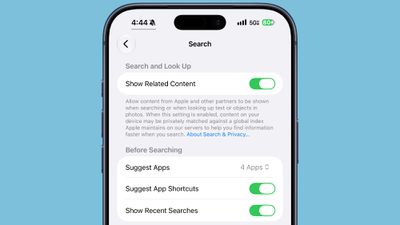
ios 27 search show apps

Control Center

When connected to Wi-Fi, the Control Center no longer shows information on cellular connection.
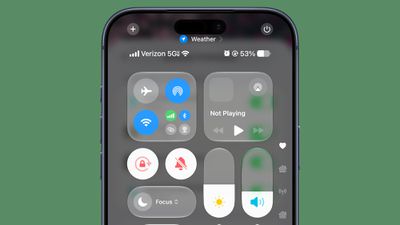
ios 27 control center 5gThe ‌iOS 27‌ Control Center in beta 4

5G

5G+ is now available in Spain.

Software Updates

When you look at your software version in Settings > General > About, it now tells you when the last update was installed.
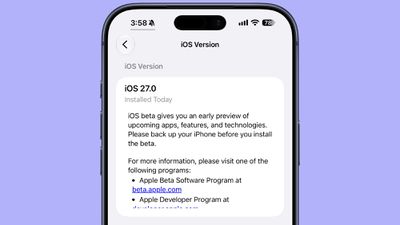
ios 27 beta 5 installed today

Clock

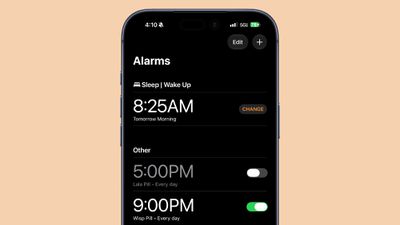
There is a thicker font for the Alarms and Timers section of the Clock app.
ios 27 beta 5 alarm font

Liquid Glass

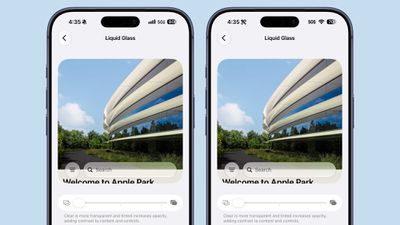
The clearest Liquid Glass setting is clearer than it was in the prior beta.
ios 27 beta 5 translucency

Mail

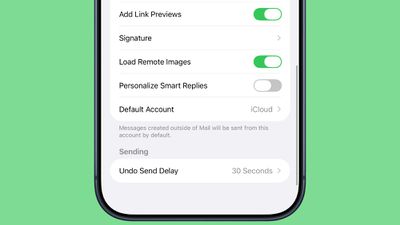
There's now a toggle for the Personalize Smart Replies feature in the Mail app. It's off by default and can be turned on in the Mail section of the Settings app.
ios 27 beta 5 mail personalize replies

Battery

The Battery section of the Settings app will now let you know if a poor cellular connection is causing battery drain.

Related Roundups: iOS 27, iPadOS 27

Popular Stories

Everything New Your iPhone Can Do on iOS 27 Feature 1

25 New Things Your iPhone Can Do in iOS 27

Thursday July 30, 2026 6:10 am PDT by
Apple will release iOS 27 in September, and despite the company's focus this year on refining its flagship operating system and nixing bugs, there are still many additional features on the way, not least of which is Apple's new context-aware Siri, re-tooled for the generative AI era. This year's major iPhone software update isn't all about AI, though, as the following feature list...
ios 27

iOS 27 Brings These Five New Features to Your iPhone Lock Screen

Thursday July 23, 2026 4:05 am PDT by
Apple unveiled iOS 27 at WWDC this week, and while the headline-grabbing Siri overhaul has received the most attention, the Lock Screen has picked up several refinements that you may have missed. Some are brand-new additions, while others are tweaks to features Apple introduced in iOS 26, but together they give you more control over how your Lock Screen looks and behaves. Here are five...
iOS 27 Feature Dark

Apple Seeds Fourth iOS 27 and iPadOS 27 Betas to Developers

Monday July 20, 2026 10:06 am PDT by
Apple today seeded the fourth betas of iOS 27 and iPadOS 27 to developers for testing purposes, with the update coming two weeks after Apple released the third betas. Registered developers can download the betas from the Settings app on the iPhone or iPad by going to the General section and selecting Software Update. iOS 27 introduces Apple's smarter version of Siri, Siri AI. Siri AI is a ...

Top Rated Comments

AppleWes Avatar
3 hours ago at 03:24 pm

New icons, thicker fonts - Oh my word, this kind of innovation is astonishing.
The entire OS layout doesn't need to be changed with every version release. I'd rather get multiple visual refinements with behind the scenes processes working better vs fancy new user interface alone.

People will jump on here to complain no matter what, yet they never leave Apple.
Score: 12 Votes (Like | Disagree)
2 hours ago at 03:43 pm

When connected to Wi-Fi, the Control Center no longer shows information on cellular connection.
Why? That was a great addition.
Score: 8 Votes (Like | Disagree)
3 hours ago at 03:16 pm

The clearest Liquid Glass setting is clearer than it was in the prior beta.
How about making the most opaque Liquid glass setting more opaque than it was in iOS 26!
Score: 8 Votes (Like | Disagree)
mikeack Avatar
3 hours ago at 03:30 pm

All this took 3 weeks.;)
We don't know what sort of performance enhancements and debugging happened. We're just seeing UI changes.
Score: 5 Votes (Like | Disagree)
2 hours ago at 04:14 pm
Only regression was removing the ability to see the cellular network connection when on WiFi in control center. I liked knowing what network I’d connect to if I dropped WiFi.
Score: 4 Votes (Like | Disagree)
AusMness Avatar
3 hours ago at 03:08 pm
Create a pass has worked in Canada since day 1
Score: 3 Votes (Like | Disagree)