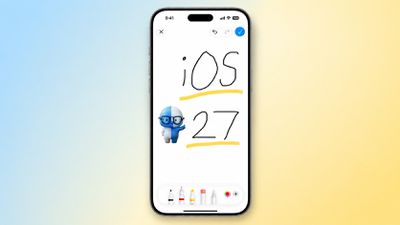
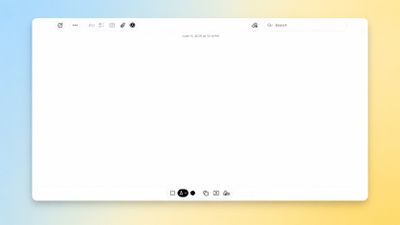
The upcoming iOS 27 and macOS 27 Golden Gate updates expand drawing tools to more of Apple's built-in apps across the iPhone and Mac.
In the Messages app on iOS 27, there is a new "Drawing" option in the app drawer, which can be opened by tapping the plus sign in the bottom-left corner.
On older iOS versions, the Messages app once had a very basic drawing tool that was accessible by tapping a button on the keyboard in landscape orientation, but now Apple's complete set of Markup tools are available in the app.
On the Mac, macOS 27 adds the Markup tools to the Notes and Freeform apps.
iOS 27 and macOS 27 are currently available in developer beta. The updates are expected to be released to the general public in September.
Friday October 2, 2026 12:59 pm PDT by Joe Rossignol
In a post on its developer news website today, Apple announced that it will be introducing "additional controls" for the "Full Disk Access" setting on macOS due to new risks posed by AI agents. This announcement comes amid the rise of always-on AI agents like Meta's Muse and OpenAI's Dots, which have prompted privacy concerns.
"Some developers are using Full Disk Access in ways that could...
Monday October 26, 2026 3:56 pm PDT by Juli Clover
Apple released iOS 27.2, uniting the iPhone Duo and other iPhone models on the same version of iOS. iOS 27.2 is the first major iOS 27 update, and it adds several useful new features.
Siri AI Improvements
Siri AI can recall past conversations you had with it, so you can ask Siri about something it told you before, like a restaurant it previously recommended. It's also able to draw on more...
Monday October 19, 2026 10:26 am PDT by Juli Clover
Apple today seeded the release candidate of an upcoming iOS 27.2 update to developers for testing purposes, with the update coming a week after Apple released the fourth iOS 27.2 beta. Apple also seeded the iPadOS 27.2 RC.
Registered developers can download the beta updates by opting in under Settings > General > Software Update and selecting the iOS 27 developer beta.
The beta was used...
Interesting. Got a link? Even if it's built into the glass, I'm inclined to think there's thickness penalty somewhere, maybe in the glass itself. Pretty rare that something can be added for free.
“In his latest post on X (Twitter) ('https://x.com/mingchikuo/status/1968249865940709538'), Kuo writes that Apple's much-rumored OLED MacBook Pro will incorporate a touch panel using on-cell touch technology. On-cell touch technology integrates the touch sensors directly into the display panel's top layer (the "cell") rather than requiring a separate, dedicated touch layer.” https://www.macrumors.com/2025/09/17/kuo-2026-oled-macbook-pro-touch-panel/
I’m pretty sure the OLED iPad pros over the last couple years have all used this technology, and as you know, switching from mini LED to OLED still allowed them to shave off of over a millimeter in thickness. So either way, the smaller size requirements of OLED compared to mini LED will allow the display to be even thinner if Apple so chooses, touch or not.
I don't know if Pencil support is likely, but even if it's just touch, the display will likely need to get thicker due to the touch layer. And either way I think there would also need to be a change in form factor. Especially if there's Pencil support, but even if it's just touch, the current traditional clamshell form factor isn't ergonomically conducive. My preference would be a "floating" design somewhat like the iPad Magic Keyboard, but more like a Surface Laptop Studio.
There will be no separate touch layer. Apple has requested Samsung’s on cell tech for the 14 and 16 inch OLED MacBook pros, meaning that the touch layer is implemented directly into the display glass.
Honestly I think basic touch support is more likely. The screens are so thin on MacBook I’d almost be afraid to use the pencil . (Unless the new models drastically change that ofc)
I don't know if Pencil support is likely, but even if it's just touch, the display will likely need to get thicker due to the touch layer. And either way I think there would also need to be a change in form factor. Especially if there's Pencil support, but even if it's just touch, the current traditional clamshell form factor isn't ergonomically conducive. My preference would be a "floating" design somewhat like the iPad Magic Keyboard, but more like a Surface Laptop Studio.



/https://forums.macrumors.com/proxy.php%3Fimage=https://images.macrumors.com/article-new/2026/06/macOS-27-Notes-Markup-Drawing.jpeg&hash=9934db4879a0cff1588f62175aa57910) [/]
[/]













































