iOS 27 Lets You Dismiss the 'Now Playing' Lock Screen Widget - MacRumors
Skip to Content

iOS 27 Lets You Dismiss the 'Now Playing' Lock Screen Widget

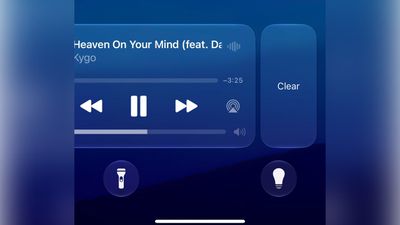
Apple in iOS 27 has made a small but significant change to how the Now Playing widget works on your iPhone's Lock Screen – you can now swipe it away to get rid of it.
lock screen now playing ios 27%402x scaled
Previously, there was no way to dismiss the Now Playing interface on the Lock Screen. But in the first iOS 27 developer build released yesterday, a leftward swipe on the playback controls slides in a Clear button from the right.

Clearing the controls from the screen also removes the smaller Now Playing widget from the Dynamic Island.

It's not quite clear yet how to bring the widgets back immediately – as 9to5Mac notes, the only workaround appears to be pausing whatever's playing, waiting a few minutes, and then resuming it. It also seems to depend on which app you're using for playback. For example, switching from a podcast to video playback re-invokes the Lock Screen widget.


Being able to make the Now Playing widget go away is admittedly a small tweak, but it will be welcomed by anyone who likes to dismiss whatever is taking up space on their Lock Screen, playback controls included. Apple will make iOS 27 available in public beta next month, with a general release expected in the fall.


Related Roundups: iOS 27, iPadOS 27

Popular Stories

Everything New Your iPhone Can Do on iOS 27 Feature 1

30 New Things Your iPhone Can Do in iOS 27

Tuesday August 11, 2026 8:07 am PDT by
Apple will release iOS 27 in September, and despite the company's focus this year on refining its flagship operating system and nixing bugs, there are still many additional features on the way, not least of which is Apple's new context-aware Siri, re-tooled for the generative AI era. This year's major iPhone software update isn't all about AI, though, as the following feature list...

ios 27

iOS 27 Brings These Five New Features to Your iPhone Lock Screen

Thursday July 23, 2026 4:05 am PDT by
Apple unveiled iOS 27 at WWDC this week, and while the headline-grabbing Siri overhaul has received the most attention, the Lock Screen has picked up several refinements that you may have missed. Some are brand-new additions, while others are tweaks to features Apple introduced in iOS 26, but together they give you more control over how your Lock Screen looks and behaves. Here are five...
iOS 27 Feature Dark

Apple Seeds Fourth iOS 27 and iPadOS 27 Betas to Developers

Monday July 20, 2026 10:06 am PDT by
Apple today seeded the fourth betas of iOS 27 and iPadOS 27 to developers for testing purposes, with the update coming two weeks after Apple released the third betas. Registered developers can download the betas from the Settings app on the iPhone or iPad by going to the General section and selecting Software Update. iOS 27 introduces Apple's smarter version of Siri, Siri AI. Siri AI is a ...

Top Rated Comments

b0nd18t Avatar
9 weeks ago
This always bothered tf out of me
Score: 5 Votes (Like | Disagree)
alexandr Avatar
9 weeks ago
Such a tiny thing, but soo welcome.
Score: 4 Votes (Like | Disagree)
9 weeks ago
OMG finally! This is the kind of stuff I'm talking about!

Forget genmoji and all that crap, I'm so glad they are finally paying attention to the things we have to deal with every day!
Score: 4 Votes (Like | Disagree)
9 weeks ago
Much needed. It used to be annoying sometimes. Glad to have this option.
Score: 3 Votes (Like | Disagree)
ItsASpider Avatar
9 weeks ago
Good that they made it possible to dismiss, but it should only be possible if nothing is playing to prevent the shenanigans with "how do you get it back".
Score: 3 Votes (Like | Disagree)
211 Avatar
9 weeks ago
I just tried it, and everything from Music goes away from the lock screen, including album cover. As for it moves to Dynamic Island, it doesn't for me. There isn't a way for me to get Music back on the lock screen, even after closing the app. I now have to unlock and go to the Music app to do anything now. This is probably a bug, so hope it gets fixed in the next update
Score: 2 Votes (Like | Disagree)