Apple today released watchOS 26.5, the fifth major update to the watchOS 26 operating system that came out in September. watchOS 26.5 comes a month and a half after Apple released watchOS 26.4.
watchOS 26.5 can be downloaded for free on an iPhone running iOS 26.5 by opening up the Apple Watch app and going to General > Software Update, or initiating an update in the Settings app on the watch. To install the new software, the Apple Watch needs to have at least 50 percent battery and it needs to be placed on a charger.
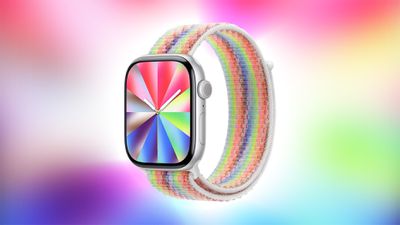
watchOS 26.5 adds a new Pride Luminance watch face. It also fixes a bug with dual SIM iPhones and an issue that could cause audio alerts to fail to play in the Workout app. Apple's release notes for the update are below.
This update includes the following enhancements and bug fixes: - Pride Luminance watch face that dynamically refracts a spectrum of colors, is available to add from the Face Gallery - Fixes an issue where Messages on Apple Watch may use SMS instead of iMessage when paired with a dual SIM iPhone - Fixes an issue where Workout app audio alerts could fail to play if the phone was not nearby Apple Watch For information on the security content of Apple software please visit this website: https://support.apple.com/100100
Thursday September 10, 2026 11:57 am PDT by Juli Clover
Some Apple Watch users who upgrade to the Series 12 or the Ultra 4 might temporarily lose access to hypertension notifications.
On the watchOS feature availability page, Apple says notifications might not be available on the Series 12 or Ultra 4 at launch because regulatory clearances are in process.
Hypertension Notifications may not be available on Apple Watch Series 12 or Ultra 4 in your ...
Wednesday September 9, 2026 12:06 pm PDT by Juli Clover
Apple today seeded the release candidate versions of watchOS 27, visionOS 27, and tvOS 27 to developers and public beta testers. The release candidates are the final versions of the updates that will be seeded to the public as long as no final bugs are found during this last round of testing.
The updates can be installed through the Software Update section in the Settings app on each...
Monday August 31, 2026 10:12 am PDT by Juli Clover
Apple today seeded the eighth beta of watchOS 27 to developers, with the update coming a week after the launch of the seventh beta.
The beta can be downloaded through the Watch app on the iPhone with a free developer account. The Apple Watch will need to be on the charger, connected to Wi-Fi, and have a battery level of 50 percent or above for new software to be installed.
watchOS 27...
I was just thinking this. Out of all my apple devices, my watch is the most disruptive when it comes to updates. Why can’t it just update when I sleep at night? I guess that might threaten the alarm if it doesn’t work… but still… my watch has been off now for an hour… lol
I wear my watch 24/7 except when I shower. Agreed… the preparing stage is really painful.
I basically only use my watch for workout tracking and sleep tracking. I do not wear it outside of those periods.
Why the heck does it insist on wanting to update overnight? While it's tracking my sleep? Damn thing never figures out "hey I'm always charging 6a-9p, I should update sometime around there instead!"
Nah. "Sorry, we were unable to update your watch because you insist on using its features."
I'm on the latest Apple watch, full charge and plenty of free space on the watch, and the Preparing stage is taking Foorreeevveerrr..... I initiated the update from the watch (not the phone). The download didn't take long but the Preparing stage is awful. WTH Apple...
I don't mind doing updates on any of my devices EXCEPT the Apple watch. You have to put it on a charger, the updates take too long. I think Apple could make this process less of a PITA.
Sorry, for the rant, but obviously I have time on my hands while I update my watches. LOL
I was just thinking this. Out of all my apple devices, my watch is the most disruptive when it comes to updates. Why can’t it just update when I sleep at night? I guess that might threaten the alarm if it doesn’t work… but still… my watch has been off now for an hour… lol
I wear my watch 24/7 except when I shower. Agreed… the preparing stage is really painful.
I'm on the latest Apple watch, full charge and plenty of free space on the watch, and the Preparing stage is taking Foorreeevveerrr..... I initiated the update from the watch (not the phone). The download didn't take long but the Preparing stage is awful. WTH Apple...
I don't mind doing updates on any of my devices EXCEPT the Apple watch. You have to put it on a charger, the updates take too long. I think Apple could make this process less of a PITA.
Sorry, for the rant, but obviously I have time on my hands while I update my watches. LOL
Can you kindly remind me once again (I could search old threads but I'm lazy) how to update Watch OS the fast way, that is, via wifi instead of bluetooth?
I believe you just initiate the update, then turn off Bluetooth on your phone if I’m remembering correctly. That forces the watch to go to WiFi and poof, so much faster.