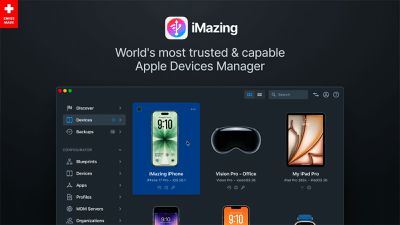
For this week's giveaway, we've teamed up with iMazing to offer MacRumors readers a chance to win one of Apple's new iPhone Air or iPhone 17 Pro models. For those unfamiliar with iMazing, it is Mac and PC software that offers a simple, fast way to manage everything on your iPhone and other Apple products. You can transfer data, make backups, manage media, save content like messages, and more.

Apple has the built-in Finder on the Mac for managing the iPhone, and an app for PCs, but iMazing's tools give you much more control than Apple's native functionality.
Creating and managing backups is easy with iMazing's backup tools. You can set up automatic backups for hassle-free protection, and the app supports snapshots so you can browse through your backups to find something specific that you're looking for. With selective restore, you can bring back just what you need. Backups are encrypted and can be saved to any computer, a local storage setup, or an external drive, and iMazing is ideal for managing multiple Apple devices.
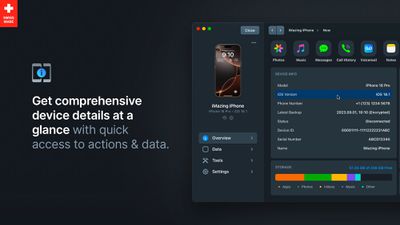
The Device overview provides detailed information on your iPhone in one spot, and it gives you a quick way to access all of iMazing's capabilities. The layout is straightforward and it's easy to find the exact tool that you're looking for. The Device overview lists information like serial number, model number, device ID, and stored data, and there's even a section for battery management that shows details on temperature, max charge, and charge cycles.
iMazing can be used to browse, export, and archive content, so you can transfer photos, music, books, movies and other media and files from your computer to your iPhone and vice versa. It's not limited to the iPhone, either. You can use the data management tools with the iPad, iPod, and Vision Pro, too. iMazing's tools are useful for moving photos from one device to another, or transferring music files without the need for a streaming service. With Quick Transfer, you can even drag and drop files and folders to your iPhone and choose an iOS app to transfer the file to.
Apple has no way to get your messages off of your iPhone, but iMazing can create an entire archive from the Messages app or WhatsApp, and it works for RCS/SMS/MMS messages and iMessages. You can save your messages into a PDF, an Excel document, or use other file formats.

iMazing can be used by businesses for advanced device management too, and it supports bulk provisioning, configuring, and streamlining MDM enrollment for fleets of Apple devices. iMazing was updated to version 3.4 recently, bringing full support for iOS 26, macOS 26, and the iPhone 17 models. There are also new features for both everyday users and IT professionals.

When you import notes, tables, colors, and attachments are included. There's a photo viewer for imported texts from Messages and WhatsApp, and useful filters for Contacts and Books.
Imported call history and voicemail show total duration, which is a useful feature for professionals who log billable calls. There is also support for multi-SIM organization. For businesses, iMazing 3.4 features advanced export filters, developer tools, Configurator updates, and CLI enhancements to streamline automation and fleet management.

iMazing can be downloaded from the iMazing website at prices starting at $30. There are options for personal subscriptions, family subscriptions, and enterprise subscriptions. iMazing also offers free trials, and some functions are free even without a purchase.
iMazing is offering an iPhone 17 Pro or iPhone Air for one lucky MacRumors reader, with the winner to choose their preferred device. To enter to win, use the widget below and enter an email address. Email addresses will be used solely for contact purposes to reach the winner(s) and send the prize(s). You can earn additional entries by subscribing to our weekly newsletter, subscribing to our YouTube channel, following us on Twitter, following us on Instagram, following us on Threads, or visiting the MacRumors Facebook page.
Due to the complexities of international laws regarding giveaways, only U.S. residents who are 18 years or older, UK residents who are 18 years or older, and Canadian residents who have reached the age of majority in their province or territory are eligible to enter. All federal, state, provincial, and/or local taxes, fees, and surcharges are the sole responsibility of the prize winner. To offer feedback or get more information on the giveaway restrictions, please refer to our Site Feedback section, as that is where discussion of the rules will be redirected.
The contest will run from today (October 3) at 9:00 a.m. Pacific Time through 9:00 a.m. Pacific Time on October 10. The winner will be chosen randomly on or shortly after October 10 and will be contacted by email. The winner will have 48 hours to respond and provide a shipping address before a new winner is chosen.