iPadOS 26 to Bring These Mac-Like Features to Your iPad - MacRumors
Skip to Content

iPadOS 26 to Bring These Mac-Like Features to Your iPad

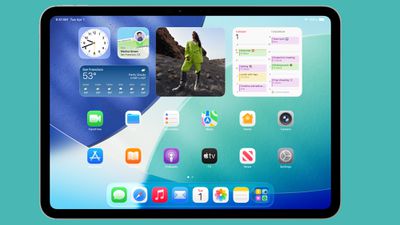
The lines between iPad and Mac have never been blurrier – and with iPadOS 26, currently in beta and expected later this month, Apple is leaning further into that overlap than ever before. The update brings a suite of powerful new features that elevate the iPad's utility, bridging the gap between touch-first tablet and full-fledged desktop machine.
ipados 26 home screen
From enhanced multitasking to advanced file management, iPadOS 26 pushes Apple's tablet deeper into Mac territory, without sacrificing the unique strengths that make the iPad so versatile. Here are just some of the ways iPadOS 26 makes the iPad feel more like a Mac than ever – coming soon to a device near you.

Menu Bar
ipados 26 menu bar
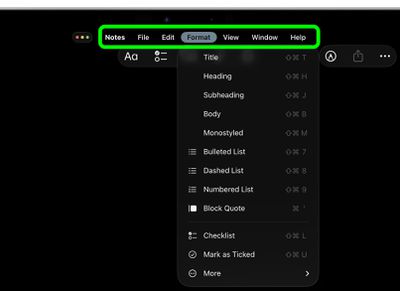
Within any active app, swipe down from the top of the screen and you will see a new, fully functioning macOS-style menu bar. With the foremost dropdown menu being the app's name (where app settings are typically accessed), other standard menus can include File, Edit, Format, View, Window, and Help. As you'd expect, the menu bar is dynamic, and will display menus specific to the app. In Safari you get Bookmarks and History, for instance.

Windowed Apps
iPadOS 26 App Windowing
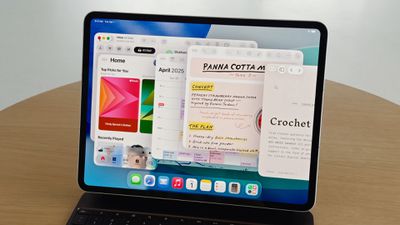
In Settings ➝ Multitasking & Gestures, there's a new Windowed Apps mode that essentially lets you arrange and resize multiple windows in a single space, just like on a Mac. The new mode can also be invoked from Control Center, thanks to a new button that with a long press lets you switch between Windowed Apps and Stage Manager.

You can move multiple app windows and stack them on top of each other by dragging each window from the top, and you can individually resize them by dragging the bottom-right corner. And if you quickly drag an app window to a corner of the screen, it will automatically expand to fill that half of the screen. Tapping a space on the Home Screen will also scatter all open windows to the sides of the screen, giving you space to open other apps.

Traffic Lights
ipados 26 traffic lights
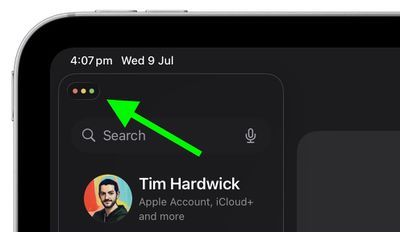
In the top-left corner of every window you'll now see three familiar traffic lights, straight out of macOS. Tapping the symbol expands it into red, amber, and green buttons for closing, minimizing, and expanding the window to fullscreen.
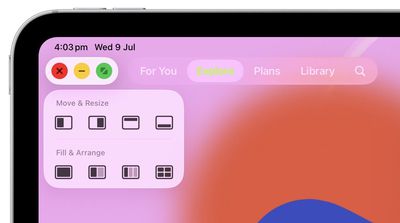
traffic light options ipados
Long-pressing the buttons also reveals the Mac-style Move & Resize and Fill & Arrange options, as well as an option to park the app off-screen to Add a New Window (if the app supports it).

App Exposé
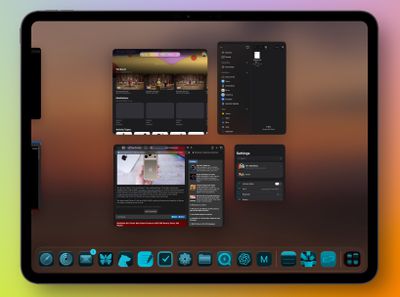
expose ipados
In the new Windowed Apps mode, iPadOS 26 also includes an App Exposé-style view that's similar to the App Switcher. Swipe up from the bottom of the screen to invoke the view, which shows all the open apps in the current space. You can also scroll the new interface to see your other open apps, whether they're sharing spaces or open in full-screen mode.

Preview
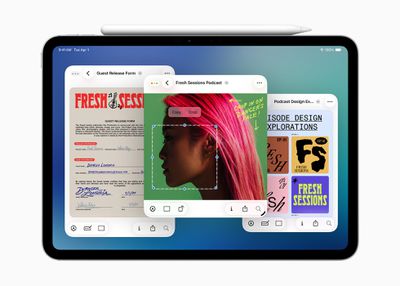
iPadOS 26 Preview App
The iPad finally includes the Mac's long-standing Preview app, only now with Apple Pencil support, enabling you to easily open, edit, and mark up a range of images, documents, and file types. The Preview app's browsing menu is a lot like the Files interface, where you can browse your files and check out recent and shared items. You can also scan documents from right within the app.

Trackpad Pointer
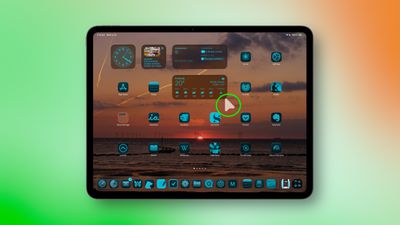
ipados 26 pointer
If you have a Magic Keyboard trackpad or a Bluetooth mouse connected to your iPad, the cursor is now a Mac-like pointer rather than a circle. And if you shake it, the pointer will get bigger so that you can easily locate it on the screen.

Advanced File Management
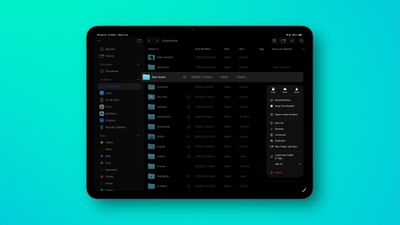
ipados 26 files app
In iPadOS 26, the iPad's Files app is enhanced with a new List view that features resizable columns and collapsible folders, and new filters, allowing users to see more document details at a glance and organize their files. To help you identify folders more easily, the app now supports folder customization with custom colors, icons, and emoji, all of which sync across devices.

In Files, iPadOS 26‌ also allows you to set a default app for opening specific files or file types, thanks to a new Open With... option in the contextual dropdown menu. You can also change the default app in the new Get Info panel.

Folders in Dock
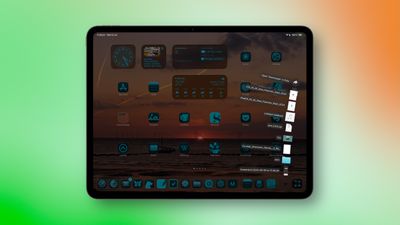
folder dock ipados
In the Files app, long press on a folder and you'll see a new Add to Dock option in the contextual dropdown menu. So you can now park any folder in your Dock, and if you long press on its icon, you'll see Mac-style display options to view the content as a Grid or a Fan, as well as the typical sorting preferences.

In iPadOS 26, you can now fit up to 23 icons in the Dock, so there's nothing stopping you from adding multiple folders. In Settings ➝ Multitasking & Gestures, there's also a new option to Automatically Show and Hide the Dock, just like in macOS.


Popular Stories

apple welcome home event

Apple Product Launch Announced for October 13: 'Welcome Home'

Thursday October 8, 2026 9:04 am PDT by
Apple today announced an upcoming product launch that will take place on Tuesday, October 13. We are expecting Apple's announcement to focus on new smart home products, including the long-rumored smart home hub, a new Apple TV 4K, and a refreshed HomePod mini. Subscribe to the MacRumors YouTube channel for more videos. The home hub is an all-new device that's like a cross between an iPad and...
MacBook Pro Ultra Feature 1

Apple to Launch Touchscreen OLED MacBook Pro and OLED iPad mini on October 27

Thursday October 8, 2026 1:31 pm PDT by
Apple will introduce new OLED touchscreen MacBook Pro models and an OLED iPad mini "on or around" Tuesday, October 27, reports Bloomberg. The launch will also include an M6 14-inch MacBook Pro and an M6 iMac. The October 27 follows Apple's October 13 debut of a new smart home hub, a revamped Apple TV 4K, and a refreshed HomePod mini. Earlier this month, MacRumors reported that Apple would do ...
October 13 Welcome Home Event Image

Apple's October 13 Launch: What's Coming

Thursday October 8, 2026 3:59 pm PDT by
Apple is planning to introduce new products on Tuesday, October 13, Apple marketing chief Greg Joswiak announced today. It won't be a traditional Apple event, but Apple has invited some members of the media to New York City to get some hands-on time with whatever's introduced. Subscribe to the MacRumors YouTube channel for more videos. Those of us not invited to the New York Experience are...

Top Rated Comments

15 months ago

There are software products that are so full-featured that people go oooh and aaah.

Then there is Apple. Take a well established software, strip out of the advanced stuff, and release it. Yes, we have Notes on the iPhone, yes, a Calendar, yes, a Calculator.

And then with each iteration, each new version they add in stuff, and the users go: Oh, that's nice.

Notes got formatting and lists, version...whatever.
Calendar got week numbers, 10 years after launch.
Calculator got scientific mode by using it landscape, iPhoneOS2

All the while they could've just released a full-featured product to start with.

This is Apple TradeMark.
This is Their Way.
If Apple doesn’t significantly update their Apps they get criticized.

If they add a slew of features other software has they get criticized for sherlocking.

Basically people will whine about Apple no matter what they do. It’s the only constant here at MR.
Score: 12 Votes (Like | Disagree)
15 months ago
Might be an unpopular opinion, but I don’t want my iPad to be more like a Mac.
Score: 10 Votes (Like | Disagree)
sledgehammer89 Avatar
15 months ago
This is the correct description, like. I don't need like, I need a Terminal, real Firefox, Chrome, vscode, configurable keyboard shortcuts and so on. I don't need a Mac-like, a looklike. I even start Mac apps in fullscreen on my 27".
Score: 8 Votes (Like | Disagree)
MacCheetah3 Avatar
15 months ago
It’s nice, I guess, for those who want it. For me…. Eh… I’d rather have a MacBook as it would seem you’d need to purchase the Magic Keyboard ('https://www.apple.com/ipad-keyboards/'), etc to make this work fluently anyway.


Can you format a hard drive in the files app?
iPadOS 18 added/includes:


Change the formatting of an external storage device
You can use the Files app to quickly change an external drive to APFS (Apple File System), ExFAT, or MS-DOS (FAT) file formats on iPad models that have a USB-C port.
[LIST=1]
* Go to the Files app on your iPad.
* Tap at the top of the screen.

* Touch and hold the name of the storage device below Locations, then tap Erase.
* Select a format for the device—for example, APFS, ExFAT, or MS-DOS (FAT)—then tap Erase again.

https://support.apple.com/guide/ipad/transfer-files-ipad-a-storage-device-server-ipad8139864c/18.0/ipados/18.0#iPad3e992b0c
Score: 8 Votes (Like | Disagree)
phuklok1 Avatar
15 months ago
not software related but i wish they would keep the usbc port but add the mac magsafe power connector on ipads…at least higher models.

it’s very convenient, more efficient than qi charging (which ipad doesn't have anyway) and saves wear and tear on the single usbc port. my usbc port still works but is definitely looser than it used to be regardless of how careful i am.
Score: 8 Votes (Like | Disagree)
turbineseaplane Avatar
15 months ago
As an iPad mini user, I would like slide over back.
Score: 6 Votes (Like | Disagree)
Latest Stories
New Entry-Level iPad Not Expected Until Early 2027
2 hours ago
Apple Plans Major iPhone Duo Retail Showcase, But Supply Will Be Limited
2 hours ago
Apple TV 4K Getting A19 Chip and a Potentially Easier-to-Find Siri Remote
3 hours ago
New Mac Mini and Mac Studio Receive Up to $200 Price Cuts at Amazon
3 hours ago
Apple HomeView Smart Hub to Ship in Mid-November in Four Colors
3 hours ago
New Apple TV 4K and HomePod Mini to Ship on October 30
4 hours ago
AirPods Max 2 Available for $429 in All Colors on Amazon
4 hours ago
Rumor: Apple to Announce New Partnership With ADT
16 hours ago
AirPods 5 vs. AirPods 5 With Wireless Charging Case Buyer's Guide
1 day ago
Accessory Deals This Weekend: Save on TVs, Headphones, and Smart Home Gear
1 day ago
Apple's All-New Home Hub Will Be Revealed October 13: What to Expect
1 day ago
Apple Announcing HomePod Mini 2 Next Week With These New Features
1 day ago
A New Apple TV 4K is Finally Coming on Tuesday
1 day ago
Top Stories: Apple's 'Welcome Home' Launch on October 13 and More
1 day ago
Apple Stores Will Add Your Name to iPhone Duo's Startup Screen
2 days ago
SpaceX Inches Closer to Becoming a U.S. Carrier
2 days ago
Apple Potentially Behind 'HomeView' Trademark Filed Alongside 'homeOS' Last Year
2 days ago
Mark Your Calendar: Six Important Apple Dates Coming Up This Month
2 days ago
MacRumors Giveaway: Win an Apple Watch Series 12 and a Nylon Band From Southern Straps
2 days ago
First Apple TV 4K Now 'Vintage' Ahead of New Model Coming on Tuesday
2 days ago
The MacRumors Show: Apple's Smart Home Products Are Coming
2 days ago
Apple Shares Fall After News of iPhone 18 Pro Order Cuts
2 days ago
Leak Details iPhone Features for Apple's LG Home Accessories
2 days ago
Prime Day Leftover Deals: AirPods Max 2 for $429, Mac Mini for $779.99, and More
2 days ago
Every M5 MacBook Air Now $200 Off on Amazon
2 days ago
Mac Shipments Fall, But Apple Still Gains Ground in Shrinking Market
2 days ago
Apple Reportedly Cuts iPhone 18 Pro Orders After Price Hike Dampens Demand
2 days ago
Apple Signs Hiring and Licensing Deal With AI Podcast Startup Huxe
2 days ago
Apple's October 13 Launch: What's Coming
3 days ago
Anthropic Says Users Can't Be Needlessly Cruel to Claude
3 days ago