Macintosh HD Gets a New Look in Latest macOS Tahoe Beta
Apple has been updating some classic Mac icons during the macOS Tahoe beta, upsetting some longtime Mac users who prefer the original look. In beta 5, Apple changed the design of the built-in Mac storage icon, which you'll notice if you have it on your desktop.
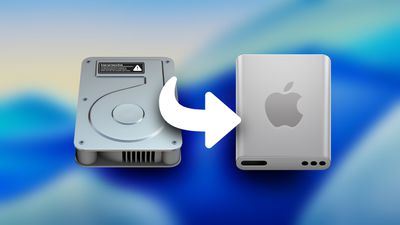
The existing icon still resembled a hard disk drive, but the new icon looks like a modern solid state drive. Apple's Macs stopped using hard disk drives starting more than a decade ago. The low-cost 21.5-inch iMac was the last Mac that had a hard drive component, as it used Apple's SSD + HDD Fusion Drive. All current Macs use SSDs.
If you don't want to see the new icon, you can hide Macintosh HD from view entirely. To do so, open up the Finder app's settings and click the check mark next to "Hard disks."
Apple also updated Disk Utility and the Finder icon in earlier betas. With the Finder icon, Apple initially reversed the color scheme with the light shade on the left and the dark on the right, but the uproar was so significant that Apple had to return it to the classic color arrangement.
Popular Stories
Shortly after the iPhone Duo launched, a few users reported hinge issues that were causing cracks in the inner display. Apple has now responded to the reports in a statement to MacRumors, saying a small number of units are affected.
The response to iPhone Duo from early users has been incredibly positive, and we are seeing exciting things from developers who are rapidly updating their apps...
Apple today announced a new iPad mini with a larger 8.5-inch OLED display, a nano-texture display option, a thinner and lighter design, an A20 Pro chip, a new Acoustic Display audio system that eliminates speaker holes, IP67-rated water and dust resistance, a landscape front camera, Apple's N1 chip with Wi-Fi 7 and Bluetooth 6 support, and more. Altogether, Apple says this amounts to the iPad...
Apple today announced a refreshed 14-inch MacBook Pro featuring the M6 chip, upgraded connectivity specifications, and more.
The M6 chip in the MacBook Pro features a 12-core CPU with 2 super cores, 4 performance cores, and 6 efficiency cores, paired with a 12-core GPU. This is up from the M5 chip with a 10-core CPU with 4 super cores and 6 efficiency cores, paired with a 10-core GPU.
M6...



















































