macOS Tahoe's New Theming System Explained

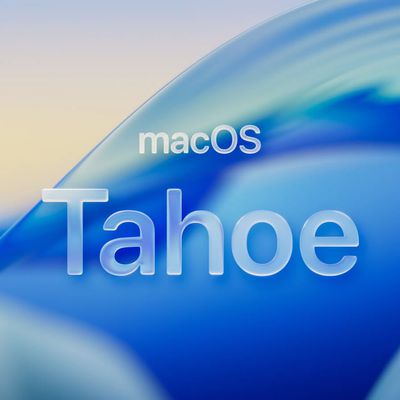
In macOS Tahoe, Apple introduces the concept of Themes, with new appearance settings that go beyond the traditional Light and Dark modes, allowing you to customize the look of your Mac desktop more than ever. Here's what's changed.
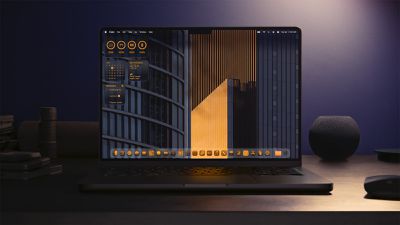
macOS Tahoe Tinted App Icons
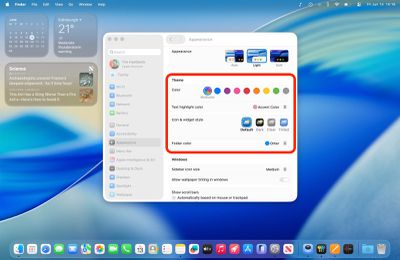
In System Settings ➝ Appearance, there are still the standard Auto, Light, and Dark modes, but Apple has added several options that allow you to really mix things up and create your own stylized desktop environment.
tahoe appearance 1

The new Theme section in Appearance settings

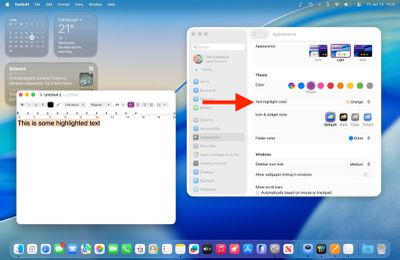
"Accent color" has become "Color," and there's a new "Text highlight color" option, so you can now make highlighted text appear in a different shade to buttons, pop‑up menus, radio buttons, checkboxes, and focused outlines.
text highlight 1

The new Text highlight color option

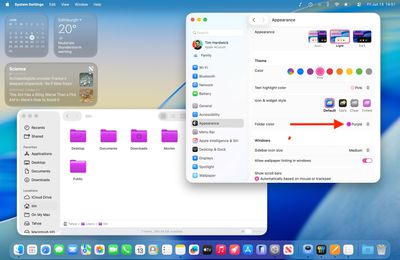
The default setting maintains the classic macOS look with app icons displaying their original colors. But you can now customize folder colors independently through a dedicated new "Folder Color" setting. When set to Automatic, folders retain their traditional blue appearance, but switching to other colors like purple will change all folder colors system-wide.
folder color 1

The new Folder color option

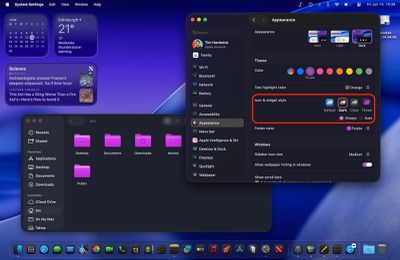
Meanwhile, a new "Icon & widget style" section offers three distinct modes alongside the Default. Like iOS 18, the new Dark option applies black backgrounds to icons throughout the system interface, including System Settings sidebar icons (this works in both Light and Dark modes). You can set this to Always or Automatic, which switches to dark icons at night while maintaining the default appearance during daylight hours.
dark icons widgets macos 1

Dark icon & widget style (shown in Dark mode)

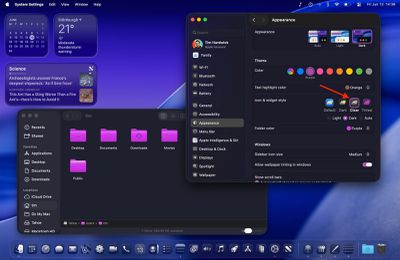
The new Clear setting emphasizes the Liquid Glass redesign and adds a new transparency by picking up background colors, creating a more translucent interface effect. Clear also includes Light and Dark variants, or it can be set to Auto for automatic day-night switching.
clear dark 1

The new Clear icon & widget style (shown in Dark mode)

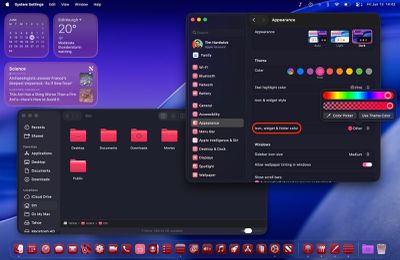
Most notably, the Tinted option allows comprehensive color customization of both icons and folders. With "Tinted" selected, the Folder color setting becomes "Icon, widget & folder color," allowing you to select from preset colors or choose custom tints using the Other option (which includes a color picker and a theme color). Tinted mode can also be configured as Light or Dark for a more subdued appearance or set to Auto for time-based switching.
appearance tint macos 1

The new Tinted icon & widget style (shown in Dark mode)
Overall, the new Theme enhancements ensure "personalization parity" between macOS and iOS. Apple is offering unprecedented control over your desktop's visual appearance, but you still get system-wide consistency across interface elements. For added visual customization, you can even add a symbol or emoji to folders for a unique flair. What do you think of the new Theme options in macOS 26? Let us know in the comments.

Related Roundup: macOS Tahoe 26
Related Forum: macOS Tahoe

Popular Stories

iOS 26

iOS 26.2 Available Next Month With These 8 New Features

Tuesday November 11, 2025 9:48 am PST by
Apple released the first iOS 26.2 beta last week. The upcoming update includes a handful of new features and changes on the iPhone, including a new Liquid Glass slider for the Lock Screen's clock, offline lyrics in Apple Music, and more. In a recent press release, Apple confirmed that iOS 26.2 will be released to all users in December, but it did not provide a specific release date....
AirPods Pro Firmware Feature

Apple Releases New Firmware for AirPods Pro 2, AirPods Pro 3, and AirPods 4

Thursday November 13, 2025 11:35 am PST by
Apple today released new firmware designed for the AirPods Pro 3, the AirPods 4, and the prior-generation AirPods Pro 2. The AirPods Pro 3 firmware is 8B25, while the AirPods Pro 2 and AirPods 4 firmware is 8B21, all up from the prior 8A358 firmware released in October. There's no word on what's include in the updated firmware, but the AirPods Pro 2, AirPods 4 with ANC, and AirPods Pro 3...
m1 chip slide

Five Years of Apple Silicon: M1 to M5 Performance Comparison

Monday November 10, 2025 1:08 pm PST by
Today marks the fifth anniversary of the Apple silicon chip that replaced Intel chips in Apple's Mac lineup. The first Apple silicon chip, the M1, was unveiled on November 10, 2020. The M1 debuted in the MacBook Air, Mac mini, and 13-inch MacBook Pro. The M1 chip was impressive when it launched, featuring the "world's fastest CPU core" and industry-leading performance per watt, and it's only ...
iphone pocket%402x

Apple Debuts iPhone Pocket, a Limited Edition iPod Sock-Style Accessory

Tuesday November 11, 2025 1:23 am PST by
Apple has teamed up with Japanese fashion house ISSEY MIYAKE to launch iPhone Pocket, a 3D-knitted limited edition accessory designed to carry an iPhone, AirPods, and other everyday items. The accessory is like a stretchy pocket, not unlike an iPod Sock, but elongated to form a strap made of a ribbed, elastic textile that fully encloses an iPhone yet allows you to glimpse the display...
homepod mini colors

New HomePod Mini Coming Soon With These Features

Tuesday November 11, 2025 7:30 am PST by
Apple is expected to announce a new HomePod mini imminently, headlining with new chips. Here are all of the new features we're expecting. The second-generation HomePod mini is highly likely to contain a more up-to-date chip for more advanced computational audio and improved responsiveness. The current HomePod mini is equipped with the Apple Watch Series 5's S5 chip from 2019. Apple is likely ...
CarPlay Pinned Messages

iOS 26.2 Adds New CarPlay Setting

Thursday November 13, 2025 6:48 am PST by
iOS 26 extended pinned conversations in the Messages app to CarPlay, for quick access to your most frequent chats. However, some drivers may prefer the classic view with a list of individual conversations only, and Apple now lets users choose. Apple released the second beta of iOS 26.2 this week, and it introduces a new CarPlay setting for turning off pinned conversations in the Messages...
homepod mini thumb feature

New HomePod Mini, Apple TV, and AirTag Were Expected This Year — Where Are They?

Wednesday November 12, 2025 11:42 am PST by
While it was rumored that Apple planned to release new versions of the HomePod mini, Apple TV, and AirTag this year, it is no longer clear if that will still happen. Back in January, Bloomberg's Mark Gurman said Apple planned to release new HomePod mini and Apple TV models "toward the end of the year," while he at one point expected a new AirTag to launch "around the middle of 2025." Yet,...
ios 26 digital id passport wallet

Apple Announces Launch of U.S. Passport Feature in iPhone's Wallet App

Wednesday November 12, 2025 9:15 am PST by
Apple today announced that iPhone users can now create a Digital ID in the Apple Wallet app based on information from their U.S. passport. To create and present a Digital ID based on a U.S. passport, you need: An iPhone 11 or later running iOS 26.1 or later, or an Apple Watch Series 6 or later running watchOS 26.1 or later Face ID or Touch ID and Bluetooth turned on An Apple Account ...
Tesla Charging

Tesla Working to Add Apple CarPlay Support to Vehicles

Thursday November 13, 2025 8:31 am PST by
Tesla is working to add support for Apple CarPlay in its vehicles, Bloomberg's Mark Gurman reports. Tesla vehicles rely on its own infotainment software system, which integrates vehicle functions, navigation, music, web browsing, and more. The automaker has been an outlier in foregoing support for Apple CarPlay, which has otherwise become an industry standard feature, allowing users to...
iphone air thinness

iPhone Air Sales Are So Bad That Apple's Delaying the Next-Generation Version

Monday November 10, 2025 11:41 am PST by
The thin, light iPhone Air sold so poorly that Apple has decided to delay the launch of the next-generation iPhone Air that was scheduled to come out alongside the iPhone 18 Pro, reports The Information. Apple initially planned to release a new iPhone Air in fall 2026, but now that's not going to happen. Since the iPhone Air launched in September, there have been reports of poor sales...

Top Rated Comments

turbineseaplane Avatar
22 weeks ago
Can I get an entire "OS X Lion" theme?

That's what I actually want here.

Score: 37 Votes (Like | Disagree)
ian-mac Avatar
22 weeks ago
Nice to have some customisation, but damn, there are going to be some ugly desktops out there.
Score: 27 Votes (Like | Disagree)
lysingur Avatar
22 weeks ago
I'm not asking much—Is there an option to get this Finder icon back?


Attachment Image
Score: 17 Votes (Like | Disagree)
SRQrws Avatar
22 weeks ago
Not trying to be snarky, but I wish Apple would spend less time on stuff like this and more on fixing buggy OSs. Heck, I still can't get iCloud Drive to reliably sync across all my devices. I prefer wallpaper that doesn't distract me. I use solar gradients on my Macs and on my PC I use a solid color background.
Score: 16 Votes (Like | Disagree)
Oberhorst Avatar
22 weeks ago
What is this? Absolutely awful, who the heck "designed" this?
I hope that's just unfinished beta business. Otherwise ?

Attachment Image
Score: 16 Votes (Like | Disagree)
turbineseaplane Avatar
22 weeks ago


What is this? Absolutely awful, who the heck "designed" this?
I hope that's just unfinished beta business. Otherwise ?
The "everything is enclosed in a capsule" is ridiculous and wastes valuable UI space with unneeded visual clutter.

They have absolutely inept "designers" working on this.
Score: 13 Votes (Like | Disagree)