Apple Explains Why iPad Multitasking Took So Long to Arrive

With iPadOS 26, Apple has introduced a new multitasking UI that allows for several open apps at the same time. You can change the size of ‌iPad‌ app windows, move them on top of each other, and rearrange them as desired, much like on the Mac. In a new interview with Ars Technica, Apple's software chief Craig Federighi has explained why the iPad took so long to gain proper windowed multitasking.
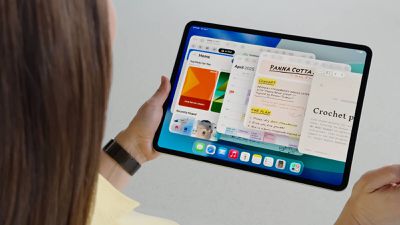
ipados 26 multitasking
The delay apparently stemmed from early hardware limitations. According to Federighi, original iPads lacked the power for true multitasking, and the touch-first interface demanded perfect responsiveness.

"It is a foundational requirement that if you touch the screen and start to move something that it responds," Federighi told Ars. "Otherwise, the entire interaction model is broken – it's a psychic break with your contract with the device."

Early iPads "didn't have the capacity to run an unlimited number of windowed apps with perfect responsiveness," he added. Apps weren't designed for dynamic resizing either.

Stage Manager's troubled 2022 debut brought its own challenges. Apple restricted it to high-end models to ensure consistent eight-app performance, but that inevitably frustrated users with older iPads. However, as iPad Pro hardware became Mac-equivalent in power, technical barriers disappeared. "Over time the iPad's gotten more powerful, the screens have gotten larger, the user base has shifted into a mode where there is a little bit more trackpad and keyboard use in how many people use the device," Federighi told Ars.

"And so the stars kind of aligned to where many of the things that you traditionally do with a Mac were possible to do on an iPad for the first time and still meet iPad's basic contract."

For iPadOS 26, Apple changed its approach. "We decided this time: make everything we can make available, even if it has some nuances on older hardware, because we saw so much demand," Federighi said. While iPadOS 26 allows for multiple app windows, there are limitations on how many apps can be open at once. On older iPads, for example, you're limited to four apps. Newer iPads can have more open app windows.

‌iPad‌ app windows feature the Mac traffic-light controls, and these can be used for resizing and closing apps. ‌iPad‌ apps also have Mac-style menu bars for tweaking settings, and there's a feature for running system-intensive tasks in the background. While the new interface borrows familiar Mac design elements like window controls and colors, there are key differences. Background processing remains restricted to finite tasks like file transfers rather than continuous system agents, for example.

"We've looked and said, as [the iPad and Mac] come together, where on the iPad the Mac idiom for doing something, like where we put the window close controls and maximize controls, what color are they – we've said why not, where it makes sense, use a converged design for those things so it's familiar and comfortable," Federighi told Ars. "But where it doesn't make sense, iPad's gonna be iPad."

Stage Manager survives as an optional mode alongside the new windowed system, giving users multiple multitasking approaches. iPadOS 26 also preserves the traditional single-app interface for users who prefer the iPad's original simplicity.

The changes are Apple's biggest step yet toward treating the iPad as a legitimate laptop replacement, particularly for the base $349 model that stands to gain the most from enhanced multitasking capabilities. iPadOS 26 is currently in developer beta, with a public beta arriving next month and a general release expected in the fall. What do you think of the multitasking changes Apple has introduced? Lets us know in the comments.


Popular Stories

M3 iPad Air

Apple's Next Two Products Are Coming Soon

Thursday February 12, 2026 11:17 am PST by
Apple plans to release an iPhone 17e and an iPad Air with an M4 chip "in the coming weeks," according to the latest word from Bloomberg's Mark Gurman. "Apple retail employees say that inventory of the iPhone 16e has basically dried out and the iPad Air is seeing shortages as well," said Gurman. "I've been expecting new versions of both (iPhone 17e and M4 iPad Air) in the coming weeks."...
Apple Sales Coach App

Apple Launching New 'Sales Coach' App

Friday February 13, 2026 2:01 pm PST by
Apple plans to launch a rebranded "Sales Coach" app on the iPhone and iPad later this month, according to a source familiar with the matter. "Sales Coach" will arrive as an update to Apple's existing "SEED" app, and it will continue to provide sales tips and training resources to Apple Store and Apple Authorized Reseller employees around the world. For example, there are articles and videos...
m5 macbook pro deal

Why You Shouldn't Buy the Next MacBook Pro

Tuesday February 10, 2026 4:27 pm PST by
Apple is planning to launch new MacBook Pro models as soon as early March, but if you can, this is one generation you should skip because there's something much better in the works. We're waiting on 14-inch and 16-inch MacBook Pro models with M5 Pro and M5 Max chips, with few changes other than the processor upgrade. There won't be any tweaks to the design or the display, but later this...
Coffee Burgundy and Purple iPhone 18 Pro Mock

Five iPhone 18 Pro Features Revealed in New Report

Friday February 13, 2026 8:43 am PST by
While the iPhone 18 Pro and iPhone 18 Pro Max are still seven months away, an analyst has revealed five new features the devices will allegedly have. Rumored color options for the iPhone 18 Pro models In a research note with investment firm GF Securities on Thursday, analyst Jeff Pu outlined the following upgrades for the iPhone 18 Pro models: Smaller Dynamic Island: It has been rumored...
iOS 26

Apple Releases iOS 26.3 and iPadOS 26.3

Wednesday February 11, 2026 10:07 am PST by
Apple today released iOS 26.3 and iPadOS 26.3, the latest updates to the iOS 26 and iPadOS 26 operating systems that came out in September. The new software comes almost two months after Apple released iOS 26.2 and iPadOS 26.2. The new software can be downloaded on eligible iPhones and iPads over-the-air by going to Settings > General > Software Update. According to Apple's release notes, ...

Top Rated Comments

winxmac Avatar
9 months ago
What was their reasoning to only introducing a Calculator app on the iPad 14 years later?
Score: 41 Votes (Like | Disagree)
sunapple Avatar
9 months ago

What was their reasoning to only introducing a Calculator app on the iPad 14 years later?
According to Federighi previous iPads did not have the capacity for handling numbers above 100, so they decided not to do a calculator.
Score: 36 Votes (Like | Disagree)
DHagan4755 Avatar
9 months ago
I heard his response to this in another interview & I understand Craig's answer — but it sounds like a typical politician.
Score: 23 Votes (Like | Disagree)
9 months ago
Apple once said in a keynote about MS and the Surface that they were confused, by turning tablets into PCs and PCs into tablets. Is Apple confused now or Microsoft was right all along? ?

Score: 18 Votes (Like | Disagree)
DMG35 Avatar
9 months ago
Better late than never.

Score: 17 Votes (Like | Disagree)
cesar527 Avatar
9 months ago

I'm surprised they kept stage manager around. That's probably less used than Rosetta2, and they have no problems killing that.
they should really kill stage manager. I tried to use once and terrible experience.
Score: 17 Votes (Like | Disagree)