macOS Tahoe Transforms Launchpad Into App Library - MacRumors
Skip to Content

macOS Tahoe Transforms Launchpad Into App Library

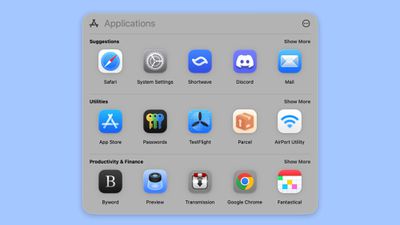
macOS Tahoe does away with the Launchpad feature that's designed to show you all of the apps on your Mac, instead replacing it with a new "Applications" interface that's similar to the App Library on the iPhone and iPad.
macos tahoe app list
The Applications interface organizes apps by category, like Utilities, Productivity and Finance, Social, Creativity, Information and Reading, Entertainment, and Other. There's also a Suggested section at the top of the interface.

The Launchpad replacement appears to be part of Apple's big Spotlight overhaul, and it can also be used to access Actions, Files, and Clipboard, with quick access keyboard shortcuts. Apple calls these "Browse Modes."

  • Command + 1 opens up Applications.
  • Command + 2 opens Files.
  • Command + 3 opens Actions.
  • Command + 4 opens Clipboard.

Actions are what you can do from the new version of Spotlight, and there are options ranging from sending a message to starting a timer. Clipboard brings up your clipboard history, including images you've copied and things you've pasted.

By default, the Applications interface shows your apps in a tiled view organized by category, but there are other options. You can choose a list view that's either organized by category or by app name, or you can use the alphabetical option in a tiled view.

‌macOS Tahoe‌ and the revamped Applications interface that replaces Launchpad is only available to developers right now. Apple plans to make a public beta available in July, with a launch to follow in September.


Related Roundup: macOS Tahoe
Related Forum: macOS Tahoe

Popular Stories

macOS Tahoe 26 Feature

Apple Releases macOS Tahoe 26.6.1 With Security Fixes

Thursday August 6, 2026 10:34 am PDT by
Apple today released macOS Tahoe 26.6.1, an update to the macOS Tahoe operating system that came out last year. macOS Tahoe 26.6.1 comes a little over a week after Apple released macOS Tahoe 26.6. Mac owners can download the software by opening the System Settings app and then navigating to the Software Updates section. According to Apple's security support document, macOS Tahoe 26.6.1...


macOS Tahoe 26 Feature

Apple Releases macOS Tahoe 26.6.2 Beta With Security Fixes

Monday August 10, 2026 10:27 am PDT by
Apple today released a new beta of macOS Tahoe 26.6.2, which is available to developers and public beta testers. The macOS Tahoe 26.6.2 beta comes just a few days after Apple released macOS Tahoe 26.6.1, a security update. Developers and public beta testers can download the software by opening the System Settings app and then navigating to the Software Updates section. According to...
apple lock security bug vulnerability fix privacy

iOS 26.6.1 and macOS Tahoe 26.6.2 Fix Nearly 30 Security Vulnerabilities

Monday August 17, 2026 12:11 pm PDT by
The iOS 26.6.1, iPadOS 26.6.1, and macOS Tahoe 26.6.2 updates Apple released today fix almost 30 security vulnerabilities, according to Apple's security support document. This is Apple's third security release in three weeks as AI surfaces bugs faster than the company's typical release schedule can absorb. Apple says the software includes security fixes that were previously added to the iOS...

Top Rated Comments

Kylo83 Avatar
16 months ago
This sucks, I use it all the time, I want to see all apps in one place, this is a step back
Score: 52 Votes (Like | Disagree)
AppleTO Avatar
16 months ago
Oh really? Launchpad is how I launch almost all my apps. I prefer it and use a minimal dock. Not sure how I feel about this one.
Score: 40 Votes (Like | Disagree)
16 months ago
So is it now a …..Start menu?
Score: 36 Votes (Like | Disagree)
16 months ago
This is very annoying for me because I basically use the LaunchPad like I use my Home Screen on iOS and leave the desktop screen blank.

On the LaunchPad, I have my apps in different folders and designed my own folder name and categories. So I would hate if the new categories are based on what Apple or the developer labels them.
Score: 28 Votes (Like | Disagree)
16 months ago
why the **** would they remove launchpad ? they could leave it as it and add app library as a bonus. this sucks
Score: 27 Votes (Like | Disagree)
Kylo83 Avatar
16 months ago
I use launchpad all the time to check what app I wanna click
Score: 24 Votes (Like | Disagree)