

iOS 26 Adds All-New 'Clear Look' Option Alongside Light and Dark Mode - MacRumors
Skip to Content

iOS 26 Adds All-New 'Clear Look' Option Alongside Light and Dark Mode

Apple in iOS 26 has introduced a third display appearance option called "Clear Look," expanding beyond the traditional Light and Dark Mode choices that have defined the iPhone experience in recent iOS versions.
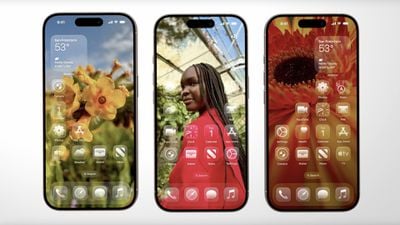
ios 26 clear look
The new mode leverages Apple's "Liquid Glass" design language, unveiled as part of the company's broadest new software redesign since iOS 7. Clear Look transforms app icons using multiple layers of translucent material that dynamically responds to content and context.

Unlike Light and Dark modes, Clear Look creates a more transparent aesthetic that allows underlying content to show through interface elements. The mode works in conjunction with Apple's new universal design system, which aims to create consistency across all Apple platforms "while maintaining each device's unique characteristics," according to the company.

App icons have been redesigned to support the new appearance option, featuring the same Liquid Glass material that adapts intelligently between different lighting environments. The mode extends beyond icons to widgets and other interface elements, offering users an entirely new way to customize their iPhone's visual appearance.

The feature will be available when iOS 26 launches this fall. In the meantime, developers can grab the iOS 26 beta now, while public beta testers can get their hands on the new software from next month.


Related Roundups: iOS 26, iPadOS 26
Related Forum: iOS 26

Popular Stories

iOS 26

Apple Seeds First iOS 26.6 and iPadOS 26.6 Betas to Developers

Tuesday May 26, 2026 10:07 am PDT by
Apple today seeded the first betas of upcoming iOS 26.6 and iPadOS 26.6 updates to developers for testing purposes, with the software coming two weeks after Apple released iOS 26.5 and iPadOS 26.5. Registered developers can download the betas from the Settings app on the iPhone or iPad by going to the General section and selecting Software Update. With the debut of iOS 27 approaching in...
iOS 26

iOS 26.5.1 Update for iPhones is Coming Soon

Friday May 22, 2026 9:23 am PDT by
Apple's software engineers are testing iOS 26.5.1, according to the MacRumors visitor logs, which have been a reliable indicator of upcoming iOS versions. iOS 26.5.1 will almost certainly be a minor update that fixes bugs and/or security vulnerabilities, and it will likely be released by the end of next week. The logs show that Apple has ramped up testing of iOS 26.6 as well, with a first ...
iOS 26

Apple Releases iOS 26.5.1 to Fix Charging Issue on iPhone Air and iPhone 17 Models

Monday June 1, 2026 10:23 am PDT by
Apple today released iOS 26.5.1, a minor update to iOS 26. The software is available three weeks after iOS 26.5 came out, and appears to only be available for the iPhone Air and all models in the iPhone 17 lineup. The new software can be downloaded on eligible iPhones over-the-air by going to Settings > General > Software Update. According to Apple's release notes, the update fixes a previ...

Top Rated Comments

jz0309 Avatar
13 months ago
that looks pretty horrible to me ... but, if you like it, all the power to you
Score: 36 Votes (Like | Disagree)

13 months ago
What is going on at Apple?


Attachment Image
Score: 33 Votes (Like | Disagree)
That70sGAdawg Avatar
13 months ago
Clear mode looks downright stupid. I would think almost everyone identifies their icons quickly by color.
Score: 31 Votes (Like | Disagree)
13 months ago
From a usability standpoint it’s terrible. People subconsciously automatically aim for a colour they associate with the app without actually looking at the icon, if they are all the same colour it makes that impossible.
Score: 20 Votes (Like | Disagree)
canadianreader Avatar
13 months ago
The new iOS design looks better than I expected except this Clear Look it's awful
Score: 17 Votes (Like | Disagree)
13 months ago
dark mode looks terrible tbh. needs more work.
Score: 17 Votes (Like | Disagree)










































