watchOS 11.2 Lets You Pause iPhone Video With Camera Remote App
In watchOS 11.2, Apple has added a useful new feature that's designed to allow you to pause video that you're recording on the iPhone using the Camera Remote app on the Apple Watch.
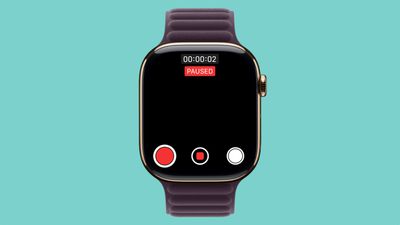
The Camera Remote app has been available since the Apple Watch initially launched, and while there was an option to start and stop video recording, there wasn't an option to pause video and restart it. When a video recording is in progress, there is now a pause button on the left side of the Camera Remote interface. Tapping it pauses a video, and then tapping the red record button restarts the video.
Apple initially added a feature for pausing video recordings with the iPhone Camera app in iOS 18, and the watchOS 11.2 update expands that same functionality to the Apple Watch's Camera Remote app.
Other new additions in watchOS 11.2 include expanded support for tidal conditions and coastal locations in the Tides app in China. watchOS 11.2 will see a release alongside iOS 18.2 next Monday.
Popular Stories
Apple today seeded the fifth beta of watchOS 27 to developers, with the update coming two weeks after the launch of the fourth beta.
The beta can be downloaded through the Watch app on the iPhone with a free developer account. The Apple Watch will need to be on the charger, connected to Wi-Fi, and have a battery level of 50 percent or above for new software to be installed. The beta is...
Apple today released the third public betas of tvOS 27 and watchOS 27, giving Apple TV and Apple Watch users a chance to try the new software ahead of its fall launch. There's also a new HomePod Software 27 beta for the HomePod and HomePod mini.
You can sign up for Apple's public beta testing program on the beta website, and then download the updates through the Settings app on each device.
...
Apple today seeded the sixth beta of watchOS 27 to developers, with the update coming a week after the launch of the fifth beta.
The beta can be downloaded through the Watch app on the iPhone with a free developer account. The Apple Watch will need to be on the charger, connected to Wi-Fi, and have a battery level of 50 percent or above for new software to be installed. The beta is available ...