

Final Cut Pro Gets Major Update With New Camera App - MacRumors
Skip to Content

Final Cut Pro Gets Major Update With New Camera App

Apple today released Final Cut Pro 2 for the iPad and Final Cut Pro 10.8 for the Mac, two Final Cut Pro updates that it first announced back in May.
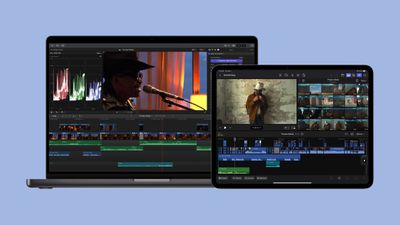
final cut pro ipad
Final Cut Pro for ‌iPad‌ has been updated with new capabilities that are designed for the M4 iPad Pro models that came out earlier this year.

Live Multicam lets users capture up to four different angles of a single scene using connected iPhones and iPads. To make this feature work, Apple has created a Final Cut Camera app that captures video from each of the devices and feeds it into Final Cut Pro.

Users can get a director's view of each connected camera in real time, and the settings can be adjusted from the Final Cut Pro app. There are options for tweaking exposure, focus, white balance, ISO, shutter speed, and zoom to get the perfect shots. Preview clips are passed through to Final Cut Pro and then replaced with full-resolution files so users can quickly move from production to editing.

Final Cut Camera is available as a standalone app as of today and in addition to feeding footage to Final Cut Pro, it can be used as a video capture app for recording video with precise manual controls.

final cut camera
The updated Final Cut Pro for ‌iPad‌ app supports external projects, so users can create or open projects on an external device and import media without taking up ‌iPad‌ storage space. Apple added additional customization options to Final Cut Pro, including 12 color-grading presets, eight basic text titles, 20 soundtracks, and new dynamic backgrounds.

With the M4 chip, final rendering with Final Cut Pro is up to 2x faster, and it supports up to 4x more streams of ProRes RAW than the M1 chip. Final Cut for ‌iPad‌ works with the Apple Pencil Pro, adding support for barrel roll and squeeze, improving access to and control over tools.

As for Final Cut Pro for the Mac, it includes Enhance Light and Color, an AI feature that improves color, color balance, contrast, and brightness in one step. Smooth Slo-Mo, another new feature, blends frames of video intelligently to provide higher-quality movement.

Final Cut Pro for ‌iPad‌ 2 is available as a free update for existing users, with new users able to purchase it for $4.99 per month or $49 per year. Final Cut Pro for Mac 10.8 is also available as a free update for existing users, with new users able to purchase the software for $299.99. Apple has also released new versions of Compressor and Motion.


Popular Stories

Apple Event Logo

Apple to Launch These 15+ New Products Later This Year

Friday March 27, 2026 2:03 pm PDT by
March has been an incredibly busy month for Apple, with the company unveiling more than 10 new products and accessories. We said hello to the MacBook Neo at the start of the month, and we bid farewell to the Mac Pro at the end of it. Nevertheless, there is still a lot more to come this year. Beyond the usual annual updates to iPhones and Apple Watches, Apple's all-new smart home hub is...

iOS 26

iOS 26.4 Adds Two New Features to CarPlay

Tuesday March 24, 2026 1:55 pm PDT by
iOS 26.4 was released today, and it includes a couple of new features for CarPlay: an Ambient Music widget and support for voice-based chatbot apps. To update your iPhone 11 or newer to iOS 26.4, open the Settings app and tap on General → Software Update. CarPlay will automatically offer the new features so long as the iPhone connected to your vehicle is running iOS 26.4 or later....
Mac Pro Feature Teal

Apple Confirms Mac Pro Is Dead, No Future Models Planned

Thursday March 26, 2026 2:04 pm PDT by
Apple has discontinued the Mac Pro and has removed the machine from its website, reports 9to5Mac. Apple said it does not plan to design a new version of the Mac Pro, and no new model will be coming in the future. The Mac Pro was last updated in 2023, which was when Apple added an M2 Ultra Apple silicon chip, but the chassis has not been refreshed since 2019. Apple redesigned the Mac Pro to...

Top Rated Comments

spaxxedout Avatar
23 months ago
Link to camera app:

https://apps.apple.com/app/id6469552837
Score: 17 Votes (Like | Disagree)
NT1440 Avatar
23 months ago

I’m also more curious who has four devices to use for Final Cut camera. I have my iPhone and that’s it. Do people use four iPads or iPhones?
You usually have more than one camera involved if you're filming something professionally.
Score: 13 Votes (Like | Disagree)
23 months ago

Final Cut Pro for Mac update super disappointing. Competitors are starting to run circles around it. It honestly needs a major overhaul at this point.

I was a die-hard Final Cut user for 17 years, and finally had to shift my primary workflow to Davinci Resolve.
Why? FCP still is the fastest for EDITING around. I love DaVinci but the editing is just as old and busted as Avid, Premiere, etc.

Does Apple need role-based mixing, AI transcription, etc. Sure. But again it's the most solid and fastest editing you'll find.
Score: 11 Votes (Like | Disagree)
spaxxedout Avatar
23 months ago

I don't see Final Cut Camera on the App Store
I had to go to another Apple app and tap 'Apple' to navigate to their developer page.

It's everything the iPhone camera app should be. Well done.
Score: 8 Votes (Like | Disagree)
RowellE Avatar
23 months ago
I’d be so upset if FCP for Mac goes the subscription model route.
Score: 7 Votes (Like | Disagree)
MacFan782040 Avatar
23 months ago

I’ve never tried it, but I have used iMovie extensively, and tried DaVinci Resolve and CapCut (all as a hobbyist). Is there no argument left for learning Final Cut? CapCut seems especially powerful for the effort and learning curve, but I feel a little funny bending the knee to our TikTok overlords.
The saddest thing about this is FCP used to be the gold standard. Apple slowly stopped caring, and it's fallen from the top. Which is mind boggling given how much user-created video has exploded in recent years and their focus on iPhone cameras and videos. It's like they're simultaneously going in opposite directions.
Score: 6 Votes (Like | Disagree)









































