iOS 17.4 Lets You See Your iPhone 15 Battery Health at a Glance
With iOS 17.4, Apple is tweaking how battery health is reported to iPhone 15 users, making it easier for them to understand their battery status at a glance.
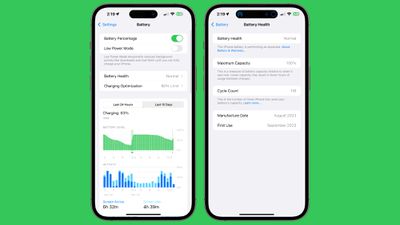
In the Battery section of the Settings app, the Battery Health listing now has a readout such as "Normal" that is accessible without tapping in to the prior "Battery Health & Charging" section.
If you tap on the battery health readout on an iPhone 15, the battery cycle count, manufacture date, and first use will be listed. This information was previously hidden in the General > About section of the Settings app.
The Charging Optimization section continues to provide the same settings. Optimized Battery Charging preserves battery health by learning usage habits and limiting the amount of time that the battery sits at a 100 percent charge. There is also an option to limit charging to 80 percent to further preserve health, and a toggle for turning off optimized charging all together.
Note that these changes are limited to the iPhone 15, iPhone 15 Plus, iPhone 15 Pro, and iPhone 15 Pro Max. Battery settings have not changed on older iPhone models.
Popular Stories
Some Apple retail employees have been told to warn customers against visiting to purchase an iPhone Duo without a pre-order on Friday, October 23.
Apple Store employees told MacRumors that they have been advised that there will likely be no iPhone Duo stock available for walk-in purchases on launch day. Staff have been instructed to discourage customers without pre-orders from coming in...
Verizon plans to charge customers $10 per month for the iPhone Handoff feature that Apple added in iOS 27. iPhone Handoff allows one phone number to be shared across two separate iPhones.
Pricing was included in Verizon's iPhone Duo announcement today, with the carrier confirming iPhone Handoff will work with the iPhone Duo and the iPhone 18 Pro models.
Verizon will support iPhone Handoff,...
Despite knowing that the iPhone Duo would face "severe supply constraints" due to manufacturing challenges, Apple chose to begin iPhone Duo pre-orders on Friday instead of waiting until it had more inventory ready, according to Bloomberg's Mark Gurman. In his Power On newsletter today, he called this decision a "major mistake."
"Let me cut to the chase: Apple made a major mistake here," he...