iPhone 15 Pro Action Button Options Potentially Revealed in iOS 17 Code: Flashlight, Shortcuts, Voice Memos, and More - MacRumors
Skip to Content

iPhone 15 Pro Action Button Options Potentially Revealed in iOS 17 Code: Flashlight, Shortcuts, Voice Memos, and More

Apple released the fourth beta of iOS 17 to developers yesterday, and among the changes in the latest beta are some new code snippets that potentially hint at functionality for the rumored Action button on the upcoming iPhone 15 Pro and iPhone 15 Pro Max.
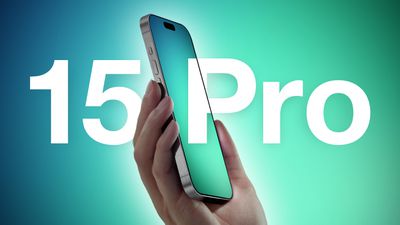
iPhone 15 Pro Two Volume Buttons and Titanium Feature Blue Green
The Action button, which could be similar to the Apple Watch Ultra's Action button but with more phone-focused options, is expected to be a new physical button on the next-generation Pro iPhone models that replaces the Ring/Silent switch. The Action button would allow users to quickly access various functions and settings without necessarily unlocking the device or navigating to an app.

According to the code found in iOS 17 beta 4, the Action button could have nine different options that users can customize and assign to different actions. While the code only lists feature names related to the Action button, we can infer what most of them will be able to do:

  • Accessibility: This option would presumably let users access various accessibility features, such as VoiceOver, Zoom, AssistiveTouch, and more.
  • Shortcuts: As on the Apple Watch Ultra, this option would let users run any shortcut they have created or downloaded from the Shortcuts app, such as sending a message, playing a playlist, or controlling smart home devices.
  • Silent Mode: Similar to how the switch works on current iPhone models, this option would let users toggle silent mode on or off, which would mute or unmute the ringer and alerts.
  • Camera: This option would likely let users launch the Camera app and/or take a photo or video with a single press of the Action button.
  • Flashlight: This option would let users turn on or off the flashlight on the back of the device.

  • Focus: This option should let users activate or deactivate a Focus mode.
  • Magnifier: This option would presumably let users activate the Magnifier app to use the iPhone's camera as a magnifying glass to zoom in on small text or objects.
  • Translate: This option could let users launch the Translate app and start a conversation or text translation with a single press of the Action button.
  • Voice Memos: This option would let users start or stop recording a voice memo with the Voice Memos app.

Apple has not yet unveiled the iPhone 15 Pro, but an announcement and launch are expected in the usual September timeframe. If the rumors are correct, the Action button could be one of the key new features that makes the iPhone 15 Pro stand out from its predecessors.

Popular Stories

iphone 16 teal

'Siri AI' Lawsuit Update: Apple to Pay Owners of These iPhone Models

Thursday July 9, 2026 7:08 am PDT by
In May, Apple agreed to pay $250 million to settle a U.S. class action lawsuit over Siri AI's delayed launch, and eligible iPhone users could receive up to a $95 payout. This week, the California court overseeing the case held a hearing regarding preliminary approval of the settlement, but the judge has not yet issued a ruling. It will likely be at least a few more months before eligible...
Apple TV Thumb 3

Everything Coming in the 2026 Apple TV 4K

Wednesday July 8, 2026 4:51 pm PDT by
The Apple TV 4K hasn't been updated since 2022, and it's due for a refresh. An update is planned for 2026, but Apple is likely going to wait to launch it after Siri AI launches in iOS 27. Design Apple TV design updates don't happen often, and that's not changing. The next Apple TV is going to have the same squircle shape as the current model, and it'll continue to be made from a black...
apple wallet drivers license feature iPhone 15 pro

Apple Says iPhone Driver's Licenses Will Expand to These 6 U.S. States

Thursday July 9, 2026 7:29 am PDT by
In select U.S. states, residents can add their driver's license or state ID to the Apple Wallet app on the iPhone and Apple Watch, and then use it to display proof of identity or age at select airports and businesses, and in select apps. To set up the feature, open the Wallet app on the iPhone and tap on the plus sign in the top-right corner. Next, tap on Driver's License and ID Cards,...

Top Rated Comments

contacos Avatar
39 months ago
Can you remove the camera and flashlight button on the lockscreen then? We really don’t need 100 ways to open them
Score: 40 Votes (Like | Disagree)
TheYayAreaLiving 🎗️ Avatar
39 months ago
I don't really use the Action Button on my Apple Watch Ultra. Do you?
I'm going to miss the classic Mute Switch which only had one job to do! Some things are great being left alone. Furthermore, less is more.

Score: 31 Votes (Like | Disagree)
jarman92 Avatar
39 months ago

I don't really use the Action Button on my Apple Watch Ultra. Do you?
I'm going to miss the classic Mute Switch which only had one job to do! Some things are great being left alone. Furthermore, less is more.


I somewhat agree, but I’m coming around to the idea of the Action Button. I like the mute switch but my phone is on silent 99.9% of the time, so the switch is pretty much useless now.
Score: 27 Votes (Like | Disagree)
39 months ago
I’d leave it on silent mode. Just me.
Score: 26 Votes (Like | Disagree)
39 months ago
please tell me the action button being able to be used as the flashlight button will FINALLY mean we have the option to remove the flashlight button on the lock screen. (I accidentally push it ALL THE TIME)
Score: 25 Votes (Like | Disagree)
mjschabow Avatar
39 months ago
Assuming 90% of us will use it to launch the camera. It's one of my favorite Samsung features coming to iOS.
Score: 21 Votes (Like | Disagree)