Microsoft Announces iMessage Support on Windows With Several Limitations
Microsoft today announced that it is adding iPhone support to its Phone Link app on Windows 11. The app allows iPhone users to make and receive phone calls, send and receive text messages, and view an iPhone's notifications directly on a PC.
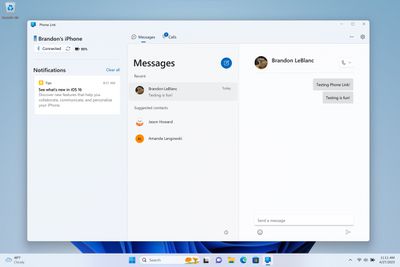
Notably, the app brings limited iMessage functionality to Windows. After pairing an iPhone with a PC via Bluetooth and granting some permissions on the iPhone, users can send and receive iMessages and SMS text messages in Phone Link, but there is no support for group chats or sending photos and videos.
As noted by The Verge's Tom Warren, Phone Link also lacks full message history for conversations and displays all sent and received messages as gray bubbles, meaning iMessages and SMS text messages cannot be differentiated.
Microsoft says iPhone support in Phone Link will be available in preview starting this week for a "small percentage" of Windows Insider members enrolled in the Dev, Beta, or Release Preview channels. The preview will be expanded "over time."
Popular Stories
Microsoft today announced launch timing and pricing for the Surface Laptop Ultra that it unveiled earlier this year.
The 15-inch Surface Laptop Ultra is priced starting at $2,599, undercutting Apple's $2,999 16-inch MacBook Pro, and it targets the same creator and developer market. Microsoft says it is built for "demanding creative, software development, AI, engineering, and 3D workloads."
...
Apple faces Russian data retention and disclosure requirements after being added to the country's state surveillance registry, Bloomberg reports.
Russia's communications regulator, Roskomnadzor, listed Apple and Microsoft on October 2 as "organizers of information dissemination," a classification that carries obligations to preserve communications and make data available to Russian security...
In a memo shared with Apple Stores and Apple Authorized Service Providers this week, and later obtained by MacRumors, Apple provided technicians with guidance on how to diagnose and address the iPhone Duo's inner display cracking issue.
If a customer reports the issue, Apple advised technicians to inspect the iPhone Duo and repair or replace it in accordance with their standard procedures....