Apple Releases Another Rapid Security Response Update for iOS 16.2 Beta Users
Apple today released a Rapid Security Response update that is available for those running the iOS 16.2 beta, marking the launch of the second RSR update since the feature was released in iOS 16.
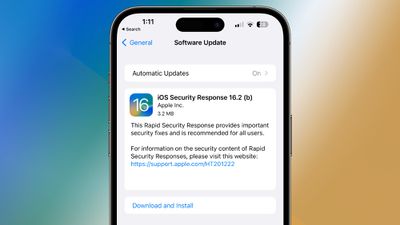
The Rapid Security Response Update is designed to provide iOS 16.2 beta users with bug fixes without the need to install a full update. The initial RSR release for iOS 16.2 beta users was a test with no actual bug fixes, and given the size of this update, it too is likely for testing the RSR system.
iOS Security Response 16.2 (b) is available through the standard Software Update mechanism in the Settings app, but is a quick update, requiring just a couple of minutes to download the update and then a quick restart for the install process.
Once the Rapid Security Response update is installed, iOS 16.2 users will see an updated version of iOS 16.2 (b), and tapping on the version in the About section of Settings will display information about the installed iOS version and the Rapid Security Response update. Those who want to disable Rapid Security Response updates can do so by following our how to.
Popular Stories
In a memo shared with Apple Stores and Apple Authorized Service Providers this week, and later obtained by MacRumors, Apple provided technicians with guidance on how to diagnose and address the iPhone Duo's inner display cracking issue.
If a customer reports the issue, Apple advised technicians to inspect the iPhone Duo and repair or replace it in accordance with their standard procedures....
Apple is releasing five new products this Friday, November 6, following pre-orders that opened last week, including its first touchscreen MacBook Pro models.
The following new products will be available from Friday:
iPad mini with OLED display and A20 Pro chip
iMac with M6 chip
14-inch MacBook Pro with M6 chip
14-inch MacBook Pro with OLED touchscreen
16-inch MacBook Pro with OLED...
Apple released iOS 27.2 on October 26, bringing enhancements to Siri AI, adding Suggestions in Messages, and sneaking in a string of smaller additions across Photos, Podcasts, Games, Apple TV, and FaceTime.
iOS 27.2 is available to download to your device now via Settings ➝ General ➝ Software Update. Note that some features may not be available in all regions or on all iPhone models....


















































