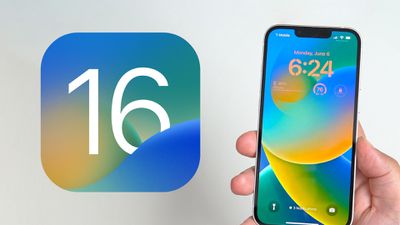
Apple today released iOS 16, the newest operating system designed for the iPhone. As with all of Apple's software updates, iOS 16 can be downloaded for free. iOS 16 is available on the iPhone 8 and later, with Apple this year dropping support for the iPhone 6s, iPhone 7, and the original iPhone SE.
iOS 16 is typically accompanied by iPadOS 16, but Apple is still working on iPadOS 16 features like Stage Manager, and so iPadOS 16 has been delayed and an iPadOS 16.1 update will be launching alongside iOS 16.1 in the near future.
Apple's updated software can be downloaded on eligible iPhones over-the-air by going to Settings > General > Software Update. It can take a few minutes for the updates to propagate to all users due to high demand.
While you download iOS 16, make sure to read over our quick feature highlights below and then visit our iOS 16 roundup for a full overview of everything that's new.
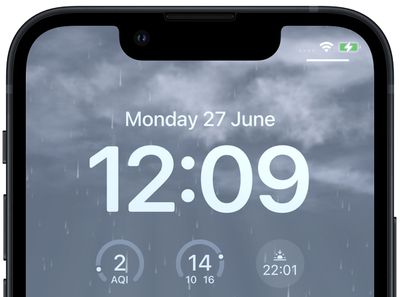
An updated Lock Screen experience is the most notable change in iOS 16, and you can now customize what your Lock Screen looks like. You can choose wallpapers, fonts, and even widgets that you want to display. Specific Focus modes and Apple Watch faces can even be linked to your Lock Screens, and you can set up several to swap to throughout the day.
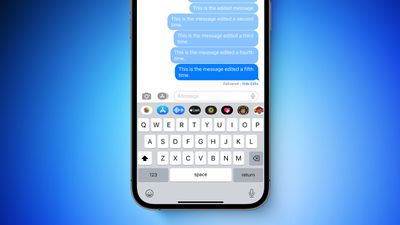
iMessages can be edited, deleted, and marked as unread, and for Mail, you can schedule emails, undo emails, and get follow-up reminders. FaceTime calls can now be handed off to other devices, and in the Health app, there are new features for sleep tracking and keeping track of the medications and vitamins that you're taking.
Coming in an update to iOS 16 later this year, iCloud Shared Photo Library makes it easier to share images with family through one library, plus the Photos app supports copy/pasting edits and it locks sensitive albums like recently deleted. In the Maps app, there's now multi-stop routing, and in Safari, Apple is aiming to replace passwords with passkeys.
The Home app has been overhauled with a new design, and with the Activity app, you can track steps and calories burned even if you don't have an Apple Watch. The Weather app has been improved with new modules that offer more data, and there are also updates for Books, Stocks, Music, Reminders, Notes, Translate, and more.
Apple's full release notes for the iOS 16 update are below:
Lock Screen
- Redesigned Lock Screen gives you all new ways to personalize your Lock Screen by showcasing favorite photos, customizing font styles, displaying widgets, and more
- Multiple Lock Screens can be created and you can easily switch between them
- Lock Screen gallery offers personalized suggestions along with Apple curated collections for your Lock Screen
- Font and color options for customizing the look of the date and time on your Lock Screen
- Widgets on the Lock Screen display information at a glance like the weather, battery levels, upcoming calendar events, and more
- A new effect places the subject of the photo in front of the time (iPhone XS and later)
- Photo styles change the color filter, tinting, and font style of photos on the Lock Screen to complement each other
- Notifications appear at the bottom of your Lock Screen and can be displayed in an expanded list view, stacked view, or count viewFocus
- Lock Screen linking connects your Lock Screen to a Focus, so you can activate a Focus by switching to the corresponding Lock Screen
- Focus filters hide distracting content in apps like Calendar, Mail, Messages, Safari and third party apps
- Streamlined setup makes it easier and faster to get started with Focus, with personalized Lock Screen and Home Screen suggestions that include apps and widgets that are relevant to the Focus you’re setting upMessages
- Edit a message for up to 15 minutes after sending it and recipients see a record of edits
- Undo send allows you to recall any message for up to 2 minutes after sending it
- Mark as unread makes it easy to come back to a conversation later
- SharePlay in Messages lets you enjoy activities like watching movies, listening to music, playing games, and more with friends while messaging
- Collaboration provides a simple way to invite others to collaborate on a file via Messages and get activity updates in the thread when someone makes an edit to a shared project
- Improved search delivers more accurate, complete results and provide suggestions as soon as you begin to type
- Undo send allows you to cancel delivery of a message within 10 seconds of hitting send
- Scheduled send for sending an email at a specific day and time
- Follow‑up surfaces sent emails that have not been replied to, to the top of your inbox so you can quickly follow‑up
- Remind me lets you schedule a date and time to be reminded about an emailSafari and Passkeys
- Shared Tab Groups let you share a set of tabs with others and see the Tab Group update instantly as you work together
- Tab Group start pages can be customized with different background images and favorites for each Tab Group
- Pinned tabs in Tab Groups enable you to pin frequently visited websites for each Tab Group
- Safari web page translation adds translation for web pages in Turkish, Thai, Vietnamese, Polish, Indonesian, and Dutch
- Passkeys offer support for an easier and safer sign‑in method to replace passwords
- Passkey syncing through iCloud Keychain makes your passkeys available across all your Apple devices while keeping them end-to-end encryptedLive Text
- Live Text video support allows you to interact with text in a paused video frame so you can copy, translate, lookup, share, and more (iPhone XS, iPhone XS Max, iPhone XR and later)
- Quick actions let you take action on data detected in photos and videos with a single tap, so you can track flights or shipments, translate foreign languages, convert currencies, and more (iPhone XS, iPhone XS Max, iPhone XR and later)Visual Look Up
- Lift subject from background isolates the subject of an image so you can copy and paste it into apps like Mail and Messages (iPhone XS, iPhone XS Max, iPhone XR and later)
- Visual Look Up adds recognition of birds, insects, spiders, and statues in your photos (iPhone XS, iPhone XS Max, iPhone XR and later)Siri
- Easy Shortcuts setup makes it possible to run shortcuts with Siri as soon as you download an app with no upfront setup (iPhone XS, iPhone XS Max, iPhone XR and later)
- A new setting allows you to send messages without Siri asking you to confirm before sending
- “Hey Siri, what can I do here?” helps you discover Siri capabilities in iOS and apps just by asking (iPhone XS, iPhone XS Max, iPhone XR and later)
- Call hang up option for ending Phone and FaceTime calls with Siri by saying “Hey Siri, hang up.” (iPhone XS, iPhone XS Max, iPhone XR and later)Dictation
- All-new Dictation experience supports using your voice and keyboard together to enter and edit text (iPhone XS, iPhone XS Max, iPhone XR and later)
- Automatic punctuation inserts commas, periods, and question marks as you dictate
- Emoji support lets you insert emoji using your voice (iPhone XS, iPhone XS Max, iPhone XR and later)Maps
- Multi-stop routing supports adding up to fifteen stops along your driving route in Maps
- Transit cards in Maps let you see low balances and replenish your card when you add transit cards to Wallet, all without leaving Maps
- Transit fares show you how much your journey will cost in the San Francisco Bay Area, London, New York, and San DiegoApple Pay and Wallet
- Apple Pay Order Tracking allows you to receive detailed receipt and order tracking information in Wallet for Apple Pay purchases with participating merchants
- ID cards in Wallet lets you share verified information with apps that require identity verification (iPhone 8 and later)
- Apple Account supports topping-up your account balance from your Apple Account card in WalletHome
- Redesigned Home app makes it easier to navigate, organize, view, and control your smart home accessories
- Home tab now integrates all your accessories, rooms, and scenes into a single tab for a whole-house view, allowing you to see your entire home at a glance
- Categories for lights, climate, security, speakers and TVs, and water let you quickly access all the relevant accessories organized by room, and displays more detailed status information
- New camera view displays up to four cameras front and center in the Home tab, scroll to see any additional camera views in your home
- Redesigned accessory tiles feature more visually recognizable icons that are color-matched to their category, and new behaviors for more precise accessory controlsHealth
- Medications feature helps you track and manage your medications, vitamins and supplements by creating a list, custom schedules and reminders, and then viewing logging over time
- Add medications using your iPhone camera (iPhone XS, iPhone XR and later)
- Interaction alerts inform you if there is a critical interaction when you add a new medication
- Cycle deviation notifications alert you if your logged menstrual cycles show a pattern of infrequent periods, irregular periods, prolonged periods, or persistent spotting
- Invitations for Health Sharing allow loved ones to easily and securely share their health data with you
- Health Sharing reminders give you transparency and control over the health data you are sharing with loved onesNews
- My Sports enables you to easily follow your favorite teams and leagues and watch highlights right in the News app
- Favorites give you easy access to the channels and topics you read the most, in a consistent place near the top of your Today feed
- New homepages deliver visually updated and easier to navigate topic feeds for local news locales, sports teams and leagues, and moreFamily Sharing
- Improved child account setup makes it easier to create an account for a child with the right parental controls, including age‑appropriate media restrictions
- Device setup for a child lets you use Quick Start to easily set up a new iOS or iPadOS device for your child with your selected parental controls in place
- Screen Time requests in Messages make it even easier to approve or decline requests from your child
- Family Checklist gives you tips and suggestions like updating a child’s parental control settings, turning on location sharing, or just reminding you to share your iCloud+ subscription with everyoneSafety Check
- Safety Check is a new section in Settings to help people in domestic or intimate partner violence situations quickly reset the access they’ve granted to others
- Emergency reset lets you quickly take action to reset access across all people and apps, including disabling location sharing via Find My, resetting privacy permissions for apps, and more
- Manage sharing and access helps you review and customize which apps and people can access your informationAccessibility
- Door detection in Magnifier locates a door, reads signs and symbols around it, and gives you instructions for how to open the door (iPhone 12 Pro and iPhone 13 Pro)
- Apple Watch mirroring provides full control of Apple Watch from iPhone and supports use of Switch Control, Voice Control, or any other assistive features on iPhone to get the most out of your Apple Watch
- Live Captions (beta) automatically converts audio into text for users who are Deaf or hard of hearing to follow along more easily with calls and media content (iPhone 11 and later)
- Buddy controller helps users with cognitive disabilities get support from a caregiver or friend while playing a game, by combining inputs from multiple game controllers into one
- VoiceOver is now available in over 20 new languages and locales, including Bangla (India), Bulgarian, Catalan, Ukrainian, and Vietnamese
- Voice Control spelling mode gives you the option to dictate names, addresses, or other custom spellings letter by letterThis release also includes other features and improvements:
- Fitness app lets you track and meet your fitness goals even if you don’t yet have an Apple Watch, using iPhone motion sensors to give you an estimate of your calories to contribute to your daily Move goal
- AirPods Pro (2nd generation) support
- Personalized Spatial Audio uses the TrueDepth camera on iPhone to create a personal profile for Spatial Audio that delivers a more precise and immersive listening experience on AirPods (3rd generation), AirPods Pro (1st and 2nd generation), AirPods Max
- Handoff in FaceTime allows you to move FaceTime calls seamlessly from your iPhone to your iPad or Mac, and vice versa
- Memoji updates include more sticker poses, hairstyles, headwear, noses, and lip colors
- Quick Note adds support for taking a note in any app on your iPhone and adding links to create context and easily find content
- Translate camera lets you translate text around you using the camera in the Translate app
- Duplicate detection in Photos identifies duplicate photos so you can quickly clean up your library
- Foreground blur for portrait photos in Camera blurs objects in the foreground for a more realistic-looking depth-of-field effect (iPhone 13, iPhone 13 Pro, and iPhone 13 Pro Max)
- Pinned lists in Reminders helps you quickly navigate to your favorite lists
- Search on the Home Screen enables Spotlight to be accessed directly from the bottom of the Home Screen, making it easy to open apps, find contacts, or get information from the web
- Automatically send messages in CarPlay to skip the confirmation step when sending messages
- Rapid Security Response gets important security improvements to your devices even faster, as they can be applied automatically between standard software updates- This release includes even more features and improvements. For more information, please visit this website: https://www.apple.com/ios/ios-16
Some features may not be available for all regions or on all iPhone models. For information on the security content of Apple software updates, please visit this website: https://support.apple.com/kb/HT201222
More Information and Discussion
Don't forget to visit our full iOS 16 roundup, and you can also discuss all of the new features in our dedicated iOS 16 forum.