PSA: Apple Has Resolved an Issue That Prevented Latest Apple Card Transactions From Showing in the Wallet App
If you couldn't see your latest Apple Card transactions in the Wallet app on your iPhone over the last 24 hours, try checking them again, because Apple says it has now fixed the issue.
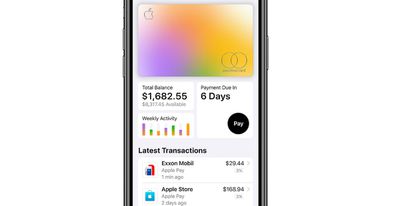
Several users took to Reddit on Tuesday and overnight to voice their concerns, with many reporting that their Apple Card balance was up-to-date yet nothing new was appearing in the Latest Transactions column.
Usually, the last 10 transactions processed by Apple Card or any card added to the Wallet app for use with Apple Pay are displayed below the card. Users can tap an individual transaction for further details such as the time, date, and location for the purchase.
For whatever reason, some Apple Card users were not seeing this transaction history. Some speculated that Apple's recent iOS 15.5 software update was behind the bug, but other users who have not updated their iPhone were also experiencing the same problem.
However, according to Apple's System Status Page, Apple has resolved an issue where "some users may have experienced delays in receiving transaction notifications." If you're still not seeing your transactions, try force quitting the Wallet app and then re-launch it on your iPhone.
Popular Stories
Apple has temporarily removed Keynote, Pages, and Numbers from the App Store, just after releasing an update that added iPhone Duo support and a new Intelligent Assistant.
It is not clear if the apps were removed intentionally, or if it is a bug. Apple has not said when the apps will be reinstated, but if it was in error, they should return soon.
Update: The Mac versions are back without...
With just three days to go until the iPhone Duo is released, Apple is getting ready for the launch. Behind the scenes, the App Store now has screenshots of Apple's built-in apps running on the Duo. We've seen some apps in marketing materials, but images of the ones we haven't seen give us an idea of what it will be like using the iPhone Duo day to day.
Many apps are shown in landscape...
Apple Music has a 404 page easter egg on the web: a functional iPod that appears when you load a page that does not exist, such as music.apple.com/macrumors.
"Page Not Found," says Apple. "Give this a spin instead."
Apple is clever with this. If you navigate to music.apple.com/ipod instead, the page says "Looking for something?" instead of "Page Not Found."
The easter egg is only...













































![Apple Pulls Keynote, Pages and Numbers From App Store [Update: Back]](https://images.macrumors.com/t/Okb7kitB_gNr6qe5Pex9nQIysD8=/112x112/article-new/2026/01/Apple-Creator-Studio-iWork-suite.jpg)



