Microsoft Releases Preview of Native OneDrive Client for Apple Silicon Macs - MacRumors
Skip to Content

Microsoft Releases Preview of Native OneDrive Client for Apple Silicon Macs

Microsoft today offered OneDrive users a pre-release version of its OneDrive syncing client for macOS that is optimized to run natively on Apple silicon.
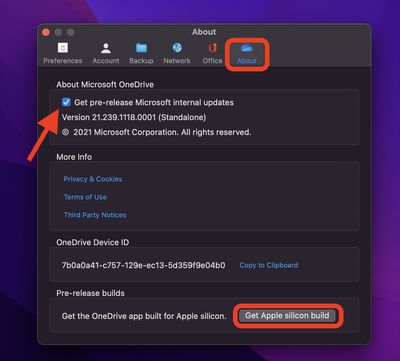
onedrive m1 macs
The official support for M1 Macs should make the OneDrive Arm preview run faster on Apple's latest machines, since the client will no longer need to go through Apple's Rosetta 2 translation layer.

OneDrive users need to be in the Office Insider program or Windows Insider program to use the Apple silicon preview version of OneDrive. Microsoft says it will be rolling out this feature to the Insiders ring over the next few days.

To get the pre-release internal build, click the OneDrive icon in the menu bar and select Help & Settings -> Preferences, then click the About tab. Under "About Microsoft OneDrive," select the checkbox to join the OneDrive Insiders preview, then under Pre-release builds, select Get Apple silicon build.

Microsoft's OneDrive support for Apple silicon comes after Dropbox announced it is working on its own native syncing client for ‌M1‌ Macs that is due for release sometime next year.

Dropbox was forced to reveal its plan to release the optimized client following complaints from users that the company was dragging its feet and being unclear about whether it would eventually offer support for Apple silicon.


Popular Stories

microsoft surface laptop 5g

Microsoft Raises Prices for All Surface PCs, Making Them More Expensive Than Equivalent Macs

Tuesday April 14, 2026 4:21 pm PDT by
Microsoft increased prices for all of its Surface PCs this week, with most models priced hundreds of dollars higher than they were when launching. Windows Central highlighted the increases, which now see Microsoft's mid-range models priced above $1,000 and flagship models priced starting at $1,500. A Microsoft spokesperson said the price increase was due to "recent increases in memory and...
Apple Event Logo

Apple Just Released a New Accessory

Monday May 4, 2026 8:13 am PDT by
Apple today released a new Pride Edition Sport Loop for the Apple Watch. The band features a rainbow design with 11 colors of woven nylon yarns. The new Pride Edition Sport Loop is available to order now on Apple.com and in the Apple Store app in 40mm, 42mm, and 46mm sizes, and it will be available at Apple Store locations starting later this week. In the U.S., the band costs $49. There...
iOS 26

Apple Says iOS 26.5 Adds Three New Features to Your iPhone

Tuesday May 5, 2026 7:36 am PDT by
iOS 26.5 includes three new features for iPhones, according to Apple's release notes for the update, which is expected to be released next week. As discovered during beta testing, iOS 26.5 enables end-to-end encryption for RCS messaging between iOS and Android devices. Apple says this security upgrade is limited to supported carriers around the world and will continue to roll out....

Top Rated Comments

58 months ago
Here is the link, direct from Microsoft if you dont want to wait for it to be made available to you.
OneDrive Universal Link ('https://oneclient.sfx.ms/Mac/Insiders/21.245.1128.0001/universal/OneDrive.pkg')
Score: 19 Votes (Like | Disagree)
Kylo83 Avatar
58 months ago
What about Teams
Score: 15 Votes (Like | Disagree)
TechRunner Avatar
58 months ago

Great! Now do Teams
Teams is in need of some serious work. If Microsoft plans on keeping it in their Office toolbox, they need to burn that thing down and start over.
Score: 7 Votes (Like | Disagree)
58 months ago
Great! Now do Teams
Score: 6 Votes (Like | Disagree)
throAU Avatar
58 months ago
Overdue... but to be honest not a massive performance win... its mostly waiting on network anyway.

Still, one less Rosetta2 dependency.
Score: 6 Votes (Like | Disagree)
jace88 Avatar
58 months ago
About time. OneDrive sync with 1TB+ of small files/folders/etc is the one thing which brings my M1 Pro to beachball.

I wish they'd introduce the option to choose whether you want full sync, selective folder syncs and everything offline or just links during the login/setup process rather than signing in, letting it sync the filenames/etc, and then changing it... but maybe this'll all be much faster with a native build of OneDrive.
Score: 5 Votes (Like | Disagree)