iPhone 13 Pro Available With Up to 1TB of Storage, Pricing Tops Out at Record $1,599
Apple today announced that the iPhone 13 Pro and iPhone 13 Pro Max are available with up to 1TB of storage, which is the largest storage capacity ever offered in an iPhone. The storage option is not cheap, with the iPhone 13 Pro Max with 1TB of storage priced at $1,599 in the United States, making it the most expensive iPhone ever.
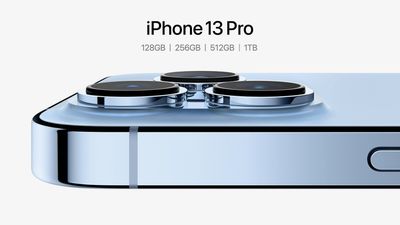
Four storage capacities are available for the iPhone 13 Pro and iPhone 13 Pro Max, including 128GB, 256GB, 512GB, and 1TB.
Key features of the iPhone 13 Pro models include a ProMotion display with a variable refresh rate up to 120Hz, a smaller notch, a faster A15 Bionic chip, longer battery life, several camera improvements, expanded 5G connectivity, and more.
All four iPhone 13 models will be available to pre-order starting this Friday, September 17 at 5 a.m. Pacific Time, and all the devices will launch one week later on Friday, September 24. There's a new Sierra Blue color available for the iPhone 13 Pro and iPhone 13 Pro Max in addition to the existing Silver, Gold, and Graphite finishes.
Popular Stories
Apple is launching five new products on Friday, November 6, following pre-orders that opened last week, including its first touchscreen MacBook Pro models.
The following new products will be available from today:
iPad mini with OLED display and A20 Pro chip
iMac with M6 chip
14-inch MacBook Pro with M6 chip
14-inch MacBook Pro with OLED touchscreen
16-inch MacBook Pro with OLED...
Apple plans to merge the iPhone's Action button with the Camera Control starting next year, according to the leaker known as "Instant Digital."
In a new post on Weibo, the leaker claimed that a single press of the combined button would open the camera, while a long press would trigger the function assigned to the Action button. They explicitly clarified that the dedicated Action button would ...
Apple is sending email surveys to some iPhone Duo buyers to get feedback on display size, crease, under-display camera, and other features.
The first question asks why the buyer chose the iPhone Duo now, with answers like "I wanted to try Apple's first foldable," "It was an impulse purchase," and "I expect smartphone prices to increase."
Other questions ask about the size of the iPhone...