Apple Aims to Lure Android Users to iPhone With Improved 'Move to iOS' Experience in iOS 15
To help new iPhone owners transition from an Android device, Apple uses the "Move to iOS" Android app for transferring content like contacts, message history, photos and videos, web bookmarks, mail account information, calendars, DRM-free songs, wallpapers, and more.
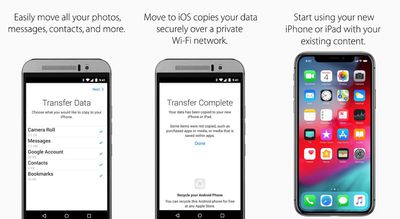
This app has been around since 2015, but with the release of iOS 15, Apple is improving the Move to iOS experience.
With iOS 15, Apple will also allow Android users to transfer photo albums, files, folders, and Accessibility settings from their Android devices to their iPhones to allow for a more personalized iPhone usage experience right from the start.
Apple is also making it easier to get the Move to iOS app by implementing a QR code that Android users can scan to be taken to the download link in the Google Play Store.
The new transfer options will be available when setting up a new device running iOS 15 from an Android phone, so the transfer process likely won't be available in full until iOS 15 launches to the public this fall. Apple may also need to release a new version of the Move to iOS app, which is not out as of yet.
Popular Stories
Apple today sent out invites for an experience in Los Angeles on Wednesday, October 28, and the "Pro and tell" tagline on the invitation likely means that the rumored MacBook models with touch-enabled OLED displays will stick with MacBook Pro branding instead of the once-rumored "MacBook Ultra" name.
The long-rumored "iPhone Ultra" ended up being named iPhone Duo, so speculation that Apple...
With just three days to go until the iPhone Duo is released, Apple is getting ready for the launch. Behind the scenes, the App Store now has screenshots of Apple's built-in apps running on the Duo. We've seen some apps in marketing materials, but images of the ones we haven't seen give us an idea of what it will be like using the iPhone Duo day to day.
Many apps are shown in landscape...
Apple's Greg Joswiak today hinted at new product announcements coming next week, sharing a social media post that says "Can't wait to pro and tell next week."
Rumors suggest Apple is planning to debut the new MacBook Pro with an OLED touchscreen display, an M6 entry-level MacBook Pro, an M6 iMac, an iPad mini with an OLED display.
Can't wait to pro and tell next week....



















































