

Skip to Content

Higher-End 13-Inch MacBook Pro Models Can Use an 87-Watt Power Adapter, but Won't Charge Any Faster

Higher-end models of the new 13-inch MacBook Pro unveiled this week are able to take some advantage of higher-wattage power adapters, as revealed in regulatory labels for the new machines.

Apple's 13-inch ‌MacBook Pro‌ models have shipped with a 61-watt USB-C power adapter since 2016, with the machines typically rated to draw at that maximum of 20.3 volts and 3 amps. You've long been able to safely use higher-wattage power adapters, but the maximum power draw remains capped by the machine itself, so it won't charge any faster.
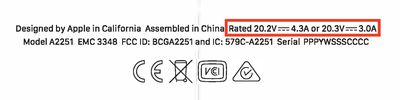
macbook pro 2020 87w rating
For the first time, the higher-end 2020 13-inch ‌MacBook Pro‌ models with 10th-generation Intel processors carry a dual power rating of 20.3V/3.0A and 20.2V/4.3A, meaning that these models can also accept Apple's 87-watt power adapter that previously shipped with the 15-inch ‌MacBook Pro‌. Many other Thunderbolt 3 and USB-C accessories like docks and displays can also deliver 87 watts to connected computers.

The lower-end ‌MacBook Pro‌ configurations with 8th-generation processors remain rated for 61 watts, and all models ship with a 61-watt power adapter.

While it's reasonable to think that the higher-end ‌MacBook Pro‌ models might be able to charge more quickly using an 87-watt adapter than they do with the 61-watt adapter they ship with, sources tell MacRumors that this isn't the case. The maximum charging speed configured on the machine remains the same, so you won't see any difference.

Where users might be able to see a bit of benefit with a higher-wattage adapter is for those running demanding apps that generate high transient workloads. Under these situations, there's a bit more headroom for an 87-watt adapter to deliver additional power to the machine. Still, the vast majority of users won't be bumping against the limits of the included 61-watt adapter, especially on a frequent basis, so those users won't see any benefit.

So while the change won't have a real-world impact on anyone but a few professional-level users regularly maxing out the capabilities of their machines, those who are curious about the new power ratings stamped on the bottom of their machines at least have an explanation.


Related Forum: MacBook Pro

Popular Stories

MacBook Neo Feature Pastel 1

First MacBook Neo Benchmarks Are In: Here's How It Compares to the M1 MacBook Air

Thursday March 5, 2026 4:07 pm PST by
Benchmarks for the new MacBook Neo surfaced today, and unsurprisingly, CPU performance is almost identical to the iPhone 16 Pro. The MacBook Neo uses the same 6-core A18 Pro chip that was first introduced in the iPhone 16 Pro, but it has one fewer GPU core. The MacBook Neo earned a single-core score of 3461 and a multi-core score of 8668, along with a Metal score of 31286. Here's how the...
HomePod mini and Apple TV Sage

New Apple TV and HomePod Mini Are Still Missing, Here's Why

Thursday March 5, 2026 6:11 am PST by
Apple this week unveiled seven products, ranging from the iPhone 17e to the MacBook Neo, but new Apple TV and HomePod mini models were not among them. Given that there have been rumors about the next-generation Apple TV and HomePod mini since all the way back in late 2024, some customers are wondering why the devices have yet to launch, and the answer likely relates to Siri. In September, ...
MacBook Neo Feature Pastel 1

Apple Announces $599 'MacBook Neo' With A18 Pro Chip

Wednesday March 4, 2026 6:15 am PST by
Apple today announced the "MacBook Neo," an all-new kind of low-cost Mac featuring the A18 Pro chip for $599. The MacBook Neo is the first Mac to be powered by an iPhone chip; the A18 Pro debuted in 2024's iPhone 16 Pro models. Apple says it is up to 50% faster for everyday tasks than the bestselling PC with the latest shipping Intel Core Ultra 5, up to 3x faster for on-device AI workloads,...

Top Rated Comments

casperes1996 Avatar
76 months ago

The cpu has a TDP of 28w. say with turbo boost that gets it up to 35w. in what scenario could anyone really go beyond 61w on a 13" MBP?
As someone else pointed out, there's more than just the CPU, but let's even leave that aside.
Let's say that with all components accounted for, we're running at 55W. A figured I've entirely plucked out me arse.
That is within 61W, yes... But now you're spending 55 of those 61W on just running the computer, leaving only 6W for charging the battery. With a beefier charger you might be able to charge the battery at the same speed you would've charged it with the computer being idle.
Score: 11 Votes (Like | Disagree)
BGPL Avatar
76 months ago
I don't mean to be a wet blanket, but this is true of any electronic device, or really anything powered by electricity. The voltage needs to match the specs of the motor or device, but the amperage can be anything as long as it meets the minimum requirement to power the machine, charge the battery, start the motor. This is because a device, machine, motor, etc only draws what it needs. You could connect a 13" MBP to a 20V charger that can do 100 amps and it won't hurt it... it will only draw its max power handling. Even then, there's usually some slack on the voltage requirement and some devices can handle a broad spectrum of voltages. As a rule I keep the power supply within 5% of the voltage spec and I can't recall a single time when I've burned something up.

Most of our home outlets in the US are 120v and 15 amps, and some of the newer homes are 20 amps. When you plug in your vacuum cleaner, the motor is designed for 120v (US), but it only draws probably 7-11 amps depending on the model. This is the same situation. Just because you plug a thing into a 15 amp outlet, doesn't mean 15 amps is coming through the cable and into the motor. It's called power draw.


Score: 9 Votes (Like | Disagree)
Tekguy0 Avatar
76 months ago
Even if you could take advantage of a higher wattage charger, it probably wouldn't be good for the battery long term.
Score: 4 Votes (Like | Disagree)
teknikal90 Avatar
76 months ago
The cpu has a TDP of 28w. say with turbo boost that gets it up to 35w. in what scenario could anyone really go beyond 61w on a 13" MBP?
Score: 3 Votes (Like | Disagree)
76 months ago
I'm confused. I thought that USB-C charging made it safe to plug in any size charger to any device without fear of it hurting the device. So, for example, I *think* I can take my MBP 16's charger and plug it into my wife's MacBook Air to charge it without harming it. Am I wrong?
Score: 3 Votes (Like | Disagree)
76 months ago

Such a crap statement.
”Higher-End 13-Inch MacBook Pro Models Can Use an 87-Watt Power Adapter, but Won't Charge Any Faster”

You could always do that. For years and years and years.
You wouldn't believe the amount of ignorance in these forums over this subject, with some people vehemently arguing that using a higher wattage power adapter will somehow damage the laptop. Those people seem to think that using a higher wattage power adapter is the same as force feeding electricity from the power lines directly into the battery. Their lack of understanding is compounded by Apple's tendency to ship different wattage power adapters for each laptop model, rather than standardizing on a single power adapter across all their laptops. Standardizing on a single power adapter for all laptops would simplify manufacturing for Apple. It would simplify inventory for stores so they don't have to stock adapters for multiple Mac laptops. It would simplify things for businesses and people who own different size Mac laptops. The difference in size between the Apple 60W and 87W is not that great. And since they are all the same price, it would make more sense to buy the most compatible.

I think this photo shows the iPad, 13 inch MBP and 15 inch MBP adapters.


Attachment Image
Score: 2 Votes (Like | Disagree)







































