iOS 13.5 Beta Makes It Easier to Unlock an iPhone With Passcode When Wearing a Mask
Many people are wearing masks that cover their faces when going outside, visiting stores, and other tasks, and Apple's Face ID iPhones do not unlock when the face is obscured by a mask.
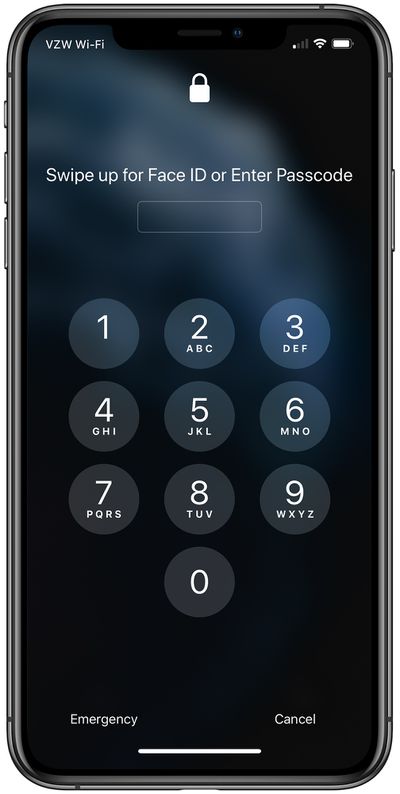
In the iOS 13.5 beta, released this morning, Apple has streamlined the speed with which the passcode pops up when a person wearing a mask is detected, making it easier to get into an iPhone with a passcode when Face ID fails.
Speedier access to the passcode interface is noticeable when you swipe upwards on the Home screen when unlocking the iPhone, as this action now immediately brings up the passcode interface if your face is covered by a mask.
Previously, the iPhone would attempt to initiate Face ID first, creating a few seconds of delay before the passcode interface was shown. The new, speedier passcode entry method makes it quicker to get into an iPhone.
The feature is available in the current iOS 13.5 beta, which should see a public release in the next few weeks.
Popular Stories
Last year, Apple launched CarPlay Ultra, the long-awaited next-generation version of its CarPlay software system for vehicles. Nearly a year later, CarPlay Ultra is still limited to Aston Martin's latest luxury vehicles, but that should change fairly soon.
In May 2025, Apple said many other vehicle brands planned to offer CarPlay Ultra, including Hyundai, Kia, and Genesis.
CarPlay Ultra...
As we wait for WWDC to kick off next Monday, Apple today announced the winners of its annual Apple Design Awards, recognizing apps and games for their innovation, ingenuity, and technical achievement.
The 2025 Apple Design Award winners are listed below, with one app and one game selected per category:
Delight and Fun - CapWords (App) and Balatro (Game)
Innovation - Play (App) and PBJ -...
Apple's iPhone development roadmap runs several years into the future and the company is continually working with suppliers on several successive iPhone models at the same time, which is why we often get rumored features months ahead of launch. The iPhone 18 series is no different, and we already have a good idea of what to expect for the iPhone 18 Pro and iPhone 18 Pro Max.
One thing worth...
Popular Stories
Last year, Apple launched CarPlay Ultra, the long-awaited next-generation version of its CarPlay software system for vehicles. Nearly a year later, CarPlay Ultra is still limited to Aston Martin's latest luxury vehicles, but that should change fairly soon.
In May 2025, Apple said many other vehicle brands planned to offer CarPlay Ultra, including Hyundai, Kia, and Genesis.
CarPlay Ultra...
As we wait for WWDC to kick off next Monday, Apple today announced the winners of its annual Apple Design Awards, recognizing apps and games for their innovation, ingenuity, and technical achievement.
The 2025 Apple Design Award winners are listed below, with one app and one game selected per category:
Delight and Fun - CapWords (App) and Balatro (Game)
Innovation - Play (App) and PBJ -...
Apple's iPhone development roadmap runs several years into the future and the company is continually working with suppliers on several successive iPhone models at the same time, which is why we often get rumored features months ahead of launch. The iPhone 18 series is no different, and we already have a good idea of what to expect for the iPhone 18 Pro and iPhone 18 Pro Max.
One thing worth...