iOS Vulnerability Prevents VPNs From Encrypting All Traffic - MacRumors
Skip to Content

iOS Vulnerability Prevents VPNs From Encrypting All Traffic

A vulnerability affecting iOS 13.3.1 and later prevents virtual private networks (VPNs) from encrypting all traffic, allowing some internet connections to bypass encryption, potentially exposing users' data and IP addresses.
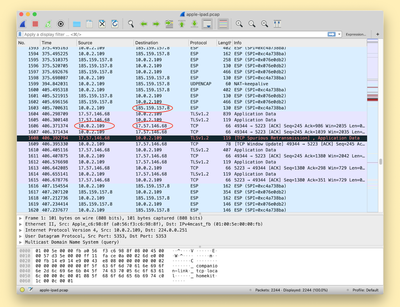
ios device network ip wireshark

A screenshot from ProtonVPN demonstrating exposed connections to Apple's servers that should be protected by the VPN

Details on the vulnerability were shared today by Bleeping Computer after it was discovered by ProtonVPN. The vulnerability is caused because iOS isn't terminating all existing connections when a user connects to a VPN, allowing them to reconnect to destination servers once the VPN tunnel has been established.

Connections made after connecting to a VPN on an iOS are not affected by this bug, but all previously established connections are not secure. This could potentially lead to a user who believes they are protected accidentally exposing IP an address and therefore, an approximate location.

Apple's Push Notifications are cited as an example of a process using connections on Apple's servers that aren't closed automatically when connecting to a VPN, but it can affect any app or service running on a user's device.

VPNs cannot work around the issue because iOS does not allow VPN apps to kill existing network connections, so this is a fix that will need to be implemented by Apple. Apple is aware of the vulnerability and is looking into options to mitigate it.

Until fixed, VPN users can connect to a VPN server, turn on Airplane Mode and then turn off Airplane Mode to kill all existing connections. The mitigation isn't entirely reliable, however, so iPhone and iPad owners who rely on VPNs should be careful until Apple puts out a fix.


Popular Stories

iOS 28 AI

Apple Taking New Approach to Developing iOS 28 and macOS 28

Sunday November 8, 2026 7:42 am PST by
Apple has made a change to its development process for iOS 28, macOS 28, and corresponding software updates, according to Bloomberg's Mark Gurman. In his Power On newsletter today, he said Apple separates development of each year's new operating systems into three major stages. Typically, he said each stage consists of four weeks of coding followed by a four-week "convergence" period where...

apple pro tell logo

Apple Launching Two More New Products This Friday

Monday November 9, 2026 4:22 am PST by
The Apple launches keep coming! The company is set to release two new products on Friday, November 13: the all-new Apple HomeView and the fourth-generation Apple TV 4K, both of which have been available to pre-order since mid-October. Apple HomeView: Apple's new smart home display, powered by Apple Intelligence with Siri AI, for entertainment and managing the home. Available in tabletop and...
Apple Store Downtown Detroit

Apple Store Subscription Sign-Up Controversy Exposed

Sunday November 8, 2026 7:28 pm PST by
In a series of YouTube videos shared over the past two weeks, electronics technician and consumer rights advocate Louis Rossmann has exposed a controversy in which some Apple Store employees have allegedly signed up customers for auto-renewing subscription trials for Apple One and other services without their informed consent. Here is how the process works at Apple Stores in the United...

Top Rated Comments

Will Tisdale 🎗 Avatar
87 months ago

This is 100% fake and not a bug. All VPNs, such as those on the desktop, do this by default unless specifically configured, as to not interrupt ongoing downloads, or worse, cause UDP-based services to silently fail.
I don’t think so.
iOS used to handle this correctly, then stopped.
Not tearing down existing connections completely undermines the point of a VPN.
Score: 11 Votes (Like | Disagree)
Will Tisdale 🎗 Avatar
87 months ago

Nope. I have two full tunnels on two different clients (Cisco Anyconnect, and Pulse Secure)
Well, I can tell you that Anyconnect will tear down any active connections, assuming it’s configured correctly. My work VPN certainly does.

TCP is designed to retry after being torn down. It’s no biggie.

The fact is, this is an iOS bug, which was introduced recently.
Score: 5 Votes (Like | Disagree)
Will Tisdale 🎗 Avatar
87 months ago

I feel like we need more info here.

As others have said, it would be problematic to silently kill existing connections when connecting to a VPN. That's certainly not the behavior I would expect. I suppose it depends on whether you use a VPN to add certain networks (such as your corporate office), or to globally route all your traffic (such as for privacy reasons). In the former case, I don't want my non-office connections to be reset.

If MacRumors is reporting this right and VPN apps cannot reset connections, that makes me wonder what changed here. Did iOS previously indeed terminate any open socket when connecting?
I feel that people need to learn about the expected behaviour of VPNs before commenting.
There’s actually two types on iOS. Split vpn and full tunnel. Split allows some stuff to be routed elsewhere. Full tunnel tunnels everything.
Score: 3 Votes (Like | Disagree)
Westside guy Avatar
87 months ago
I’m sometimes stunned by the upvotes people get for posting incorrect information.

If a VPN is configured to send all network traffic through the VPN when it’s running - which is typically what‘s done - then all traffic should be routing through it from the moment it’s enabled. Not just connections to new end points established afterward - all traffic.

Even if a VPN is configured to just carry traffic to a few specific end points (such as the OpenVPN tunnel to our servers, which I’m relying on heavily right now due to the stay at home order currently in place here in Washington): if you’re already connected to one of those end points before establishing the tunnel, you would expect all further traffic to go through the tunnel. The idea that you wouldn’t is ludicrous.
Score: 3 Votes (Like | Disagree)
87 months ago
This is 100% fake and not a bug. All VPNs, such as those on the desktop, do this by default unless specifically configured, as to not interrupt ongoing downloads, or worse, cause UDP-based services to silently fail. Windows built-in VPN client has this exact same behavior.
Score: 3 Votes (Like | Disagree)
gnasher729 Avatar
85 months ago

This is 100% fake and not a bug. All VPNs, such as those on the desktop, do this by default unless specifically configured, as to not interrupt ongoing downloads, or worse, cause UDP-based services to silently fail. Windows built-in VPN client has this exact same behavior.
Could we clean up on the use of the word "fake". It's not fake. It may be irrelevant. If you think it's irrelevant, say it's irrelevant. The whole of your post states clearly that it is not fake. And downvoting someone for daring to correct your incorrect use of language is very bad style.


Oops... Has iOS gotten too complicated, or is it just lazy programmers?
Neither. If you have a connection _before_ VPN is turned on, then changing that connection to use VPN will break it. Users will not be happy. Most applications are not clever enough to switch to another connection when VPN is turned on (most are not aware of VPN at all).

Everything you did before you turned on VPN is unprotected obviously. Nobody complains. Everything you start after you turn on VPN is protected. The few connections that you started before you started VPN have been unprotected all the time, and the stay unprotected. Like you make a phone call. If you turn on VPN halfway through the call, the first half is unprotected anyway. The second half of the call _works_. You just need to know that you can't protect the second half of a call with VPN. The whole call, or nothing.


Oops... Has iOS gotten too complicated, or is it just lazy programmers?
Neither. If you have a connection _before_ VPN is turned on, then changing that connection to use VPN will break it. Users will not be happy. Most applications are not clever enough to switch to another connection when VPN is turned on (most are not aware of VPN at all).

Everything you did before you turned on VPN is unprotected obviously. Nobody complains. Everything you start after you turn on VPN is protected. The few connections that you started before you started VPN have been unprotected all the time, and the stay unprotected. Like you make a phone call. If you turn on VPN halfway through the call, the first half is unprotected anyway. The second half of the call _works_. You just need to know that you can't protect the second half of a call with VPN. The whole call, or nothing.
Score: 2 Votes (Like | Disagree)
Latest Stories
'Apple Support Community' Permanently Closing on November 20
4 hours ago
Apple's Holiday Gift Guide Highlights iPhone Duo and More
7 hours ago
Three Workers Die at Tata iPhone Parts Plant in India
7 hours ago
iCloud Mail, Calendar, Contacts and More Experiencing Outage [Updated]
8 hours ago
Apple's Claris Testing 'Harbor' App for Local AI on Macs
8 hours ago
iFixit's PROLED MacBook Pro Teardown Reveals Logo LEDs
10 hours ago
10 Free iPhone Duo Apps Worth Downloading
12 hours ago
Apple Releases New AirPods Firmware
12 hours ago
Amazon Begins Early Black Friday Sale, Featuring Sitewide Discounts on Tech and Decor
14 hours ago
Apple Announces Swift Student Challenge Ahead of WWDC 2027
15 hours ago
Next iPad Air Likely to Have These 10 New Features
15 hours ago
iPad Mini 2021 vs. 2026 Buyer's Guide: Is It Worth Upgrading?
15 hours ago
New Apple TV Sign Language Feature Announced
15 hours ago
Disable Touch on MacBook Pro PROLED XDR and When Using Sidecar
16 hours ago
Anker's Early Black Friday Sale Surprises With Mystery Boxes and Big Discounts
16 hours ago
Apple Arcade Adding These Four Games in December
16 hours ago
OLED iPad Air Rumored to Launch in Two Sizes in Early 2027
18 hours ago
The Original iPod Went on Sale 25 Years Ago Today
19 hours ago
Apple Maps Could Factor Parking Into Your Arrival Time
20 hours ago
Waze Now Alerts Drivers to Nearby Cyclists Using Garmin LiveTrack
20 hours ago
iPhone 20 Pro: Ten Big Changes That Could Redefine Apple's Flagship
20 hours ago
Here's What Apple Fixed in iOS 27.2.1 and macOS 27.2.1
1 day ago
Webex Gets iPhone Duo Support
1 day ago
Meta's Muse AI Agent Comes to Apple Watch
1 day ago
Anker Launches Eufy Security Cam With Auto-Tracking Light
1 day ago
macOS 27.2.1 Fixes eMudhra Certificate Flaw in Command-Line Tools
2 days ago
Anthropic Launches Claude Fable 5.2 and Mythos 5.2
2 days ago
Apple Releases macOS Golden Gate 27.2.1
2 days ago
Apple Releases iOS 27.2.1 With Bug Fixes
2 days ago
Apple Releases watchOS 27.2.1 and visionOS 27.2.1 With Security Fixes
2 days ago