

Popular writing app Ulysses received its eighteenth major update today, adding some notable features and bringing full support for iOS 13 and iPadOS.
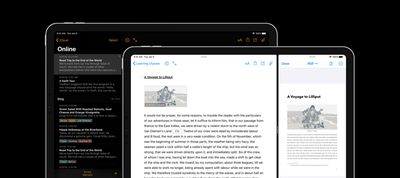
First up, version 18 of Ulysses adds support for Apple's new system-level Dark Mode, meaning users no longer need to activate the app's native dark theme to get a twilight look that's designed to be easier on the eyes.
Instead, the app can now honor the user's global preference and will also respond to the new Automatic setting that switches between Light and Dark based on the time of day.
This version also sees the removal of Ulysses native iPad Split View feature, which makes way for the new system Split View. The decision to drop the app's native Split View was tough for the developers, but ultimately they felt it was important that it conforms to the behavior of the global feature, and the functionality is very similar anyway.
Notably, iPadOS also allows apps to have multiple windows open in so-called spaces, and Ulysses fully supports that now, so users can work on several projects and easily switch between them.
Elsewhere in this version, users can now optionally save Ulysses files in external folders (though in iOS, this is currently limited to Dropbox) without losing access to all of Ulysses' advanced features. So things like annotations, writing goals, keywords, notes, and image attachments remain functional in files that are synchronized via Dropbox instead of iCloud.
In addition, Ulysses 18 supports previewing image captions in the editor and exporting them to PDF and DOCX documents, working with numbered lists has also been improved, keywords can now be reordered via Drag and Drop, and a Command-Up Arrow/Down Arrow keyboard shortcut has been added to quickly navigate to the beginning/end of the sheet list.
Ulysses can be downloaded for free on the App Store and the Mac App Store, with version 18 rolling out to existing users today.
After a 14-day trial period, a subscription is required to unlock the app on all devices. A monthly subscription costs $4.99, while a yearly subscription is $39.99. Students can use Ulysses at a discounted price of $11.99 per six months. The discount is granted from within the app.















































Top Rated Comments