Apple Seeds Third Beta of Upcoming tvOS 12.2 Update to Developers
Apple today seeded the third beta of an upcoming tvOS 12.2 update to developers for testing purposes, two weeks after seeding the second beta and a month after releasing the tvOS 12.1.2 update.
Designed for the fourth and fifth-generation Apple TV models, the new tvOS 12.2 developer beta can be downloaded onto the Apple TV via a profile that's installed using Xcode. Once the initial beta has been downloaded, subsequent betas can be installed over the air.
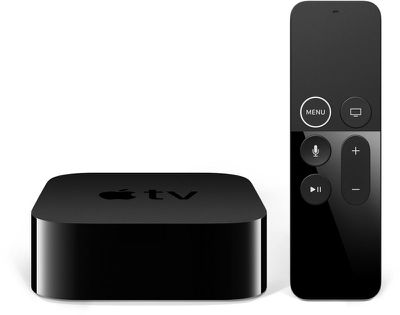
tvOS 12.2, paired with iOS 12.2, lets users ask Siri to play specific media on an Apple TV from an iOS device. You can, for example, ask Siri to play Modern Family on the TV in the living room, or Pitch Perfect on the TV in the bedroom. This works for music and TV shows, and movies.
No other new features were discovered in the tvOS 12.2 beta as of yet, and it can be difficult to determine what's new because Apple does not provide release notes for tvOS betas or releases. If additional features are discovered in tvOS 12.2, we'll update this post.
Popular Stories
Just two days before Apple's "Welcome home" experience in New York, Bloomberg's Mark Gurman has leaked several details about the new products set to be unveiled, including an all-new smart home hub, a HomePod mini 2, and a new Apple TV 4K.
Here is an all-in-one summary of the details shared by Gurman:Apple's home hub with a touch-enabled display will be named HomeView, seemingly confirming a ...
Apple today announced the fourth-generation Apple TV 4K, with key features including an A19 chip, Siri AI support, an updated Siri Remote that has Find My support with Precision Finding, built in far-field microphones, support for surround sound with four HomePods in front and rear pairs, and more.
The A19 chip in the new Apple TV 4K delivers up to 50% faster CPU performance and up to twice...
Apple plans to introduce a series of new smart home products on Tuesday, October 13, according to Bloomberg's Mark Gurman.
Apple reportedly plans to debut its long-awaited smart home hub device, a new HomePod mini, and a new Apple TV on the date. The new HomePod mini and Apple TV are set to retain their existing designs, but tout faster chips to support Siri AI. The new HomePod mini will...