Apps Introducing Support for Siri Shortcuts and Other iOS 12 Features

Apple this morning released iOS 12, and following the update, hundreds of apps are introducing support for the new features, including Siri Shortcuts. Siri Shortcuts let you create multi-step automations using first and third-party apps that can be activated through Siri voice command.

Below, we've rounded up some of the more notable apps that have been introducing support for Siri Shortcuts. Siri Shortcuts can be created in the Shortcuts app in iOS 12, but are available for use in iOS 12, in watchOS 5 and on the Siri watch face, on HomePod, and with CarPlay.

ETA - ETA is a navigation app that offers up directions, traffic conditions, and travel time. With the new update, ETA introduces shortcuts for adding a location, calculating and displaying travel time, and getting turn-by-turn directions.
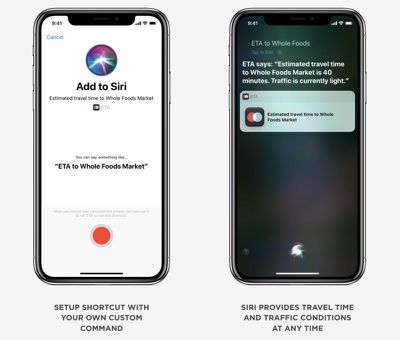
ios12eta
TripIt - TripIt, a travel organization app, is introducing Siri Shortcuts that let users access flight information and upcoming travel plans that are stored within the app.
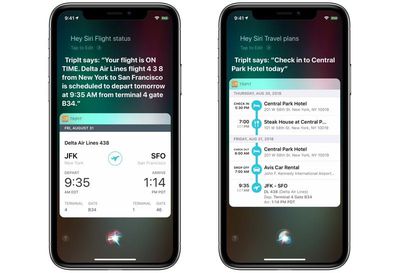
tripitios12
Bear - Note taking app Bear includes Siri Shortcuts designed to let you create new notes on iOS and use Siri to search through your notes without opening the Bear app. There are also new navigation options, enhanced header linking, new iMessage stickers, and more transparency surrounding syncing. Bear for macOS has also been updated with features like Dark Mode support.

Halide - Photography app Halide is introducing Siri Shortcuts support that's designed to let you trigger a shot using a Siri voice command. With the Shortcuts integration, Halide can also show up as a contextual suggestion if you take photos at specific times or places. Halide's latest update also includes support for iPhone XS Max, wide color, and a new feature called "Technical Readout" that creates a report with system-level details about the iPhone's camera. There are performance improvements.
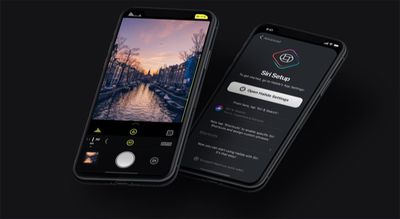
ios12halide
Sky Guide - Sky Guide has introduced Siri Shortcuts for identifying objects in the sky with commands like "Hey Siri, what star is that?" with the iPhone pointed at a specific star or planet. Sky Guide's shortcut will let Siri tap into Sky Guide's info to provide the answer, with no need to open up the Sky Guide app.

Things 3 - To-do app Things is gaining full support for Siri Shortcuts, which will also enable Siri suggestions for Things tasks. There's are Shortcuts integrations for adding new items to a Things to-do list, opening up a list you refer to often, and creating repeat lists for tasks you do more than once, such as packing for a trip. Password AutoFill, Landscape Mode, and Dynamic Snooze Notifications are also included. Things will now appear on the Apple Watch on the Siri watch face thanks to Shortcuts integration.
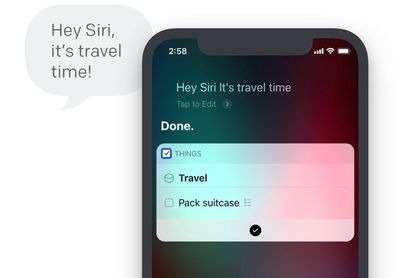
ios12things
Pandora - Pandora includes support for Siri Shortcuts, with a new option that lets you ask Siri to play a favorite station. Siri is also able to keep track of your favorite Pandora stations and present them as suggestions on the Lock screen.

PCalc - Popular calculator app PCalc introduces support for Siri Shortcuts with options like rounding to a certain number of decimal places when making a calculation or converting currencies or measurements. All of PCalc's app features can be turned into shortcuts that are designed to run in the background or open up PCalc to perform an action. PCalc users should read MacStories' complete overview of the PCalc shortcut update for details.

WaterMinder - With WaterMinder's new Siri Shortcuts, you can create shortcuts for logging a drink, showing the last logged drink, showing your remaining hydration goal for the day, or showing your current daily hydration level.

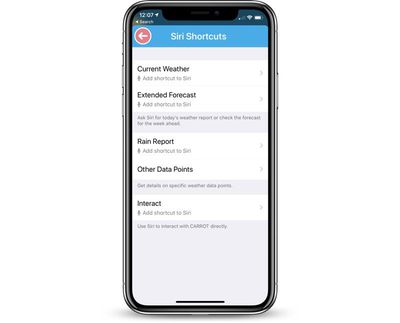
Carrot Weather - With Siri Shortcuts support, you can get weather reports and forecasts without needing to open the Carrot Weather app. There are options for current weather, weather forecast, rain reports, and more. Today's Carrot Weather update also supports Apple's new iPhones and complications on Apple Watch Series 4, and it shows as a data source on the Siri watch face.
carrotweathersirishortcuts
Day One - Day One's iOS 12 update brings Siri Shortcuts that can do things like create a new entry, camera, or audio recording specific to an individual journal, so you can create new content for each of your journals via voice command. The update also introduces a new filter for checklist entries and it includes support for typing Markdown links.

Focus 5 - Pomodoro-based time management app Focus 5 includes Siri shortcuts for doing things like adding new tasks or accessing the app through Siri predictions. The app also includes a new task lit feature for better organizing tasks and it offers a Dark Mode.

Monster Job Search - The app for job search site Monster now supports Siri Shortcuts for your favorite search queries, preventing you from needing to repeatedly type in the same search terms.

For those who are just getting started with Shortcuts, Apple has shared a detailed Shortcuts User Guide, which is a great way to get acquainted with all of the things that the Shortcuts feature is able to do.

The user guide is organized into sections that include Shortcuts basics, creating and using Shortcuts, managing Shortcuts, using advanced Shortcuts, and frequently asked questions.

Know of other apps that have introduced support for Siri Shortcuts and other iOS 12 features? Let us know in the comments. We'd also love to hear the most useful Siri Shortcuts features you've found so far in iOS 12.


Related Forum: iOS 12

Popular Stories

iOS 26

iOS 26.2 Coming Soon With These 8 New Features on Your iPhone

Thursday December 11, 2025 8:49 am PST by
Apple seeded the second iOS 26.2 Release Candidate to developers earlier this week, meaning the update will be released to the general public very soon. Apple confirmed iOS 26.2 would be released in December, but it did not provide a specific date. We expect the update to be released by early next week. iOS 26.2 includes a handful of new features and changes on the iPhone, such as a new...
AirPods Pro Firmware Feature

Apple Releases New Firmware for AirPods Pro 2 and AirPods Pro 3

Thursday December 11, 2025 11:28 am PST by
Apple today released new firmware designed for the AirPods Pro 3 and the prior-generation AirPods Pro 2. The AirPods Pro 3 firmware is 8B30, up from 8B25, while the AirPods Pro 2 firmware is 8B28, up from 8B21. There's no word on what's include in the updated firmware, but the AirPods Pro 2 and AirPods Pro 3 are getting expanded support for Live Translation in the European Union in iOS...
Google maps feaure

Google Maps Quietly Added This Long-Overdue Feature for Drivers

Wednesday December 10, 2025 2:52 am PST by
Google Maps on iOS quietly gained a new feature recently that automatically recognizes where you've parked your vehicle and saves the location for you. Announced on LinkedIn by Rio Akasaka, Google Maps' senior product manager, the new feature auto-detects your parked location even if you don't use the parking pin function, saves it for up to 48 hours, and then automatically removes it once...
iOS 26

iOS 26.4 and iOS 27 Features Revealed in New Leak

Friday December 12, 2025 10:56 am PST by
Macworld's Filipe Espósito today revealed a handful of features that Apple is allegedly planning for iOS 26.4, iOS 27, and even iOS 28. The report said the features are referenced within the code for a leaked internal build of iOS 26 that is not meant to be seen by the public. However, it appears that Espósito and/or his sources managed to gain access to it, providing us with a sneak peek...
iOS 26

Apple Releases iOS 26.2 With Alarms for Reminders, Lock Screen Changes, Enhanced Safety Alerts and More

Friday December 12, 2025 10:10 am PST by
Apple today released iOS 26.2, the second major update to the iOS 26 operating system that came out in September, iOS 26.2 comes a little over a month after iOS 26.1 launched. ‌iOS 26‌.2 is compatible with the ‌iPhone‌ 11 series and later, as well as the second-generation ‌iPhone‌ SE. The new software can be downloaded on eligible iPhones over-the-air by going to Settings >...
Foldable iPhone 2023 Feature 1

Apple to Make More Foldable iPhones Than Expected [Updated]

Tuesday December 9, 2025 9:59 am PST by
Apple has ordered 22 million OLED panels from Samsung Display for the first foldable iPhone, signaling a significantly larger production target than the display industry had previously anticipated, ET News reports. In the now-seemingly deleted report, ET News claimed that Samsung plans to mass-produce 11 million inward-folding OLED displays for Apple next year, as well as 11 million...
AirTag 2 Mock Feature

Apple AirTag 2: Four New Features Found in iOS 26 Code

Thursday December 11, 2025 10:31 am PST by
The AirTag 2 will include a handful of new features that will improve tracking capabilities, according to a new report from Macworld. The site says that it was able to access an internal build of iOS 26, which includes references to multiple unreleased products. Here's what's supposedly coming: An improved pairing process, though no details were provided. AirTag pairing is already...
iOS 26

15 New Things Your iPhone Can Do in iOS 26.2

Friday December 5, 2025 9:40 am PST by
Apple is about to release iOS 26.2, the second major point update for iPhones since iOS 26 was rolled out in September, and there are at least 15 notable changes and improvements worth checking out. We've rounded them up below. Apple is expected to roll out iOS 26.2 to compatible devices sometime between December 8 and December 16. When the update drops, you can check Apple's servers for the ...
macOS Tahoe 26 Thumb

Apple Releases macOS Tahoe 26.2 With Edge Light

Friday December 12, 2025 10:08 am PST by
Apple today released macOS Tahoe 26.2, the second major update to the macOS Tahoe operating system that came out in September. macOS Tahoe 26.2 comes five weeks after Apple released macOS Tahoe 26.1. Mac users can download the macOS Tahoe update by using the Software Update section of System Settings. macOS Tahoe 26.2 includes Edge Light, a feature that illuminates your face with soft...

Top Rated Comments

TheOtherJFK Avatar
95 months ago
I really hope this means Nest will get their s**t together and work with their iOS customers. Not offering HomeKit is just stubborn.
Score: 11 Votes (Like | Disagree)
TheYayAreaLiving ?️ Avatar
95 months ago
Apple is on fire today!
Score: 6 Votes (Like | Disagree)
adrianlondon Avatar
95 months ago
Useless if you don't talk to your *iPhone, downloaded it and removed it within 5 minutes.

*=Siri... Not actually the iPhone, it's a phone, everyone talks to his/her phone while calling/getting a call.
I've created a shortcut and I don't use Siri. I used the option to create an icon on my homescreen for the shortcut (it also shows if I enable the Shortcut widget), so I simply click on it. No talking needed.
Score: 5 Votes (Like | Disagree)
chfilm Avatar
95 months ago
Need Sonos to Integrate this!!

I want this:
“Hey Siri, I’m going to bed”.
-> turn off all lights except the one in the bedroom at 30%, starting a dimming countdown of 20 minutes.
-> start a playlist “meditation” at Sonos, with a sleep timer to 15 minutes.
-> launch beddit sleep tracking
-> put the phone into DND mode till 8am.

I think almost none of it is possible as of yet. Hopefully one day.
Score: 2 Votes (Like | Disagree)
hlevolve Avatar
95 months ago
I really look forward to using this app. Could open up a whole range of things I will actually use Siri for, especially with all of the 3rd party integration.
[doublepost=1537214732][/doublepost]
I really hope this means Nest will get their s**t together and work with their iOS customers. Not offering HomeKit is just stubborn.
Yeah, I am still waiting on Ring to add HomeKit support. Its really really ridiculous at this point. They have been saying "It's coming" forever now.
Score: 2 Votes (Like | Disagree)
ck2875 Avatar
95 months ago
Most useful addition I have found is Citymapper's Siri Shortcuts to check on nearby departures or your commute. Simply asking HomePod when the next train arrives and having it say there's one 3 minutes away according to Citymapper is easily going to be part of my daily routine (granted, there might be differences in how close the train is).

I tried setting up Siri Shortcuts with Transit, but it doesn't seem to work with HomePod for whatever reason, and would only work if I activated Siri on my phone. On the phone, it would pull up the departures. On HomePod, it would get confused and say I needed to do that on my phone. Since HomePod wrangles control of "Hey Siri" away from nearby devices, that was a bit of a no-go.
Score: 2 Votes (Like | Disagree)