Skip to Content

Apple Alerting Customers to Upcoming Discontinuation of Back to My Mac in macOS Mojave

Apple today began sending out notifications to customers letting them know that support for Back to My Mac is ending in macOS Mojave.

Back to My Mac was not present in the first developer beta of macOS Mojave and it has not been available in any subsequent beta, but many customers may have missed the news of its imminent sunsetting, which has now been confirmed by Apple.
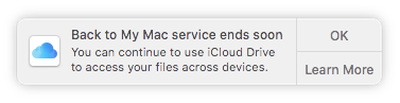
backtomymacending
Back to My Mac is a feature that is designed to allow Mac owners to connect to one Mac from another Mac for file transfers and screen sharing purposes. It lets users set up a network of Mac computers with two or more Macs, but it can be complicated to set up and use, which may be why Apple has decided to discontinue it in favor of simpler measures.

Apple is directing customers to a support document that outlines the changes coming to Back to My Mac, instructing them on how to transition to iCloud Drive, screen sharing, and Apple Remote Desktop.

Back to My Mac will not be available on macOS Mojave. You can get ready now by learning about alternatives for file access, screen sharing, and remote desktop access.

Apple's support document suggests customers can access all of their files across devices with iCloud Drive, operate other Macs with screen sharing, and manage Macs remotely with Apple Remote Desktop, software available from the Mac App Store for $80.

Many Back to My Mac users are likely to be unhappy with Apple's suggestion to transition to Apple Remote Desktop for remote management given its high price and the fact that it sees few updates, but there are other options like TeamViewer and LogMeIn.


Related Forum: macOS Mojave

Popular Stories

MacBook Neo Feature Pastel 1

First MacBook Neo Benchmarks Are In: Here's How It Compares to the M1 MacBook Air

Thursday March 5, 2026 4:07 pm PST by
Benchmarks for the new MacBook Neo surfaced today, and unsurprisingly, CPU performance is almost identical to the iPhone 16 Pro. The MacBook Neo uses the same 6-core A18 Pro chip that was first introduced in the iPhone 16 Pro, but it has one fewer GPU core. The MacBook Neo earned a single-core score of 3461 and a multi-core score of 8668, along with a Metal score of 31286. Here's how the...
imac video apple feature

Apple Unveils Seven New Products

Friday March 6, 2026 11:48 am PST by
Apple this week unveiled seven products, including an iPhone 17e, an iPad Air with the M4 chip, updated MacBook Air and MacBook Pro models, a new Studio Display, a higher-end Studio Display XDR, and an all-new MacBook Neo that starts at just $599. iPhone 17e features the same overall design as the iPhone 16e, but it gains Apple's A19 chip, MagSafe for magnetic wireless charging and magnetic...
Apple MacBook Pro M4 hero

Apple Planning 'MacBook Ultra' With Touchscreen and Higher Price

Sunday March 8, 2026 8:05 am PDT by
Apple is planning to launch an all-new "MacBook Ultra" model this year, featuring an OLED display, touchscreen, and a higher price point, Bloomberg's Mark Gurman reports. Gurman revealed the information in his latest "Power On" newsletter. While Apple has been widely expected to launch new M6-series MacBook Pro models with OLED displays, touchscreen functionality, and a new, thinner design...

Top Rated Comments

99 months ago
The fact they think ARD is a viable alternative at $80 is absurd.
Score: 48 Votes (Like | Disagree)

99 months ago
Back to My Mac = Free. Apple Remote Desktop = $79.99. Thanks Apple.
Score: 21 Votes (Like | Disagree)
v1597psh Avatar
99 months ago
What about accessing Time Capsule and Airport Extreme remotely?
Score: 18 Votes (Like | Disagree)
99 months ago
cue anger from 90% of users who have never used back to my mac once in their lives.
Score: 13 Votes (Like | Disagree)
99 months ago
Just received the notification from Apple about Back to My Mac going away. The only way I use this feature today is opening finder and in the sidebar is my home iMac and I click that and click "share screen" to take care of remote tasks like exporting FCP videos or uploading videos to YouTube via screen sharing.

I see "screen sharing" will be an option but I won't be able to access my iMac via Screen sharing remotely without setting some sort of NAT pass through on my router, right? Back to my mac was so easy to use because it required no tech-ery to get it working.

Score: 12 Votes (Like | Disagree)
OldSchoolMacGuy Avatar
99 months ago
Suppose not a lot of people used it to justify the continued inclusion and keeping the service going.
Score: 10 Votes (Like | Disagree)