

After an announcement at CES in January and more details unveiled earlier in May, Philips Hue today is finally beginning to roll out a major 3.0 update to its iOS app for all users of the connected lighting platform. In the release notes, the developers call version 3.0 "the biggest update to the Hue app since the original release of the 2.0 version."
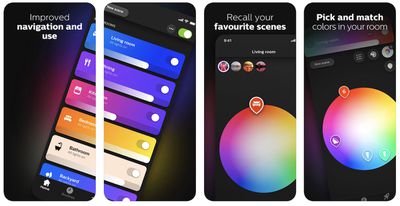
philips hue app release
Major changes include improved user interface navigation with quicker access to favorite scenes and colors, brightness controls and light visualization for individual lights and not just grouped-together rooms, and new color pickers for better overview and grouping of lights in a room. Hue's lighting designers have also created 30 new picture scenes for pre-set lighting recipes, and a new picture-to-light algorithm can automatically build scenes using the user's own pictures.

Users will also find a few existing Hue features again in version 3.0, including lighting routines to automatically dim lights at night and gradually turn them on in the morning, and the location awareness feature so lights can be set to turn on when the owner arrives at home or turn off when they leave. Meanwhile, the timer function activates lights after a specified time by triggering a scene or simply flashing the lights.


In the release notes, the Philips Hue team discussed the app's changes and thanked its users:

"The 3.0 app update is the biggest update to the Hue app since the original release of the 2.0 version. We’ve tried to make it more intuitive and enjoyable for everyday use. Some changes you might hardly notice, while others are hard to miss."

Later in July, Philips Hue will also debut a line of Hue lights for outdoors, so that users can connect and control their lighting on a patio, balcony, or other environment outside. The new lights include the Philips Hue Lily, which can be used to highlight key features in a garden, and the Philips Hue Calla, which can be placed in the ground and light pathways through outdoor spaces.

For the app update, version 3.0 is available to download today from the iOS App Store for free [Direct Link].


Top Rated Comments

Swampthing Avatar
101 months ago
How is the icon still that terrible 3 versions in :(
That didn’t take long. Some people here always find something to complain about with everything.

Score: 7 Votes (Like | Disagree)
thisisnotmyname Avatar
101 months ago
The app is fine, fix the firmware so it doesn't turn on every light after a power outage!
[doublepost=1527601077][/doublepost]
As far as I know this is a wanted/mandatory feature.
If there is an emergency and ambulance or firefighters need to enter a room, the first thing is to turn the lights on. They might try it one or two times if nothing happens ... by having them coming up at full strenght when the power was off, the chance to find a person lying on the floor is higher.

This was discussed in the hue forums quite some time ago and it was made clear that this will not change.
First responders deal with emergencies in power outages all the time, they carry flashlights. Some of us don't have old style switches in our homes so this whole concept is just ridiculous. It's a longstanding complaint from a big portion of their user base and they refuse to fix the issue.
Score: 3 Votes (Like | Disagree)
101 months ago
I want the lights to be able to go back to their previous or scheduled state when I turn the wall switch back on from the off position.
Score: 3 Votes (Like | Disagree)
Babygotfont Avatar
101 months ago
Can you use the bulbs without a hub yet? I’ve been waiting for that along with the price to come down over the years.
i made the determination when researching and investing into my smart home ... decision #1 ... no devices that require their own or an additional hub. period. no exceptions.
Score: 2 Votes (Like | Disagree)
101 months ago
The biggest complaint about the Hue system - per me amd their help line - is that when the power goes off, all the lights come on full strength. I was told this would be fixed in this release yet there is no mention of it. The rest of the update is just fluff for me as I never change my setups.

It's great that I can turn the lights off again remotely, but if I'm out of town, checking Hue every 5 minutes isn't part of the plan.

It would be nice if they can't figure out how to fix it, if they just sent out an alert to my phone that the power went off.
Score: 2 Votes (Like | Disagree)
az431 Avatar
101 months ago
As far as I know this is a wanted/mandatory feature.
If there is an emergency and ambulance or firefighters need to enter a room, the first thing is to turn the lights on. They might try it one or two times if nothing happens ... by having them coming up at full strenght when the power was off, the chance to find a person lying on the floor is higher.

This was discussed in the hue forums quite some time ago and it was made clear that this will not change.
Because emergency responders never enter dark rooms and aren’t prepared for that scenario?
Score: 1 Votes (Like | Disagree)

Popular Stories

maxresdefault

Apple Shows Off a Key Reason to Upgrade to the iPhone 17

Saturday February 7, 2026 9:26 am PST by
Apple today shared an ad that shows how the upgraded Center Stage front camera on the latest iPhones improves the process of taking a group selfie. "Watch how the new front facing camera on iPhone 17 Pro takes group selfies that automatically expand and rotate as more people come into frame," says Apple. While the ad is focused on the iPhone 17 Pro and iPhone 17 Pro Max, the regular iPhone...
apple wallet drivers license feature iPhone 15 pro

Apple Says These 7 U.S. States Plan to Offer iPhone Driver's Licenses

Monday February 9, 2026 6:24 am PST by
In select U.S. states, residents can add their driver's license or state ID to the Apple Wallet app on the iPhone and Apple Watch, and then use it to display proof of identity or age at select airports and businesses, and in select apps. The feature is currently available in 13 U.S. states and Puerto Rico, and it is expected to launch in at least seven more in the future. To set up the...
m5 macbook pro deal

Why You Shouldn't Buy the Next MacBook Pro

Tuesday February 10, 2026 4:27 pm PST by
Apple is planning to launch new MacBook Pro models as soon as early March, but if you can, this is one generation you should skip because there's something much better in the works. We're waiting on 14-inch and 16-inch MacBook Pro models with M5 Pro and M5 Max chips, with few changes other than the processor upgrade. There won't be any tweaks to the design or the display, but later this...
Apple Logo Zoomed

Apple Expected to Launch These 10+ Products Over the Coming Months

Tuesday February 10, 2026 6:33 am PST by
It has been a slow start to 2026 for Apple product launches, with only a new AirTag and a special Apple Watch band released so far. We are still waiting for MacBook Pro models with M5 Pro and M5 Max chips, the iPhone 17e, a lower-cost MacBook with an iPhone chip, long-rumored updates to the Apple TV and HomePod mini, and much more. Apple is expected to release/update the following products...
iOS 26

Apple Releases iOS 26.3 and iPadOS 26.3

Wednesday February 11, 2026 10:07 am PST by
Apple today released iOS 26.3 and iPadOS 26.3, the latest updates to the iOS 26 and iPadOS 26 operating systems that came out in September. The new software comes almost two months after Apple released iOS 26.2 and iPadOS 26.2. The new software can be downloaded on eligible iPhones and iPads over-the-air by going to Settings > General > Software Update. According to Apple's release notes, ...









































