

Illustration app Procreate today updated its Procreate Pocket iPhone app to version 2.0, which developer Savage describes as "reengineered from the ground up" and "an entirely new app." Procreate Pocket 2 is powered by Silica-M, the same graphics engine that powers Procreate for iPad, as well as Apple's own Metal technology.
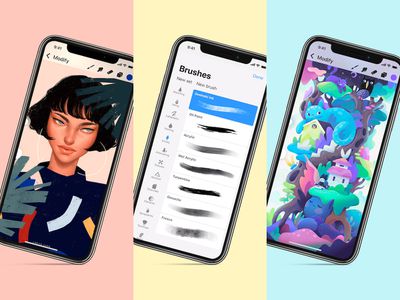
procreate pocket 2
Savage says that with the upgraded technology boost in version 2.0, Procreate Pocket can now create canvases with rich P3 color depth, and users can choose from 136 hand-made brushes that include pencils, inks, wet painting, and digital-only abstract effects. Procreate Pocket also now includes "almost every Procreate feature from iPad," like ColorDrop, QuickLine, Perspective Guides, Layer Masks, custom brush creation, and more.

The developer specifically optimized Procreate Pocket 2 for iPhone X users, with features that take advantage of 3D Touch and haptic feedback.

"We literally threw the Procreate Pocket 1.0 codebase away and started fresh. Every pixel and every line of code is new, and we're so happy to finally bring Silica-M to our iPhone users," said James Cuda, CEO and co-founder of Savage.

The app is also gaining two new features not yet available on iPad, including Brush Set export and import, allowing artists to easily share their creations through online marketplaces or expand their own libraries with thousands of custom brushes from other users. The second addition is a 30 second time-lapse export, which uses a custom built algorithm to remove non-essential frames from any time-lapse and offers a shortened version that can easily be shared on social media.


Procreate Pocket 2 is available today on the iOS App Store as a free update for existing users, and those who haven't downloaded the app yet can do so for $4.99 [Direct Link].


Top Rated Comments

BrettArchibald Avatar
101 months ago
I can't see how I would want to do any drawing on an iPhone with no Pencil support.

Good job you can use one of the many other stylus available.
I think the (obvious) point he meant is the ability to use a fine-tipped stylus, like, you know, a pencil, and not the other useless fat chunky crayons that are out there...

Or just learn to draw with your finger. It’s not that hard.
Why do people always have to counter with an argumentative contradictory rebuttal on how that person is somehow wrong, when someone gives their own opinion on something. Jeez...
There's a reason traditional artists tend to use the traditional equipment they do, as opposed to just dipping their fingers in paint and dragging their fingers all over a canvas... That's because finger-painting offers a LOT less control over what you can do.
I agree with the OP: if you are going to do painting on an iPhone, then it would be infinitely more preferable to do so with an Apple Pencil than with just your finger.
Score: 5 Votes (Like | Disagree)
101 months ago
I mean, the app looks brilliant.

But I can't see how I would want to do any drawing on an iPhone with no Pencil support.
Score: 2 Votes (Like | Disagree)
travoose Avatar
101 months ago
I mean, the app looks brilliant.

But I can't see how I would want to do any drawing on an iPhone with no Pencil support.
It’d be awesome if they knew something we didn’t!
Score: 1 Votes (Like | Disagree)

Popular Stories

m5 macbook pro deal

Why You Shouldn't Buy the Next MacBook Pro

Tuesday February 10, 2026 4:27 pm PST by
Apple is planning to launch new MacBook Pro models as soon as early March, but if you can, this is one generation you should skip because there's something much better in the works. We're waiting on 14-inch and 16-inch MacBook Pro models with M5 Pro and M5 Max chips, with few changes other than the processor upgrade. There won't be any tweaks to the design or the display, but later this...
maxresdefault

Apple Shows Off a Key Reason to Upgrade to the iPhone 17

Saturday February 7, 2026 9:26 am PST by
Apple today shared an ad that shows how the upgraded Center Stage front camera on the latest iPhones improves the process of taking a group selfie. "Watch how the new front facing camera on iPhone 17 Pro takes group selfies that automatically expand and rotate as more people come into frame," says Apple. While the ad is focused on the iPhone 17 Pro and iPhone 17 Pro Max, the regular iPhone...
iOS 26

Apple Releases iOS 26.3 and iPadOS 26.3

Wednesday February 11, 2026 10:07 am PST by
Apple today released iOS 26.3 and iPadOS 26.3, the latest updates to the iOS 26 and iPadOS 26 operating systems that came out in September. The new software comes almost two months after Apple released iOS 26.2 and iPadOS 26.2. The new software can be downloaded on eligible iPhones and iPads over-the-air by going to Settings > General > Software Update. According to Apple's release notes, ...
apple wallet drivers license feature iPhone 15 pro

Apple Says These 7 U.S. States Plan to Offer iPhone Driver's Licenses

Monday February 9, 2026 6:24 am PST by
In select U.S. states, residents can add their driver's license or state ID to the Apple Wallet app on the iPhone and Apple Watch, and then use it to display proof of identity or age at select airports and businesses, and in select apps. The feature is currently available in 13 U.S. states and Puerto Rico, and it is expected to launch in at least seven more in the future. To set up the...
Apple Logo Zoomed

Apple Expected to Launch These 10+ Products Over the Coming Months

Tuesday February 10, 2026 6:33 am PST by
It has been a slow start to 2026 for Apple product launches, with only a new AirTag and a special Apple Watch band released so far. We are still waiting for MacBook Pro models with M5 Pro and M5 Max chips, the iPhone 17e, a lower-cost MacBook with an iPhone chip, long-rumored updates to the Apple TV and HomePod mini, and much more. Apple is expected to release/update the following products...









































